> ## Documentation Index
> Fetch the complete documentation index at: https://help.semji.com/llms.txt
> Use this file to discover all available pages before exploring further.
# How can I manage the distribution of my AI credits according to my workspaces?
> You can manage the number of credits you wish to allocate to your workspaces.
### Here are the steps for distributing your IA credits:
### Step 1:
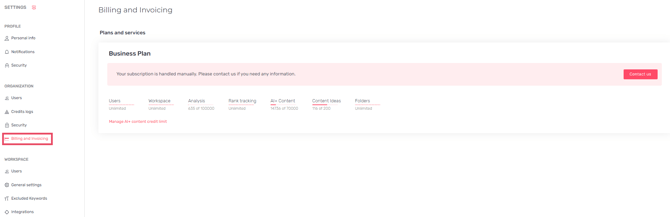
Go to Semji's settings and click on **“Billing and Invoicing”.**
 Step 2:
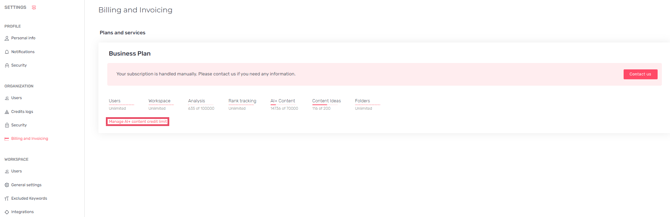
Click on **“Manage AI+ content credit limit”**.
Step 2:
Click on **“Manage AI+ content credit limit”**.
 ### Step 3:
Add the allocation you wish to set up on your workspaces.
> *Good to know 💡: You can specify a number of credits not to be exceeded over a rolling period, or leave the field blank for unlimited credits.*
### Step 3:
Add the allocation you wish to set up on your workspaces.
> *Good to know 💡: You can specify a number of credits not to be exceeded over a rolling period, or leave the field blank for unlimited credits.*
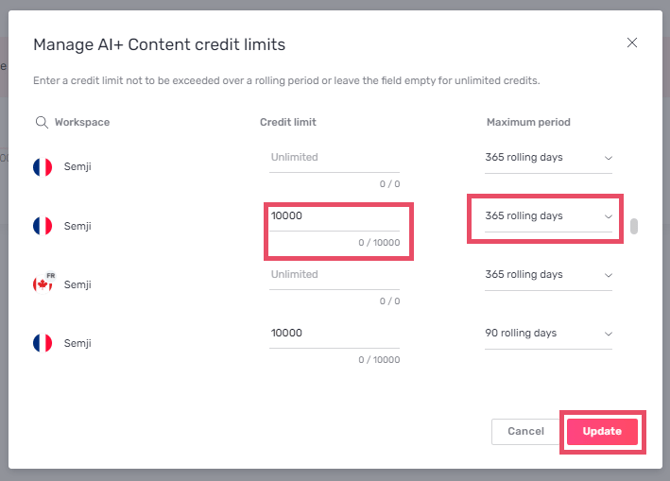 For example, if you have 7,000 credits available across your organization and several workspaces, you can distribute the number of IA credits evenly, or allocate a specific number to a single workspace.
Click on “**Update**” to save your changes.
This documentation is built and hosted on [Mintlify](https://mintlify.com), a developer documentation platform.
For example, if you have 7,000 credits available across your organization and several workspaces, you can distribute the number of IA credits evenly, or allocate a specific number to a single workspace.
Click on “**Update**” to save your changes.
This documentation is built and hosted on [Mintlify](https://mintlify.com), a developer documentation platform.