> ## Documentation Index
> Fetch the complete documentation index at: https://help.semji.com/llms.txt
> Use this file to discover all available pages before exploring further.
# How do you manage the language of your work interface?
> Semji offers you the opportunity to work in English, Spanish, Italian or French, as you wish.
### **Which languages are generated by Semji?**
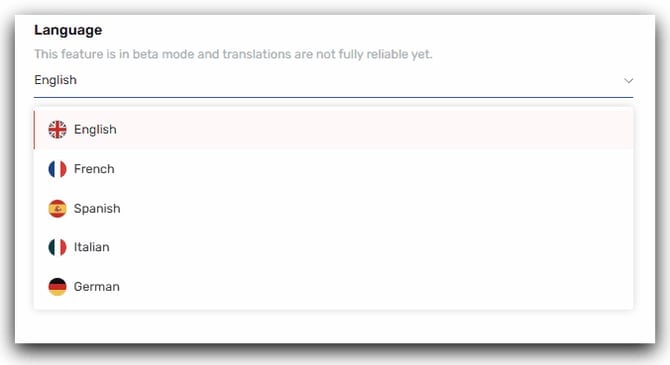
Semji supports 5 languages:
* English
* German
* French
* Spanish
* Italian
* German
 ### **How to change the language of a workspace?**
To set the language of a workspace, follow these steps:
1. Go to the left-hand side menu
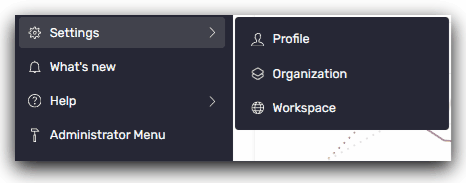
2. Click Settings -> Profile
### **How to change the language of a workspace?**
To set the language of a workspace, follow these steps:
1. Go to the left-hand side menu
2. Click Settings -> Profile
 3. Select the language of your choice
The language change is saved automatically.
This setting will only impact your personal access to the platform. It will not impact the language set by others.
You can now work in the language you want on Semji!
> *You can also find out more about: [Semji's languages and localizations](/en/admin-and-settings/what-languages-and-localizations-does-semji-support) here.*
This documentation is built and hosted on [Mintlify](https://mintlify.com), a developer documentation platform.
3. Select the language of your choice
The language change is saved automatically.
This setting will only impact your personal access to the platform. It will not impact the language set by others.
You can now work in the language you want on Semji!
> *You can also find out more about: [Semji's languages and localizations](/en/admin-and-settings/what-languages-and-localizations-does-semji-support) here.*
This documentation is built and hosted on [Mintlify](https://mintlify.com), a developer documentation platform.