> ## Documentation Index
> Fetch the complete documentation index at: https://help.semji.com/llms.txt
> Use this file to discover all available pages before exploring further.
# Intelligence Hub: Understanding the main screens
> The basics for navigating between Report, Competition, and Data Explorer
### Report screen
#### Objective
Get **an overview** of your organic performance and **compare** it to your competitors from multiple analytical angles.
#### What is it used for?
* Quickly **spot trends** (rises, drops, sudden falls).
* Identify **opportunity areas** (topics, personas, formats, funnel stages).
* Access detailed data using the **Data Explorer**.
#### Available charts
#### Traffic and positioning analyses
* **Organic traffic** evolution: track traffic **trends** monthly and over the last 12 months to position yourself versus competitors
* **Evolution of the number of pages produced**: track the number of pages produced by your competitors monthly and over the last 12 months
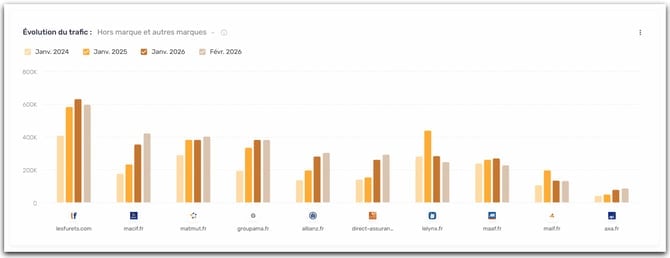
* **Branded traffic, other brands vs non-branded**: measure your dependency on your brand and estimate the potential for non-branded growth.
 * * **Brand:** queries containing your brand.
* **Non-branded:** generic queries, essential for growing acquisition.
* **Other brands:** queries containing the name of a brand different from yours, but related to products you sell on your site.
* *Example:* you are Zalando and you sell Adidas shoes → a query like “adidas gazelle” is counted as Other brands (because it contains “Adidas”).
* **Traffic by page types:** identify which **formats** (blog, product, landing page, etc.) perform best
* **Short-tail vs long-tail traffic:** understand the nature of the queries that generate traffic and where opportunities lie.
* **Short-tail:** short, highly competitive queries, often with high volume.
* **Long tail:** more specific queries, often easier to capture, with a more precise intent.
* **Number of keywords by position:** view the number of keywords ranked in the TOP 3, TOP 10 and TOP 30+
#### AI-enhanced analyses
Thanks to the model enhanced with AI Properties, you will find enriched charts on your own themes, personas, and stages of the marketing funnel.
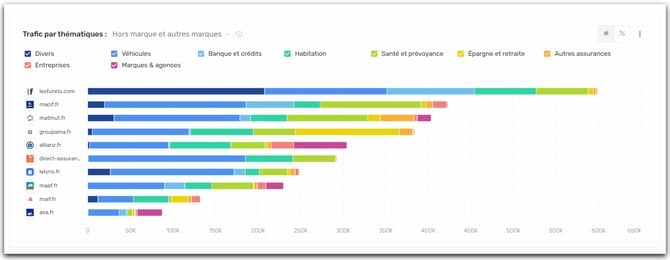
* **Traffic by themes:** identify your strengths/weaknesses by theme and compare your coverage versus competitors.
* * **Brand:** queries containing your brand.
* **Non-branded:** generic queries, essential for growing acquisition.
* **Other brands:** queries containing the name of a brand different from yours, but related to products you sell on your site.
* *Example:* you are Zalando and you sell Adidas shoes → a query like “adidas gazelle” is counted as Other brands (because it contains “Adidas”).
* **Traffic by page types:** identify which **formats** (blog, product, landing page, etc.) perform best
* **Short-tail vs long-tail traffic:** understand the nature of the queries that generate traffic and where opportunities lie.
* **Short-tail:** short, highly competitive queries, often with high volume.
* **Long tail:** more specific queries, often easier to capture, with a more precise intent.
* **Number of keywords by position:** view the number of keywords ranked in the TOP 3, TOP 10 and TOP 30+
#### AI-enhanced analyses
Thanks to the model enhanced with AI Properties, you will find enriched charts on your own themes, personas, and stages of the marketing funnel.
* **Traffic by themes:** identify your strengths/weaknesses by theme and compare your coverage versus competitors.
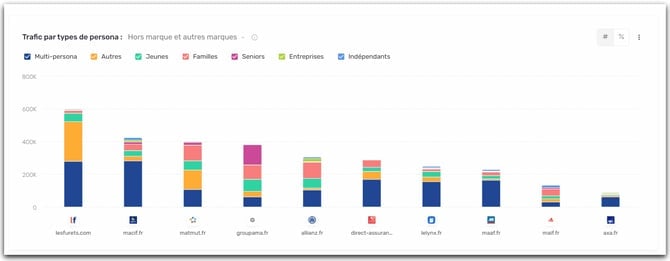
 * **Traffic by personas:** understand which audiences drive the most traffic to you, and which are underutilized.
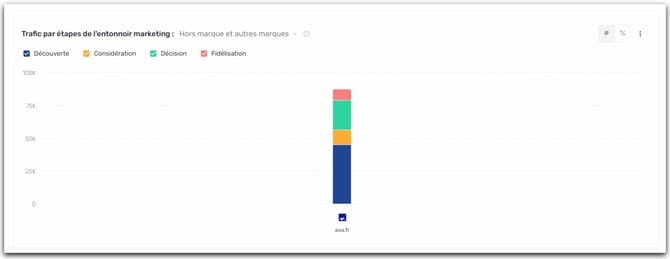
 * **Traffic by funnel stages:** check the **balance** of your presence (Discovery → Loyalty) and detect gaps.
 #### How to use it?
1. Browse the charts to get an overall view.
2. Use the global filters to frame your analysis.
3. Click on an element in a chart to open the Data Explorer.
4. Export if needed to share or build an action plan.
### Competition screen
#### Objective
Set up and analyze your competitive landscape, then compare your performance in a **head-to-head (1v1) matchup.**
#### What is it used for?
* Make a targeted comparison with a competitor (view in “Battle” mode).
* Switch to the Data Explorer to analyze the URLs behind any gap.
#### What you'll find there
* Find all the charts available in the Report tab
### Data Explorer screen
#### Objective
Access the **data details** (URLs, keywords, metrics and dimensions) to move from insight to concrete actions.
#### What is it used for?
* Understand which URLs and which keywords explain a result seen in the Report or Competition.
* Identify opportunities (content to create, content to optimize, angles to strengthen).
* Send the identified keywords directly to the Planning in your Content Hub.
* Export the data (CSV / Excel) for analysis and sharing.
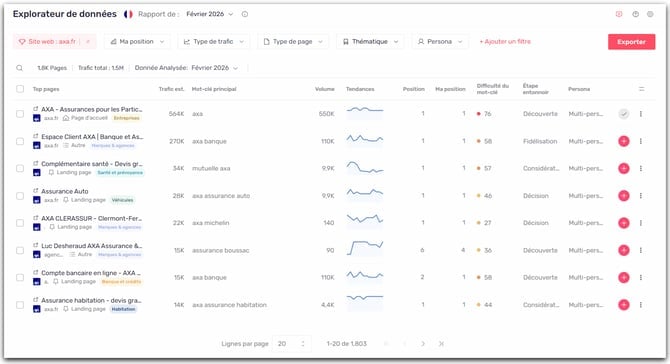
#### Understanding the metrics and dimensions of the data table
* **Top pages:** the page that generated at least 1 unit of traffic
* **Estimated traffic:** the estimated traffic generated by this page
* **Primary keyword:** the keyword that brings the most traffic to this page in search results
* **Volume:** the average monthly search volume for the primary keyword (how many times it is searched per month)
* **Trends:** a mini-chart showing the evolution of search volume over the past 12 rolling months
* **Position:** the current position of the page in Google results for its primary keyword
* **My position:** your own page's position for that same keyword
* **Keyword difficulty:** a score indicating how hard it is to rank for this keyword (the higher the score, the more competitive it is)
* **Funnel stage:** indicates where the page sits in the user journey: Discovery, Consideration, or Loyalty
* **Persona:** the typical user profile targeted by this page
* **First seen:** the date when this page was first detected in Google
#### How to use it?
1. Browse the charts to get an overall view.
2. Use the global filters to frame your analysis.
3. Click on an element in a chart to open the Data Explorer.
4. Export if needed to share or build an action plan.
### Competition screen
#### Objective
Set up and analyze your competitive landscape, then compare your performance in a **head-to-head (1v1) matchup.**
#### What is it used for?
* Make a targeted comparison with a competitor (view in “Battle” mode).
* Switch to the Data Explorer to analyze the URLs behind any gap.
#### What you'll find there
* Find all the charts available in the Report tab
### Data Explorer screen
#### Objective
Access the **data details** (URLs, keywords, metrics and dimensions) to move from insight to concrete actions.
#### What is it used for?
* Understand which URLs and which keywords explain a result seen in the Report or Competition.
* Identify opportunities (content to create, content to optimize, angles to strengthen).
* Send the identified keywords directly to the Planning in your Content Hub.
* Export the data (CSV / Excel) for analysis and sharing.
#### Understanding the metrics and dimensions of the data table
* **Top pages:** the page that generated at least 1 unit of traffic
* **Estimated traffic:** the estimated traffic generated by this page
* **Primary keyword:** the keyword that brings the most traffic to this page in search results
* **Volume:** the average monthly search volume for the primary keyword (how many times it is searched per month)
* **Trends:** a mini-chart showing the evolution of search volume over the past 12 rolling months
* **Position:** the current position of the page in Google results for its primary keyword
* **My position:** your own page's position for that same keyword
* **Keyword difficulty:** a score indicating how hard it is to rank for this keyword (the higher the score, the more competitive it is)
* **Funnel stage:** indicates where the page sits in the user journey: Discovery, Consideration, or Loyalty
* **Persona:** the typical user profile targeted by this page
* **First seen:** the date when this page was first detected in Google
 #### Dimensions at your disposal
With the different filters at your disposal, cross-reference your data and easily identify your opportunities.
* **Website:** allows you to select one or more competitor websites to include in the analysis.
* **My position:** allows you to filter pages according to your current SEO ranking in search results.
* **Traffic type:** allows you to segment data by the nature of the traffic (Branded, Non-branded, Other brands).
* **Page type:** allows you to filter pages according to their typology (homepage, article, tool, article listing, e‑commerce category, etc.).
* **Theme:** allows you to restrict the display to pages belonging to a specific theme.
* **Persona:** allows you to filter pages based on the target audience profile associated with them.
* **First seen:** allows you to filter pages by the date when they first appeared on Google.
* **Funnel stage:** allows you to filter according to the page’s position in the conversion funnel (Discovery, Consideration, Decision, Loyalty).
* **Keyword length:** allows you to filter for long‑tail or short‑tail keywords.
* **Keyword:** allows you to filter for specific keywords.
* **Keyword difficulty:** allows you to filter by the competitiveness level of the primary keyword associated with the page.
* **Position:** allows you to filter by the rankings of your competitors’ pages.
* **Title:** allows you to filter by titles or terms present in page titles.
* **Volume:** allows you to filter pages according to the monthly search volume of their primary keyword.
* **Estimated traffic:** allows you to filter pages according to their estimated organic traffic.
* **Planning:** allows you to filter content that has already been added or not added to your Planning in Content Hub.
* **URL:** allows you to filter by types of URLs.
### Q\&A
#### What are the different types of pages analyzed (and how are they defined)?
* **News:** a page that covers a recent event, an announcement, or time-sensitive information.
* **Article:** editorial content (often a blog post) that addresses a topic or a search intent.
* **E-commerce category:** a page that lists products belonging to the same category.
* **Forum:** a discussion page where users ask questions and respond via posts.
* **Landing page:** a page designed to convert for a specific offer or action (signup, demo request, purchase).
* **Article listing:** a page that aggregates multiple articles (by theme, tag, date, etc.) in a list format.
* **Local:** a page dedicated to a geographic area, a point of sale, or a localized search.
* **Tool:** a page offering an interactive feature (simulator, generator, calculator, etc.).
* **Homepage:** the site's main homepage.
* **Product:** a page presenting a product or an item for purchase.
* **Video:** a page whose primary content is a video (hosted on the site or via a platform).
#### What is the difference between "Position" and "My position"? Why is there sometimes a discrepancy between these two metrics on pages of my site?
These are two metrics that come from different sources, so they may not necessarily match.
**My position:**
It corresponds to a position observed by Semji by "re-reading" a Google SERP and checking at which position your site appears best at the time the monthly report is calculated.
**Position :**
It corresponds to a position coming from another Semrush data source and generally refers to the previous month.
For concrete examples of opportunities in the Explorer, see: Identifying opportunities using your data.
This documentation is built and hosted on [Mintlify](https://mintlify.com), a developer documentation platform.
#### Dimensions at your disposal
With the different filters at your disposal, cross-reference your data and easily identify your opportunities.
* **Website:** allows you to select one or more competitor websites to include in the analysis.
* **My position:** allows you to filter pages according to your current SEO ranking in search results.
* **Traffic type:** allows you to segment data by the nature of the traffic (Branded, Non-branded, Other brands).
* **Page type:** allows you to filter pages according to their typology (homepage, article, tool, article listing, e‑commerce category, etc.).
* **Theme:** allows you to restrict the display to pages belonging to a specific theme.
* **Persona:** allows you to filter pages based on the target audience profile associated with them.
* **First seen:** allows you to filter pages by the date when they first appeared on Google.
* **Funnel stage:** allows you to filter according to the page’s position in the conversion funnel (Discovery, Consideration, Decision, Loyalty).
* **Keyword length:** allows you to filter for long‑tail or short‑tail keywords.
* **Keyword:** allows you to filter for specific keywords.
* **Keyword difficulty:** allows you to filter by the competitiveness level of the primary keyword associated with the page.
* **Position:** allows you to filter by the rankings of your competitors’ pages.
* **Title:** allows you to filter by titles or terms present in page titles.
* **Volume:** allows you to filter pages according to the monthly search volume of their primary keyword.
* **Estimated traffic:** allows you to filter pages according to their estimated organic traffic.
* **Planning:** allows you to filter content that has already been added or not added to your Planning in Content Hub.
* **URL:** allows you to filter by types of URLs.
### Q\&A
#### What are the different types of pages analyzed (and how are they defined)?
* **News:** a page that covers a recent event, an announcement, or time-sensitive information.
* **Article:** editorial content (often a blog post) that addresses a topic or a search intent.
* **E-commerce category:** a page that lists products belonging to the same category.
* **Forum:** a discussion page where users ask questions and respond via posts.
* **Landing page:** a page designed to convert for a specific offer or action (signup, demo request, purchase).
* **Article listing:** a page that aggregates multiple articles (by theme, tag, date, etc.) in a list format.
* **Local:** a page dedicated to a geographic area, a point of sale, or a localized search.
* **Tool:** a page offering an interactive feature (simulator, generator, calculator, etc.).
* **Homepage:** the site's main homepage.
* **Product:** a page presenting a product or an item for purchase.
* **Video:** a page whose primary content is a video (hosted on the site or via a platform).
#### What is the difference between "Position" and "My position"? Why is there sometimes a discrepancy between these two metrics on pages of my site?
These are two metrics that come from different sources, so they may not necessarily match.
**My position:**
It corresponds to a position observed by Semji by "re-reading" a Google SERP and checking at which position your site appears best at the time the monthly report is calculated.
**Position :**
It corresponds to a position coming from another Semrush data source and generally refers to the previous month.
For concrete examples of opportunities in the Explorer, see: Identifying opportunities using your data.
This documentation is built and hosted on [Mintlify](https://mintlify.com), a developer documentation platform.