> ## Documentation Index
> Fetch the complete documentation index at: https://help.semji.com/llms.txt
> Use this file to discover all available pages before exploring further.
# How to connect my PIANO Analytics account?
> To view the performance of your content in Semji
Integrate your analytics data into the platform. Find out how to connect your account and activate this feature.
### Why connect your PIANO Analytics account?
Piano Analytics is an advanced web analytics tool. It allows you to measure traffic and analyze the performance of a website or an application. In this regard, it is similar to other tools like [Google Analytics (UA, GA4)](/en/connect-your-tools/how-to-connect-my-google-analytics), [Matomo](/en/connect-your-tools/why-and-how-to-connect-your-matomo) or [Adobe Analytics](/en/connect-your-tools/why-and-how-to-connect-your-adobe-analytics).
In addition to helping you create and optimize your content, Semji helps you track your results and performance at a glance. The platform retrieves data from such tools, in order to display the performance of the worked contents.
*Without a connection to your statistical tools, you cannot follow your KPIs (Key Primary Indicators) directly in your interface.*
The advantages of using Piano Analytics with Semji :
* Easily upload your data to the platform
* Select your KPIs to track
* Take advantage of detailed reporting following the optimization of each content
[ ](https://downloads.intercomcdn.com/i/o/223902749/8213f318a3807b36ffd7d971/logo-AT-Internet.png?expires=1619362800\&signature=d8a32214853dff1f0fe78198a8d0af3c555d07c9ce7f12e33014931885230f6b)
### How to connect your PIANO Analytics account to Semji?
#### **1) Pre-requisites**
* **An PIANO Analytics API key**
Before starting, it is essential to have access to your API key on PIANO Analytics. This is what will allow Semji to access your data.
See here for all the information you need to generate your API key: [https://helpcentre.atinternet-solutions.com/hc/en-gb/articles/360013277119-API-Keys](https://helpcentre.atinternet-solutions.com/hc/en-gb/articles/360013277119-API-Keys)
Any questions? Contact your account manager at PIANO Analytics.
* **The Custom plan on Semji**
The PIANO Analytics connection feature is available with some Semji subscription packages. To benefit from it, contact the support or your Customer Success Manager.
* **An Owner Account**
In order to connect PIANO Analytics to Semji, you must have an Owner account. If necessary, contact your Semji Customer Success Manager to modify the access rights and status of your user account.
#### **2) Set up**
\*\*Step 1
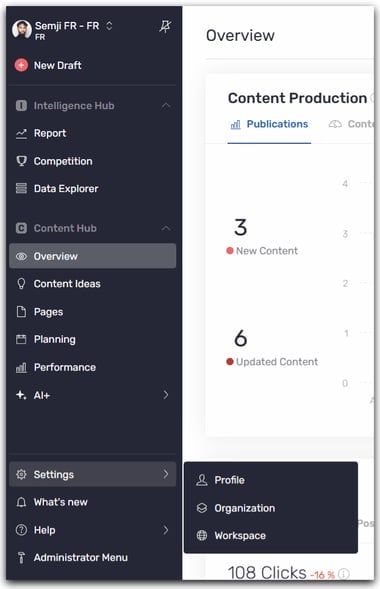
\*\*Go to the left sidebar menu, click on Settings -> Workspace
####
](https://downloads.intercomcdn.com/i/o/223902749/8213f318a3807b36ffd7d971/logo-AT-Internet.png?expires=1619362800\&signature=d8a32214853dff1f0fe78198a8d0af3c555d07c9ce7f12e33014931885230f6b)
### How to connect your PIANO Analytics account to Semji?
#### **1) Pre-requisites**
* **An PIANO Analytics API key**
Before starting, it is essential to have access to your API key on PIANO Analytics. This is what will allow Semji to access your data.
See here for all the information you need to generate your API key: [https://helpcentre.atinternet-solutions.com/hc/en-gb/articles/360013277119-API-Keys](https://helpcentre.atinternet-solutions.com/hc/en-gb/articles/360013277119-API-Keys)
Any questions? Contact your account manager at PIANO Analytics.
* **The Custom plan on Semji**
The PIANO Analytics connection feature is available with some Semji subscription packages. To benefit from it, contact the support or your Customer Success Manager.
* **An Owner Account**
In order to connect PIANO Analytics to Semji, you must have an Owner account. If necessary, contact your Semji Customer Success Manager to modify the access rights and status of your user account.
#### **2) Set up**
\*\*Step 1
\*\*Go to the left sidebar menu, click on Settings -> Workspace
####  **Step 2**
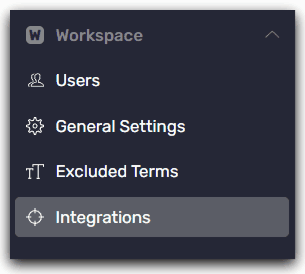
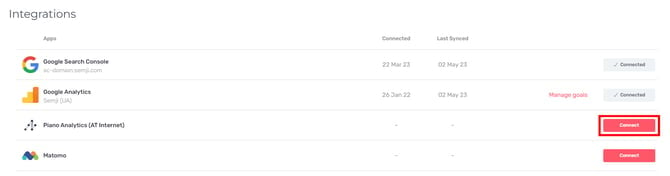
Once in the Workspace settings, click on "Integrations" then click on the "Connect" button in front of the PIANO Analytics logo
**Step 2**
Once in the Workspace settings, click on "Integrations" then click on the "Connect" button in front of the PIANO Analytics logo
 **Step 3**
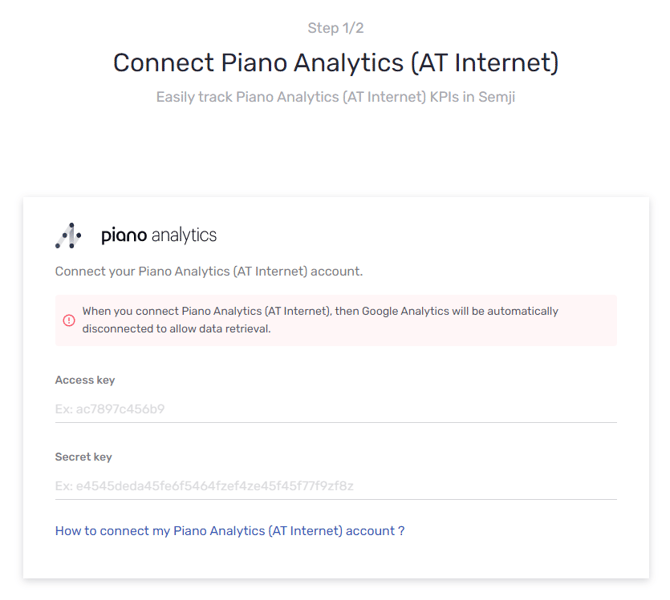
Enter your "access key" and your "secret key" created from your PIANO Analytics account interface.
**Step 3**
Enter your "access key" and your "secret key" created from your PIANO Analytics account interface.
 And that's it! You can track the performance of optimized content with the help of Semji.
### Where to view PIANO Analytics data in the Semji platform?
Once your PIANO Analytics account is connected to the Semji platform, you can view the traffic generated by each content in :
* The Overview tab
* The Performance tab
* The Performance tab accessible from the [editor](/en/create-optimize-and-publish/everything-you-need-to-know-about-the-semji-editor-and-its-features) of a content draft
You will find the same data from PIANO Analytics: it is displayed as a graph and the historic data is recovered.
This documentation is built and hosted on [Mintlify](https://mintlify.com), a developer documentation platform.
And that's it! You can track the performance of optimized content with the help of Semji.
### Where to view PIANO Analytics data in the Semji platform?
Once your PIANO Analytics account is connected to the Semji platform, you can view the traffic generated by each content in :
* The Overview tab
* The Performance tab
* The Performance tab accessible from the [editor](/en/create-optimize-and-publish/everything-you-need-to-know-about-the-semji-editor-and-its-features) of a content draft
You will find the same data from PIANO Analytics: it is displayed as a graph and the historic data is recovered.
This documentation is built and hosted on [Mintlify](https://mintlify.com), a developer documentation platform.