---
title: "Content Master agent: your end-to-end AI editorial advisor"
description: Analyze your content, identify editorial priorities, and get targeted, directly actionable outputs in conversational mode.
---
[Skip to content](https://help.semji.com/en/content-master-agent#main-content)
- [English](https://help.semji.com/en/content-master-agent)
- [Français](https://help.semji.com/fr/agent-content-master)
English
Show submenu for translations

Open main navigation
Close main navigation
- - [English](https://help.semji.com/en/content-master-agent)
- [Français](https://help.semji.com/fr/agent-content-master)
English
Show submenu for translations
- Contact us
Contact us
How can we help you?
- There are no suggestions because the search field is empty.
1. [Help Center](https://help.semji.com/en?hsLang=en)
2. [AI+ Agents](https://help.semji.com/en/ai-agents?hsLang=en)
3. [Pre-configured Agents](https://help.semji.com/en/ai-agents?hsLang=en#pre-configured-agents)
# Content Master agent: your end-to-end AI editorial advisor
## Analyze your content, identify editorial priorities, and get targeted, directly actionable outputs in conversational mode.
Table of contents
---
[In summary](https://help.semji.com/en/content-master-agent#insummary)
[What it changes for you](https://help.semji.com/en/content-master-agent#whatit)
[How to use the Content Master agent](https://help.semji.com/en/content-master-agent#howtouse)
[Learn more](https://help.semji.com/en/content-master-agent#learnmore)
### In summary
**What you can do:** Launch a guided editorial work session on any piece of content, covering writing, rewriting, SEO/GEO optimization, E-E-A-T auditing and internal linking, and get an output calibrated to your specific need.
**Who it's for:** Content managers, writers, and anyone involved in content production or optimization.
**Why it's useful:** The agent listens to your need before producing anything. It adapts to the task type and delivers a result you can apply directly, without a generic wall of text to rework.
### What it changes for you
**The problem:** When facing content that needs improvement, it's not always clear where to start. Traditional AI tools produce long, generic outputs that are hard to use directly. Each editorial task requires a different approach, whether it's writing, optimization, auditing or internal linking, and switching between multiple agents or interfaces slows down production.
**The solution:** Content Master is a conversational agent that analyzes your content before producing anything. It identifies your current Content Score, page type, and detected opportunities, then suggests contextualized next steps. You express your need, it adapts and delivers an output calibrated to the nature of the task.
**The impact:**
- **Directly actionable outputs:** ready-to-use text for writing tasks, prioritized recommendations for analysis, executive summaries for audits.
- **Full editorial coverage:** one agent for all your editorial tasks: writing, rewriting, SEO/GEO optimization, E-E-A-T auditing and internal linking.
- **Intelligent follow-through:** the agent proactively suggests new directions at the end of each session, based on what it observed during the work.
- **Immediate time savings:** no more switching between tools or building prompts from scratch every time.
### How to use the Content Master agent
#### 1) Access the template from the Discover gallery
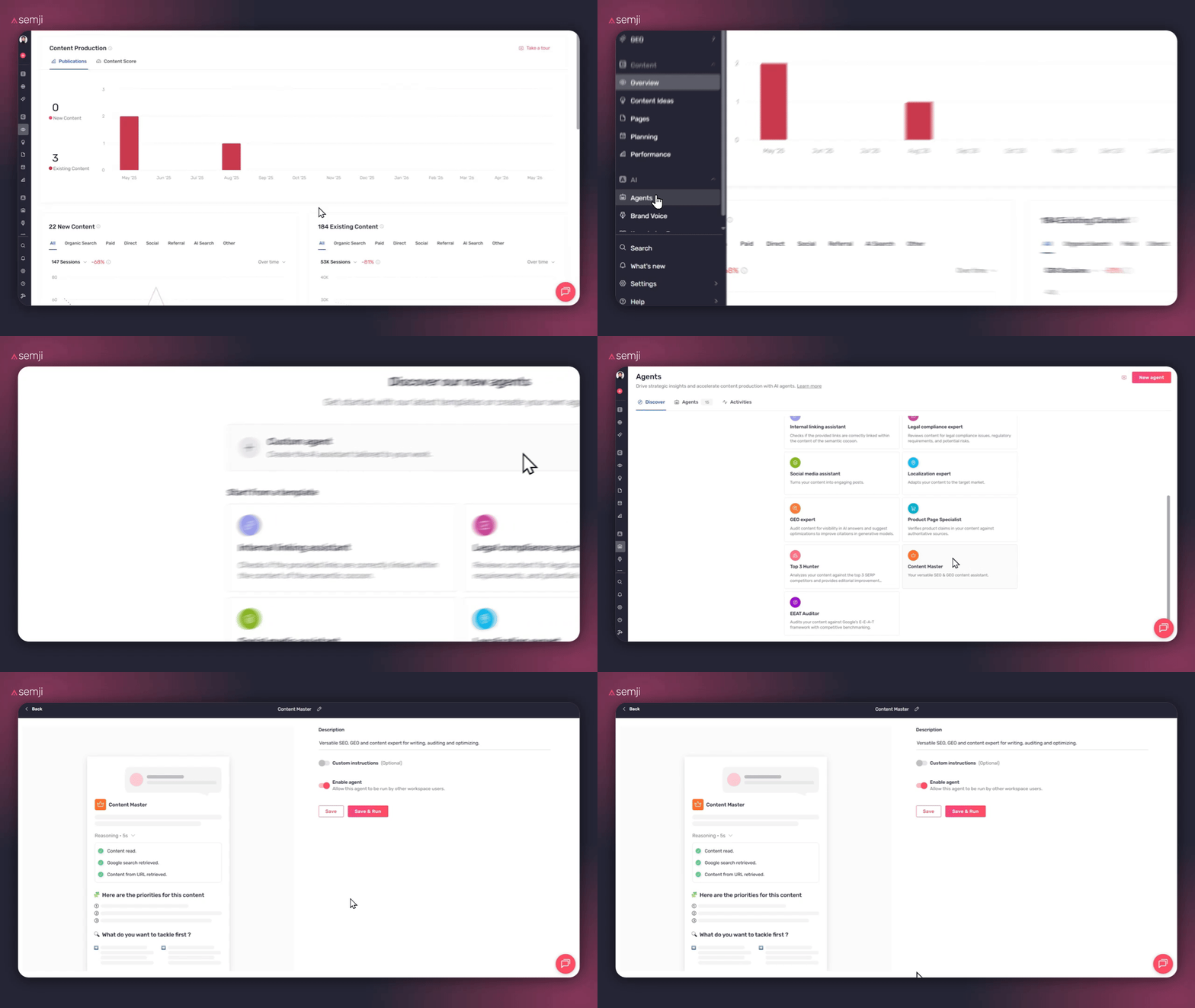
In the Semji content editor, click **"Agents"** in the left sidebar, then click **"Discover"** to open the pre-configured agent gallery.
Find the **"Content Master"** template and click it to open it.
#### 2) Add custom instructions (optional)
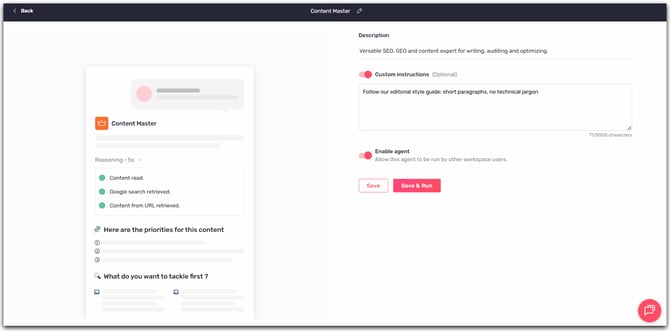
Before the agent analyzes your content, you can provide specific guidelines for it to follow throughout the session. These instructions apply to all outputs produced during your conversation.
**Examples of useful instructions:**
- "Always use an expert, authoritative tone — no casual language"
- "Never remove existing data points or statistics from the text"
- "Follow our editorial style guide: short paragraphs, no technical jargon"
- "Target an audience of marketing directors, not writers"
- "Always preserve legally validated claims and mandatory disclaimers"
> **Tip ✅:** If you regularly use Content Master on the same type of content, keep your instructions in a shared document so you can copy them easily at the start of each session.
#### 3) Let the agent analyze your content
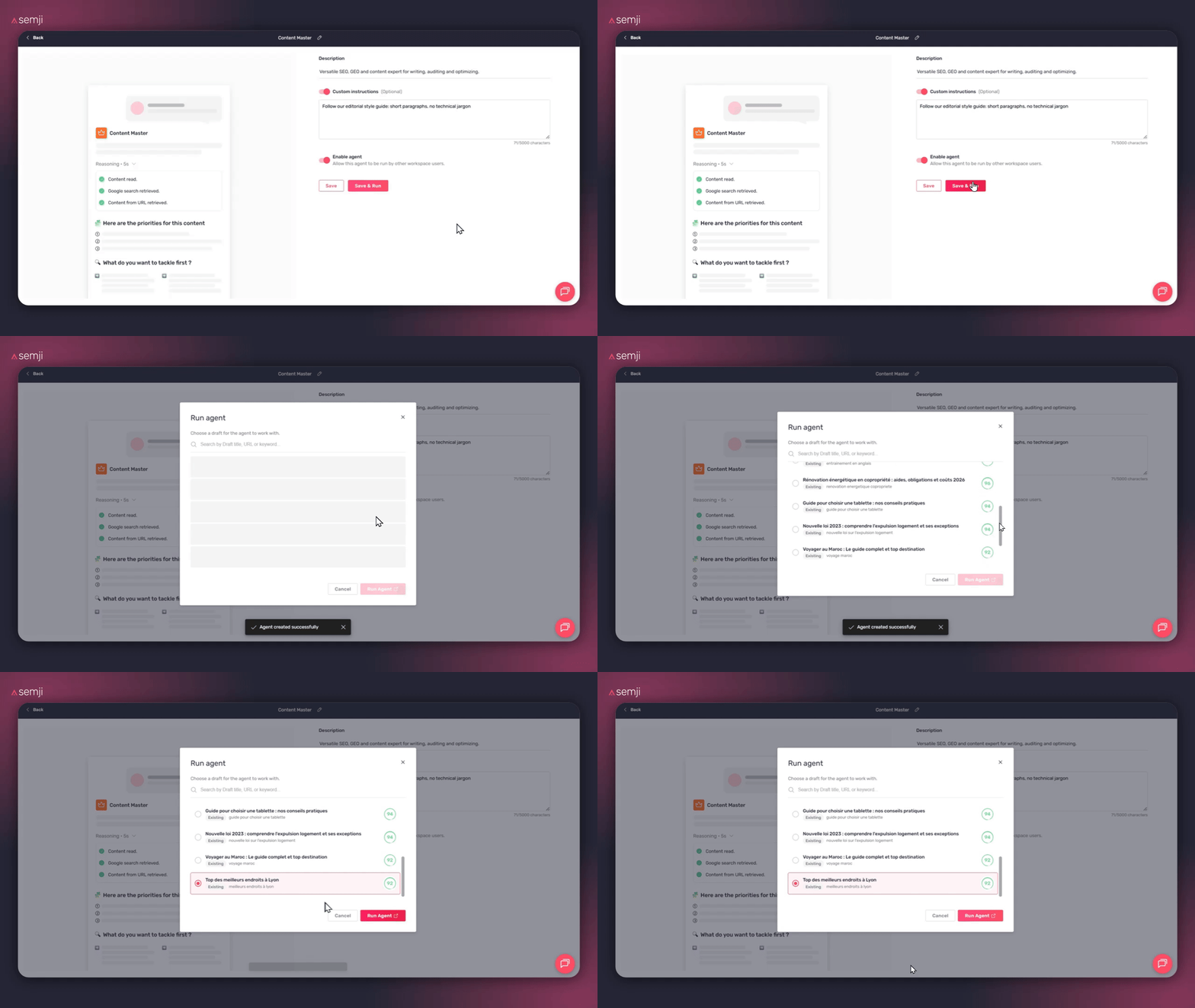
Once your instructions are set, click **"Save & Run"** to start the agent . It reads your content and SEO context (primary keyword, Content Score, page type), then surfaces contextualized work directions: detected opportunities, priority improvement areas, and recommended task types.
#### 4) Express your need in conversational mode
Tell the agent what you want to do. The more specific your request, the more targeted the output.
**Example requests:**
- "Rewrite the introduction with a stronger focus on search intent"
- "Run an E-E-A-T audit on this article and identify missing trust signals"
- "Optimize this content for GEO and AI Overviews"
- "Suggest internal linking opportunities toward my category pages"
- "Rewrite the first three paragraphs to improve readability"
> **Tip ✅:** Be precise about the expected output type (ready-to-use text, recommendation list, diagnostic) so the agent can calibrate its response accordingly.
⏱️ **Duration:** 30–90 seconds depending on task complexity
**ℹ️ Cost:** 10 AI credits per run, 10 AI credits per follow-up message
#### 5) Apply the output and use the intelligent follow-ups
The agent adapts its output to the task type:
- **Writing or rewriting:** text ready to paste directly into the editor
- **Audit or analysis:** structured diagnostic with prioritized recommendations
- **SEO/GEO optimization:** before/after suggestions ready to apply
At the end of the session, the agent proactively suggests follow-up directions based on what it observed during the work. You can continue the conversation to refine a passage, request an alternative, or tackle a new task without starting over.
### Learn more
Content Master covers the full range of editorial tasks end-to-end. For more specialized needs, our other pre-configured agents go even deeper on specific dimensions.
**Continue your optimization with our other available agents:**
**👉 [E-E-A-T Auditor agent: strengthening the credibility and authority of your content](https://help.semji.com/en/eeat-auditor-agent?hsLang=en)**
**👉[Product Page Specialist agent: optimizing your e-commerce product pages for SEO](https://help.semji.com/en/product-page-specialist?hsLang=en)**
**👉 [Top 3 Hunter agent: aligning your content with what actually ranks](https://help.semji.com/en/top-3-hunter-agent?hsLang=en)**
**👉[Guide: optimize your SEO/GEO content with AI+ Agents](https://help.semji.com/en/guide-optimize-your-seo-geo-content-with-ai-agents?hsLang=en)**
- [Getting started with Semji](https://help.semji.com/en/getting-started-with-semji?hsLang=en#main-content)
- [Create your account and log in](https://help.semji.com/en/getting-started-with-semji?hsLang=en#create-your-account-and-log-in)
- [Identifying opportunities](https://help.semji.com/en/identifying-opportunities?hsLang=en#main-content)
- [Identify opportunities](https://help.semji.com/en/identifying-opportunities?hsLang=en#identify-opportunities)
- [Exploring your pages in Semji](https://help.semji.com/en/identifying-opportunities?hsLang=en#exploring-your-pages-in-semji)
- [Managing your editorial planning](https://help.semji.com/en/managing-your-editorial-planning?hsLang=en#main-content)
- [Adapting the planning to your production workflow](https://help.semji.com/en/managing-your-editorial-planning?hsLang=en#adapting-the-planning-to-your-production-workflow)
- [Understanding the planning view](https://help.semji.com/en/managing-your-editorial-planning?hsLang=en#understanding-the-planning-view)
- [Optimizing and publishing content](https://help.semji.com/en/optimizing-and-publishing-content?hsLang=en#main-content)
- [Prepare & write](https://help.semji.com/en/optimizing-and-publishing-content?hsLang=en#prepare-write)
- [Optimize for SEO](https://help.semji.com/en/optimizing-and-publishing-content?hsLang=en#optimize-for-seo)
- [Update & publish](https://help.semji.com/en/optimizing-and-publishing-content?hsLang=en#update-publish)
- [Optimize for GEO](https://help.semji.com/en/optimizing-and-publishing-content?hsLang=en#optimize-for-geo)
- [AI+ Agents](https://help.semji.com/en/ai-agents?hsLang=en#main-content)
- [Getting Started & Guides](https://help.semji.com/en/ai-agents?hsLang=en#getting-started-guides)
- [Pre-configured Agents](https://help.semji.com/en/ai-agents?hsLang=en#pre-configured-agents)
- [Advanced Use Cases](https://help.semji.com/en/ai-agents?hsLang=en#advanced-use-cases)
- [Maximize your efficiency with AI](https://help.semji.com/en/maximize-your-efficiency-with-ai?hsLang=en#main-content)
- [Setting up your AI environment](https://help.semji.com/en/maximize-your-efficiency-with-ai?hsLang=en#setting-up-your-ai-environment)
- [Generate content with AI](https://help.semji.com/en/maximize-your-efficiency-with-ai?hsLang=en#generate-content-with-ai)
- [Track and analyze your competitors](https://help.semji.com/en/track-and-analyze-your-competitors?hsLang=en#main-content)
- [SEO](https://help.semji.com/en/track-and-analyze-your-competitors?hsLang=en#seo)
- [GEO](https://help.semji.com/en/track-and-analyze-your-competitors?hsLang=en#geo)
- [Track and analyze your performance](https://help.semji.com/en/track-and-analyze-your-performance?hsLang=en#main-content)
- [Understanding performance metrics](https://help.semji.com/en/track-and-analyze-your-performance?hsLang=en#understanding-performance-metrics)
- [Managing your SEO performance](https://help.semji.com/en/track-and-analyze-your-performance?hsLang=en#managing-your-seo-performance)
- [Connecting your tools](https://help.semji.com/en/connecting-your-tools?hsLang=en#main-content)
- [SSO & authentication](https://help.semji.com/en/connecting-your-tools?hsLang=en#sso-authentication)
- [Connect analytics & GSC](https://help.semji.com/en/connecting-your-tools?hsLang=en#connect-analytics-gsc)
- [CMS Integration](https://help.semji.com/en/connecting-your-tools?hsLang=en#cms-integration)
- [Semji & your CMS](https://help.semji.com/en/connecting-your-tools?hsLang=en#semji-your-cms)
- [Semji extension](https://help.semji.com/en/connecting-your-tools?hsLang=en#semji-extension)
- [Semji API](https://help.semji.com/en/connecting-your-tools?hsLang=en#semji-api)
- [Administration & global preferences](https://help.semji.com/en/administration-global-preferences?hsLang=en#main-content)
- [Users & roles](https://help.semji.com/en/administration-global-preferences?hsLang=en#users-roles)
- [Languages & general preferences](https://help.semji.com/en/administration-global-preferences?hsLang=en#languages-general-preferences)
- [Resources & Webinars](https://help.semji.com/en/resources-webinars?hsLang=en#main-content)
- [Webinar 2025](https://help.semji.com/en/resources-webinars?hsLang=en#webinar-2025)
- [Assistance & FAQs](https://help.semji.com/en/assistance-faqs?hsLang=en#main-content)
- [Data privacy & security](https://help.semji.com/en/assistance-faqs?hsLang=en#data-privacy-security)
- [Frequently Asked Questions](https://help.semji.com/en/assistance-faqs?hsLang=en#frequently-asked-questions)
[](http://semji.com?hsLang=en)
[mailto:email@email.com](mailto:email@email.com)
Copyright © 2026, Semji