---
title: "Tutorial: Creating and configuring a custom agent"
description: Your custom AI assistant, no code and no technical skills required
---
[Skip to content](https://help.semji.com/en/create-and-configure-your-custom-ai-agent#main-content)
- [English](https://help.semji.com/en/create-and-configure-your-custom-ai-agent)
- [Français](https://help.semji.com/fr/créer-et-configurer-votre-agent-ia-sur-mesure)
English
Show submenu for translations

Open main navigation
Close main navigation
- - [English](https://help.semji.com/en/create-and-configure-your-custom-ai-agent)
- [Français](https://help.semji.com/fr/créer-et-configurer-votre-agent-ia-sur-mesure)
English
Show submenu for translations
- Contact us
Contact us
How can we help you?
- There are no suggestions because the search field is empty.
1. [Help Center](https://help.semji.com/en?hsLang=en)
2. [AI+ Agents](https://help.semji.com/en/ai-agents?hsLang=en)
3. [Getting Started & Guides](https://help.semji.com/en/ai-agents?hsLang=en#getting-started-guides)
# Tutorial: Creating and configuring a custom agent
## Your custom AI assistant, no code and no technical skills required
Table of contents
---
[In summary](https://help.semji.com/en/create-and-configure-your-custom-ai-agent#enresume)
[What this changes for you](https://help.semji.com/en/create-and-configure-your-custom-ai-agent#cequeca)
[How to create your custom agent](https://help.semji.com/en/create-and-configure-your-custom-ai-agent#commentcreer)
[Test your agent](https://help.semji.com/en/create-and-configure-your-custom-ai-agent#testez)
### In summary
**What you can do:** Create a 100% custom agent by defining your own instructions and combining powerful tools to meet your exact, specific needs.
**Who it’s for:** SEO Managers, Content Managers, and advanced users who have specific needs not covered by preconfigured agents.
**Why it’s useful:** Go beyond the limits of preconfigured agents and build tailor-made AI workflows to address all your specific requirements.
### What this changes for you
**The problem:** Preconfigured agents cover the most common use cases, but every company has specific needs. You might need to analyze your competitors according to your own criteria, check the consistency of your brand voice, generate schema markup tailored to your industry, or identify SEO cannibalization according to your methodology.
**The solution:** The Custom Agent allows you to create your own AI assistant by precisely defining what it should do. You write your instructions in natural language, select the tools it needs, and the agent executes your workflow automatically.
**The impact:**
- **Total adaptability:** Create agents that match your specific business needs exactly
- **No technical skills required:** Write your instructions in French as if briefing a colleague
- **Powerful tools available:** Explore the Google SERP and retrieve the content of any web page
- **Scalability:** Modify your agents on the fly as your needs evolve
### How to create your custom agent
#### Step 1: Access the custom agent
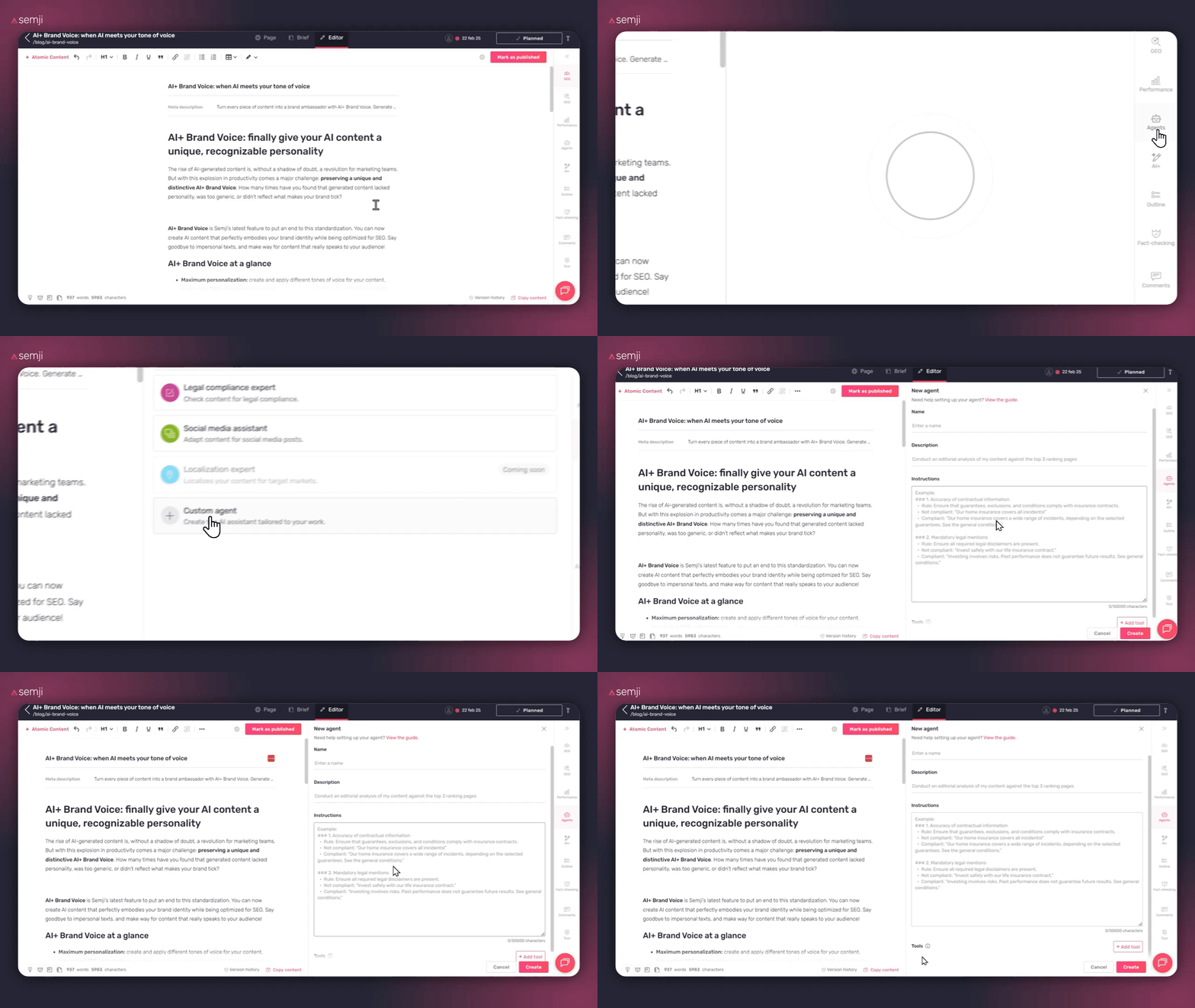
In the Semji editor, click on **"Agents"** in the right sidebar, then select the **"Custom Agent"** template.
#### Step 2: Define your agent
##### Name
Give a clear, descriptive name that explains exactly what your agent does.
**Example names:**
- "Top 3 content gap analyzer"
- "Complete E-E-A-T checker"
- "Article schema markup generator"
- "SEO cannibalization detector"
- "Detailed competitor comparator"
##### Description
Explain in one sentence what your agent does. This description helps your colleagues quickly understand its purpose.
**Examples of good descriptions:**
- "Analyze the editorial content of the TOP 3 results in the SERP to identify topics missing from my strategy"
- "Check that my content meets E-E-A-T criteria (Experience, Expertise, Authoritativeness, Trustworthiness)"
- "Automatically generate the schema markup tailored to my type of content"
- "Detect if my primary keyword is already covered on other pages of my site"

##### Instructions
This is the most important step: you will write the detailed instructions that the agent must follow to accomplish its task.
**How to write good instructions:**
**1. Structure your request**
Organize your instructions into clear sections:
- Objective: what the agent must accomplish
- Methodology: how it should proceed
- Output format: how it should present the results
**2. Be precise and detailed**
The more precise your instructions are, the better the results will be.
❌ **Bad example:** "Analyze my competitors"
✅ **Good example:** "Analyze the content of the TOP 3 results in the SERP for my target keyword. For each competitor, identify: the topics covered, the H2/H3 structure, the secondary keywords used, and the differentiating elements. Then compare with my current content to identify the gaps."
**3. Indicate the desired output format**
Specify how the agent should present its results.
**Example formats:**
- Comparison table
- Bulleted list with recommendations
- Structured report with scores
- Priority action checklist
**4. Provide examples if necessary**
If your need is complex, give concrete examples of what you expect.
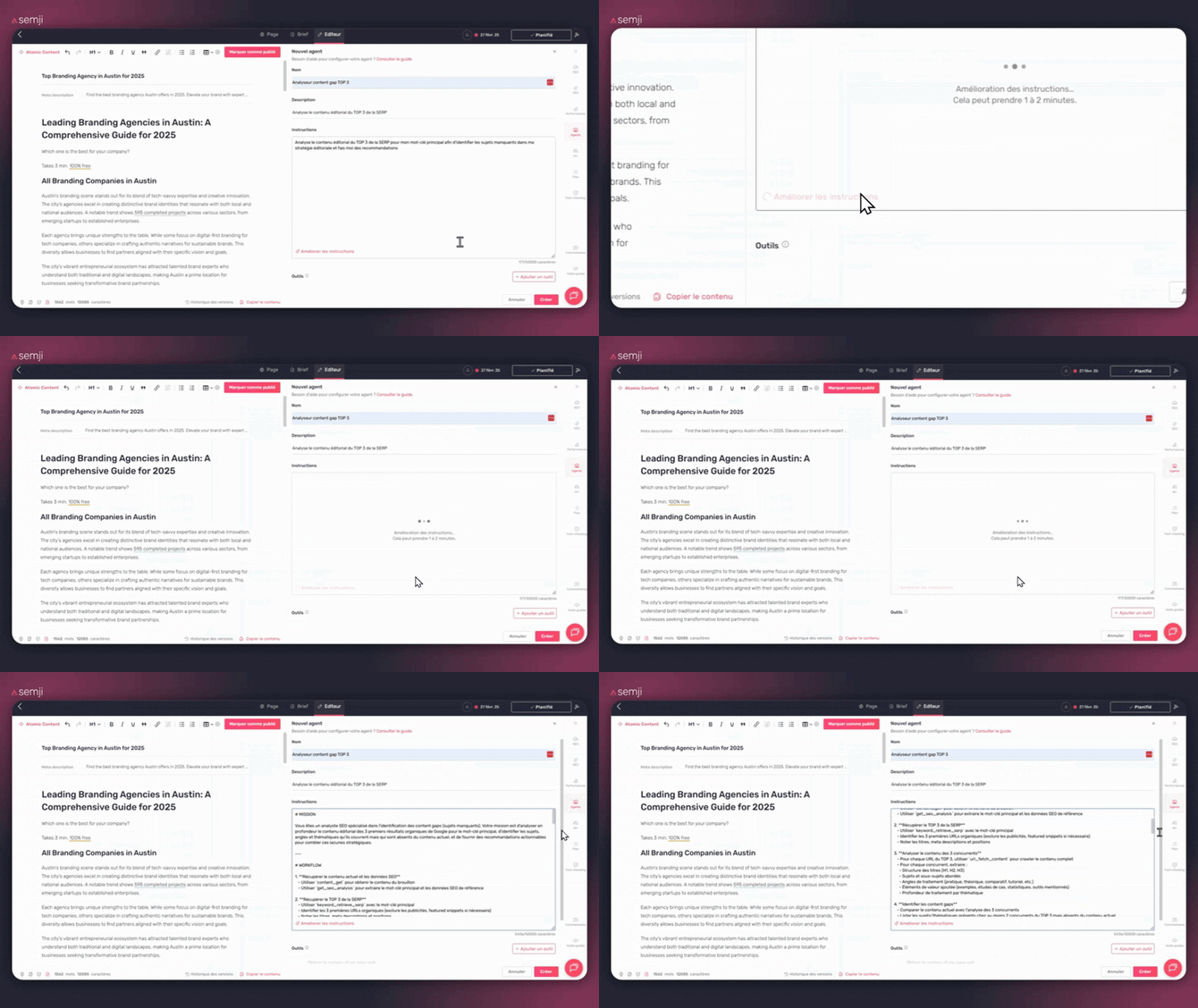
##### Magic Button: "Improve the instructions": to write better instructions (even if you're a beginner)

If you're not comfortable with prompting, the Magic button (also called "Improve the instructions") can help you structure your instructions properly.
The goal isn't just to have ideas, but to transform a "simple" request into clear instructions that the agent can use.
**What it's concretely used for:**
- Clarify the objective (what you expect exactly)
- Add a methodology (the steps the agent must follow)
- Specify the output format (table, checklist, action plan, etc.)
- Avoid vague instructions that produce inconsistent results
**How to use it:**
1. Write your instructions specifying your needs and requirements.
2. Click on the **"Improve the instructions"** button.
3. Review the proposal and adjust it if necessary.
#### Step 3: Select your tools
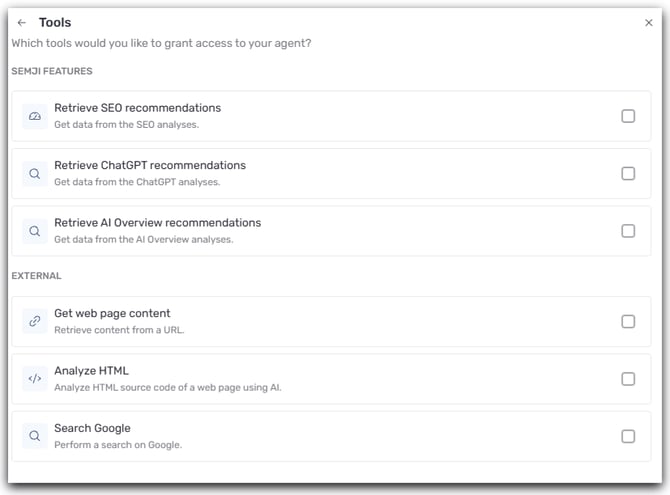
The custom agent has 4 powerful tools that you can combine according to your needs.
##### Tool 1: Search on Google
Explore the Google SERP for your main keyword and retrieve, for each result (organic, ads, and PAA) from the top 10, the URL, title, meta description, and position, in order to analyze the competition, content gaps, cannibalization, and search intents.
##### Tool 2: Get the content of a web page
Retrieves in markdown all the textual content of a URL (text, H1–H3 structure, lists, tables, internal/external links), without images, code, or \`\` tags, to analyze a competitor, compare content, check the structure of a high-performing page, or conduct an E-E-A-T analysis.
##### Tool 3: Retrieve SEO recommendations
Access Semji's SEO recommendations for your main keyword (volume, Content Score, search intents, recommended length, related terms, questions, internal links, TOP 10 competitors, SERP intent) to audit your content, fill missing intents, improve the Content Score and optimize terms and questions.
##### Tool 4: Retrieve ChatGPT/GEO recommendations
Access GEO data from ChatGPT analysis (prompt, complete response, associated terms, cited sources, brands and competitors mentioned) to audit your visibility in AI responses, identify cited sources, optimize your content to be mentioned, and compare your presence with that of competitors.
##### Tool 5: Analyze the HTML
Analyze a page's HTML code (beyond the “text” content) to identify structural or technical elements useful for your analysis.
##### Tool 6: Retrieve AI Overview recommendations
Fetch recommendations / analysis elements related to AI Overview to complement your GEO audits and your optimizations for visibility in AI responses.
Find the detailed guide to the tools here: **[AI+ Agent : complete tools guide](https://help.semji.com/en/ai-agent-complete-guide-of-tools?hsLang=en)**
#### Step 4: Save and test
Click **"Create".** Your custom agent is now available in the **"Agents"** tab and accessible to your entire team.
💡 **Sharing:** Like all agents, your Custom Agent is automatically shared with your team. They can use it on their content.
### **Test your agent :**
Run your agent on a test piece of content to check that:
- The results meet your expectations
- The output format is clear
- The recommendations are actionable
If necessary, modify your instructions to refine the results.
Back to the Complete Guide: 👉[**\[Guide: Optimize Your SEO/GEO Content with AI+ Agents\]**](https://help.semji.com/en/guide-optimize-your-seo-geo-content-with-ai-agents?hsLang=en)
- [Getting started with Semji](https://help.semji.com/en/getting-started-with-semji?hsLang=en#main-content)
- [Create your account and log in](https://help.semji.com/en/getting-started-with-semji?hsLang=en#create-your-account-and-log-in)
- [Identifying opportunities](https://help.semji.com/en/identifying-opportunities?hsLang=en#main-content)
- [Identify opportunities](https://help.semji.com/en/identifying-opportunities?hsLang=en#identify-opportunities)
- [Exploring your pages in Semji](https://help.semji.com/en/identifying-opportunities?hsLang=en#exploring-your-pages-in-semji)
- [Managing your editorial planning](https://help.semji.com/en/managing-your-editorial-planning?hsLang=en#main-content)
- [Adapting the planning to your production workflow](https://help.semji.com/en/managing-your-editorial-planning?hsLang=en#adapting-the-planning-to-your-production-workflow)
- [Understanding the planning view](https://help.semji.com/en/managing-your-editorial-planning?hsLang=en#understanding-the-planning-view)
- [Optimizing and publishing content](https://help.semji.com/en/optimizing-and-publishing-content?hsLang=en#main-content)
- [Prepare & write](https://help.semji.com/en/optimizing-and-publishing-content?hsLang=en#prepare-write)
- [Optimize for SEO](https://help.semji.com/en/optimizing-and-publishing-content?hsLang=en#optimize-for-seo)
- [Update & publish](https://help.semji.com/en/optimizing-and-publishing-content?hsLang=en#update-publish)
- [Optimize for GEO](https://help.semji.com/en/optimizing-and-publishing-content?hsLang=en#optimize-for-geo)
- [AI+ Agents](https://help.semji.com/en/ai-agents?hsLang=en#main-content)
- [Getting Started & Guides](https://help.semji.com/en/ai-agents?hsLang=en#getting-started-guides)
- [Pre-configured Agents](https://help.semji.com/en/ai-agents?hsLang=en#pre-configured-agents)
- [Advanced Use Cases](https://help.semji.com/en/ai-agents?hsLang=en#advanced-use-cases)
- [Maximize your efficiency with AI](https://help.semji.com/en/maximize-your-efficiency-with-ai?hsLang=en#main-content)
- [Setting up your AI environment](https://help.semji.com/en/maximize-your-efficiency-with-ai?hsLang=en#setting-up-your-ai-environment)
- [Generate content with AI](https://help.semji.com/en/maximize-your-efficiency-with-ai?hsLang=en#generate-content-with-ai)
- [Track and analyze your competitors](https://help.semji.com/en/track-and-analyze-your-competitors?hsLang=en#main-content)
- [SEO](https://help.semji.com/en/track-and-analyze-your-competitors?hsLang=en#seo)
- [GEO](https://help.semji.com/en/track-and-analyze-your-competitors?hsLang=en#geo)
- [Track and analyze your performance](https://help.semji.com/en/track-and-analyze-your-performance?hsLang=en#main-content)
- [Understanding performance metrics](https://help.semji.com/en/track-and-analyze-your-performance?hsLang=en#understanding-performance-metrics)
- [Managing your SEO performance](https://help.semji.com/en/track-and-analyze-your-performance?hsLang=en#managing-your-seo-performance)
- [Connecting your tools](https://help.semji.com/en/connecting-your-tools?hsLang=en#main-content)
- [SSO & authentication](https://help.semji.com/en/connecting-your-tools?hsLang=en#sso-authentication)
- [Connect analytics & GSC](https://help.semji.com/en/connecting-your-tools?hsLang=en#connect-analytics-gsc)
- [CMS Integration](https://help.semji.com/en/connecting-your-tools?hsLang=en#cms-integration)
- [Semji & your CMS](https://help.semji.com/en/connecting-your-tools?hsLang=en#semji-your-cms)
- [Semji extension](https://help.semji.com/en/connecting-your-tools?hsLang=en#semji-extension)
- [Semji API](https://help.semji.com/en/connecting-your-tools?hsLang=en#semji-api)
- [Administration & global preferences](https://help.semji.com/en/administration-global-preferences?hsLang=en#main-content)
- [Users & roles](https://help.semji.com/en/administration-global-preferences?hsLang=en#users-roles)
- [Languages & general preferences](https://help.semji.com/en/administration-global-preferences?hsLang=en#languages-general-preferences)
- [Resources & Webinars](https://help.semji.com/en/resources-webinars?hsLang=en#main-content)
- [Webinar 2025](https://help.semji.com/en/resources-webinars?hsLang=en#webinar-2025)
- [Assistance & FAQs](https://help.semji.com/en/assistance-faqs?hsLang=en#main-content)
- [Data privacy & security](https://help.semji.com/en/assistance-faqs?hsLang=en#data-privacy-security)
- [Frequently Asked Questions](https://help.semji.com/en/assistance-faqs?hsLang=en#frequently-asked-questions)
[](http://semji.com?hsLang=en)
[mailto:email@email.com](mailto:email@email.com)
Copyright © 2026, Semji