> ## Documentation Index
> Fetch the complete documentation index at: https://help.semji.com/llms.txt
> Use this file to discover all available pages before exploring further.
# Incoming Links recommendations
> To work on your internal linking
### Why are incoming links important?
Incoming links are links to be made **from certain pages of your site to the page you are optimizing with Semji**. They contribute to your site's internal linking and to a better ranking.
A good internal linking is the proof for Google that your site is semantically **coherent and complete on a given theme**.
Linking complementary content together provides a **better browsing experience** for your users, reduces the bounce rate of a page, increases the number of page views per session... and allows you to pass on SEO juice to another page on your site.
Finally, **internal links promote the indexation of your content** by helping Google's robots to easily browse all the pages of your site.
### How to increase my Content Score thanks to incoming links?
#### Understand Incoming Links Recommendations
To decide whether or not to add Incoming Links to your content, look at the number of Content Score points you can earn with them.
 *Here, it should be understood that Semji recommends the insertion of 8 internal links from other pages of the site to the content you are working on. For the moment, only 1 recommended internal link is in place and detected by the platform. By inserting the 7 missing links, you will be able to gain 9 Content Score points.*
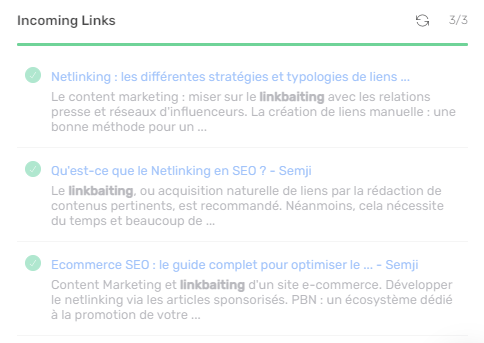
Semji then lists the pages on your site from which you can link to the content you are creating or optimizing. **In bold, Semji identifies an anchor** in the online content that could host the internal link.
#### Integrate internal links from your CMS
To validate an incoming link recommendation, go to the page from which you want to add an internal link in your CMS. Insert a link to the page you worked on in Semji and publish this update. Note that Semji, in the content preview, identifies the most appropriate anchor to insert your link (in bold in the text excerpt).
Once the link is set up and visible online, go back to Semji and refresh the Incoming Links section using the dedicated button.
Semji then notices the presence of the link. Your Content Score evolves as well as the completion bar !
*Here, it should be understood that Semji recommends the insertion of 8 internal links from other pages of the site to the content you are working on. For the moment, only 1 recommended internal link is in place and detected by the platform. By inserting the 7 missing links, you will be able to gain 9 Content Score points.*
Semji then lists the pages on your site from which you can link to the content you are creating or optimizing. **In bold, Semji identifies an anchor** in the online content that could host the internal link.
#### Integrate internal links from your CMS
To validate an incoming link recommendation, go to the page from which you want to add an internal link in your CMS. Insert a link to the page you worked on in Semji and publish this update. Note that Semji, in the content preview, identifies the most appropriate anchor to insert your link (in bold in the text excerpt).
Once the link is set up and visible online, go back to Semji and refresh the Incoming Links section using the dedicated button.
Semji then notices the presence of the link. Your Content Score evolves as well as the completion bar !
 ### Questions about Incoming Links
**The content I'm working on with Semji doesn't exist yet, how can I validate the Incoming links recommendations when I don't have any URL yet?**
All you have to do is publish your new article in order to get your new URL and then make the links from the pages recommended by Semji.
This documentation is built and hosted on [Mintlify](https://mintlify.com), a developer documentation platform.
### Questions about Incoming Links
**The content I'm working on with Semji doesn't exist yet, how can I validate the Incoming links recommendations when I don't have any URL yet?**
All you have to do is publish your new article in order to get your new URL and then make the links from the pages recommended by Semji.
This documentation is built and hosted on [Mintlify](https://mintlify.com), a developer documentation platform.