> ## Documentation Index
> Fetch the complete documentation index at: https://help.semji.com/llms.txt
> Use this file to discover all available pages before exploring further.
# Questions recommendations
> To answer questions that Internet users are really asking
### **Why are Questions important?**
Questions suggested by Semji are the ones that Internet users are asking around your keyword. Answer these questions to be relevant to Internet users and Google. The more a content answers clearly and completely to a search intention, the more visible it gets.
### How are the questions generated?
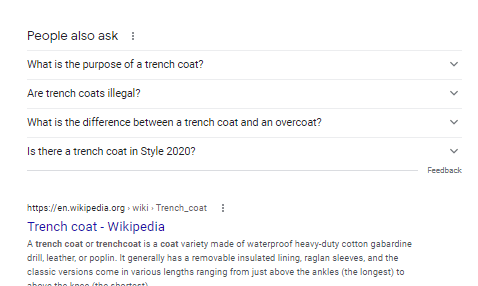
The questions suggested by **Semji** are taken from Google data and in particular from the "People Also Ask" box that often appear in Google's results pages.
 ### How to increase my score using questions?
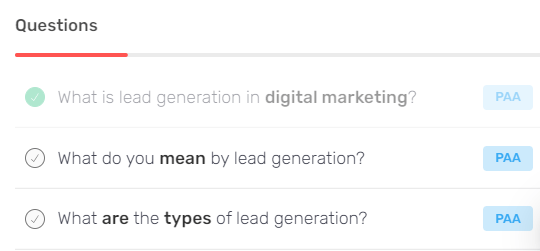
To change the Content Score of your publication, you must insert questions suggested by Semji in the main title or subtitles (Hn) of your content.
1. Choose a relevant question
2. Look for the words in bold, they are what count for your content score
3. Add the question to your text by clicking on + or simply write the question in the editor
### How to increase my score using questions?
To change the Content Score of your publication, you must insert questions suggested by Semji in the main title or subtitles (Hn) of your content.
1. Choose a relevant question
2. Look for the words in bold, they are what count for your content score
3. Add the question to your text by clicking on + or simply write the question in the editor
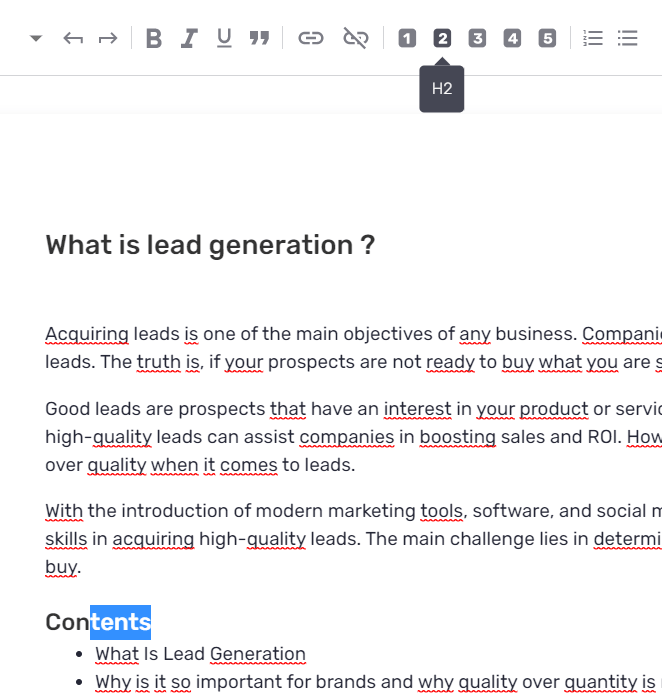
 If you are writing the question in your text, then make sure you choose a heading level. To do this, highlight the text, and choose 1 to tag your heading as H1, 2 for H2 etc. Once you have chosen a title level, your score will change.
 If you have integrated the question into your text using the +, the H2 tag is selected by default. Your score changes immediately!
### **Starting from scratch?**
Search Intents and Questions sections help you build your writing plan. Click on the + each time a topic interests you, and it will be added to your blank page. The more topics you cover, the more your content score will evolve, and the more you will be sure to produce relevant, deep, powerful content.
**Reminder: the minimum recommended content score is 75. The higher your score, the more chance you have to be in the top 3.**
### What if a question is not relevant?
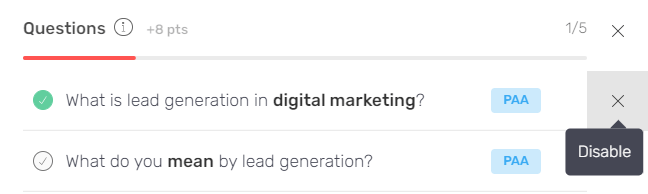
A question is not relevant to your content? Deactivate it. The score of your content is then recalculated based on the active recommendations.
If you have integrated the question into your text using the +, the H2 tag is selected by default. Your score changes immediately!
### **Starting from scratch?**
Search Intents and Questions sections help you build your writing plan. Click on the + each time a topic interests you, and it will be added to your blank page. The more topics you cover, the more your content score will evolve, and the more you will be sure to produce relevant, deep, powerful content.
**Reminder: the minimum recommended content score is 75. The higher your score, the more chance you have to be in the top 3.**
### What if a question is not relevant?
A question is not relevant to your content? Deactivate it. The score of your content is then recalculated based on the active recommendations.
 This documentation is built and hosted on [Mintlify](https://mintlify.com), a developer documentation platform.