---
title: Everything you need to know about the Pages tab
description: Semji allows you to easily identify which pages should be prioritized and optimized based on your existing content.
---
[Skip to content](https://help.semji.com/en/en/everything-you-need-to-know-about-the-pages-tab#main-content)
- [English](https://help.semji.com/en/en/everything-you-need-to-know-about-the-pages-tab)
- [Français](https://help.semji.com/fr/fr/tout-savoir-sur-longlet-pages)
English
Show submenu for translations

Open main navigation
Close main navigation
- - [English](https://help.semji.com/en/en/everything-you-need-to-know-about-the-pages-tab)
- [Français](https://help.semji.com/fr/fr/tout-savoir-sur-longlet-pages)
English
Show submenu for translations
- Contact us
Contact us
How can we help you?
- There are no suggestions because the search field is empty.
1. [Help Center](https://help.semji.com/en?hsLang=en)
2. [Identifying opportunities](https://help.semji.com/en/identifying-opportunities?hsLang=en)
3. [Exploring your pages in Semji](https://help.semji.com/en/identifying-opportunities?hsLang=en#exploring-your-pages-in-semji)
# Everything you need to know about the Pages tab
## Semji allows you to easily identify which pages should be prioritized and optimized based on your existing content.
Table of contents:
---
[What is the Pages tab for?](https://help.semji.com/en/en/everything-you-need-to-know-about-the-pages-tab#what)
[What does the Pages tab contain?](https://help.semji.com/en/en/everything-you-need-to-know-about-the-pages-tab#what-does)
[How to use the filters in the Pages tab?](https://help.semji.com/en/en/everything-you-need-to-know-about-the-pages-tab#how-to-use-filters)
[How to import content into the Pages tab?](https://help.semji.com/en/en/everything-you-need-to-know-about-the-pages-tab#how-to-import)
| Free trial | Custom Legacy | Basic | Business | Unlimited |
| --- | --- | --- | --- | --- |
| ✅ | ✅ | ✅ | ✅ | ✅ |
### What is the Pages tab for?
Semji's Pages tab allows you to easily prioritize existing content for optimization.
After logging into Google Search Console, Semji will fetch the content on your website that has generated clicks in the last 28 days and add it to the Pages tab
To help you prioritize your content, Semji will identify content with high click-through potential.
The number of red dots shows the priority level of this content, the more red dots, the more potential Semji has identified.
*Note 💡: Content with low Click Potential does not mean that it should not be optimized. If it represents a business opportunity for you, you should optimize it.*
### What does the Pages tab contain?
The tab features different key indicators for your content.
**Monthly Clicks:** This shows the number of clicks within 30 days on your content for all keywords combined.

**Focus Keyword:** This is the Focus Keyword of your content on which you generate the most traffic. By clicking on the arrow, you can change the keyword. Semji suggests keywords with key indicators such as monthly clicks, your position on Google's results page and the keyword's search volume.

**Volume:** This represents the search volume of the main keyword.

**Clicks Potential:** This is a ratio of time spent optimizing the content and the results you will get. The more red dots there are, the more potential there is to optimize it. It allows you to quickly identify and prioritize content.

**[Content Score](https://help.semji.com/fr/tout-comprendre-du-content-score?hsLang=en):** Semji analyzes your content and assigns a pre-optimization score based on different optimization suggestions. This score helps you identify how many changes need to be made to your existing content.
**Planning:** With the + sign you can easily add content to your calendar, assign it and add a deadline.

On the left side of your screen, you can sort contents by Opportunities:
- Clicks
- Conversions, based on the different objectives defined in your Google Analytics connector, Matomo, Piano Analytics, Adobe Analytics or Piwik Pro.
- Transactions
- Revenues
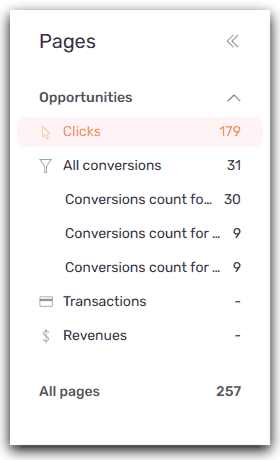
*Note 💡: By default, Semji focuses on Click Opportunities as the main objective. The "All pages" view allows you to have a global view on all the existing content imported in Semji.*
### How to use the filters on the Pages tab?
To make it easier to search for new content, Semji provides you with different filters to find content based on your objectives.
*Good to know 💡: You can now filter your content using HTTP codes!*
*This allows you to view your 301 pages after a redesign, and also to correct your 404 pages.*
### How to import content into the Pages tab?
The 'Import' button gives you two options:
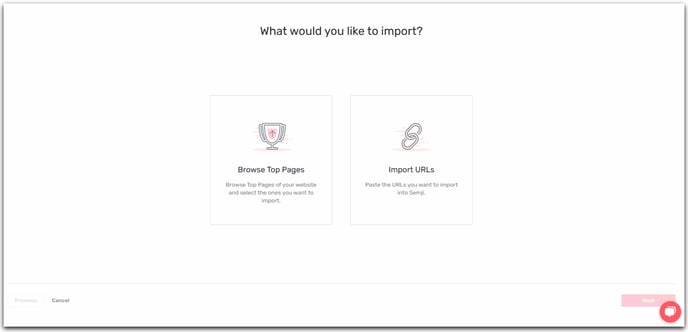
- Browse the best pages: Semji will browse your website and import the pages with the highest potential.
- Import URLs: Semji only imports pages that have received at least one impression. If you want to work on other pages of your website, simply enter the URLs you want to import. You can import several URLs at once.
For more detailed information on how to optimize the import of your content, please consult our complete guide, available [here](https://help.semji.com/en/how-to-import-a-url-in-semji?hsLang=en).
Now you can use the Pages tab. You can easily identify existing content with high potential and start optimizing it!
To learn more, check out our post on [Everything you need to know about the Planning tab.](https://help.semji.com/en/all-you-need-to-know-about-the-planning-tab?hsLang=en).
- [Getting started with Semji](https://help.semji.com/en/getting-started-with-semji?hsLang=en#main-content)
- [Create your account and log in](https://help.semji.com/en/getting-started-with-semji?hsLang=en#create-your-account-and-log-in)
- [Identifying opportunities](https://help.semji.com/en/identifying-opportunities?hsLang=en#main-content)
- [Identify opportunities](https://help.semji.com/en/identifying-opportunities?hsLang=en#identify-opportunities)
- [Exploring your pages in Semji](https://help.semji.com/en/identifying-opportunities?hsLang=en#exploring-your-pages-in-semji)
- [Managing your editorial planning](https://help.semji.com/en/managing-your-editorial-planning?hsLang=en#main-content)
- [Adapting the planning to your production workflow](https://help.semji.com/en/managing-your-editorial-planning?hsLang=en#adapting-the-planning-to-your-production-workflow)
- [Understanding the planning view](https://help.semji.com/en/managing-your-editorial-planning?hsLang=en#understanding-the-planning-view)
- [Optimizing and publishing content](https://help.semji.com/en/optimizing-and-publishing-content?hsLang=en#main-content)
- [Prepare & write](https://help.semji.com/en/optimizing-and-publishing-content?hsLang=en#prepare-write)
- [Optimize for SEO](https://help.semji.com/en/optimizing-and-publishing-content?hsLang=en#optimize-for-seo)
- [Update & publish](https://help.semji.com/en/optimizing-and-publishing-content?hsLang=en#update-publish)
- [Optimize for GEO](https://help.semji.com/en/optimizing-and-publishing-content?hsLang=en#optimize-for-geo)
- [AI+ Agents](https://help.semji.com/en/ai-agents?hsLang=en#main-content)
- [Getting Started & Guides](https://help.semji.com/en/ai-agents?hsLang=en#getting-started-guides)
- [Pre-configured Agents](https://help.semji.com/en/ai-agents?hsLang=en#pre-configured-agents)
- [Advanced Use Cases](https://help.semji.com/en/ai-agents?hsLang=en#advanced-use-cases)
- [Maximize your efficiency with AI](https://help.semji.com/en/maximize-your-efficiency-with-ai?hsLang=en#main-content)
- [Setting up your AI environment](https://help.semji.com/en/maximize-your-efficiency-with-ai?hsLang=en#setting-up-your-ai-environment)
- [Generate content with AI](https://help.semji.com/en/maximize-your-efficiency-with-ai?hsLang=en#generate-content-with-ai)
- [Track and analyze your competitors](https://help.semji.com/en/track-and-analyze-your-competitors?hsLang=en#main-content)
- [SEO](https://help.semji.com/en/track-and-analyze-your-competitors?hsLang=en#seo)
- [GEO](https://help.semji.com/en/track-and-analyze-your-competitors?hsLang=en#geo)
- [Track and analyze your performance](https://help.semji.com/en/track-and-analyze-your-performance?hsLang=en#main-content)
- [Understanding performance metrics](https://help.semji.com/en/track-and-analyze-your-performance?hsLang=en#understanding-performance-metrics)
- [Managing your SEO performance](https://help.semji.com/en/track-and-analyze-your-performance?hsLang=en#managing-your-seo-performance)
- [Connecting your tools](https://help.semji.com/en/connecting-your-tools?hsLang=en#main-content)
- [SSO & authentication](https://help.semji.com/en/connecting-your-tools?hsLang=en#sso-authentication)
- [Connect analytics & GSC](https://help.semji.com/en/connecting-your-tools?hsLang=en#connect-analytics-gsc)
- [CMS Integration](https://help.semji.com/en/connecting-your-tools?hsLang=en#cms-integration)
- [Semji & your CMS](https://help.semji.com/en/connecting-your-tools?hsLang=en#semji-your-cms)
- [Semji extension](https://help.semji.com/en/connecting-your-tools?hsLang=en#semji-extension)
- [Semji API](https://help.semji.com/en/connecting-your-tools?hsLang=en#semji-api)
- [Administration & global preferences](https://help.semji.com/en/administration-global-preferences?hsLang=en#main-content)
- [Users & roles](https://help.semji.com/en/administration-global-preferences?hsLang=en#users-roles)
- [Languages & general preferences](https://help.semji.com/en/administration-global-preferences?hsLang=en#languages-general-preferences)
- [Resources & Webinars](https://help.semji.com/en/resources-webinars?hsLang=en#main-content)
- [Webinar 2025](https://help.semji.com/en/resources-webinars?hsLang=en#webinar-2025)
- [Assistance & FAQs](https://help.semji.com/en/assistance-faqs?hsLang=en#main-content)
- [Data privacy & security](https://help.semji.com/en/assistance-faqs?hsLang=en#data-privacy-security)
- [Frequently Asked Questions](https://help.semji.com/en/assistance-faqs?hsLang=en#frequently-asked-questions)
[](http://semji.com?hsLang=en)
[mailto:email@email.com](mailto:email@email.com)
Copyright © 2026, Semji