---
title: "Fact Checking ✅: Produce quality and verified content"
description: Quickly visualize the sources of your content produced through Fact Checking.
---
[Skip to content](https://help.semji.com/en/en/produce-quality-verified-content-with-fact-checking#main-content)
- [English](https://help.semji.com/en/en/produce-quality-verified-content-with-fact-checking)
- [Français](https://help.semji.com/fr/fr/produisez-un-contenu-qualitatif-et-vérifie-avec-la-fonctionnalite-fact-checking)
English
Show submenu for translations

Open main navigation
Close main navigation
- - [English](https://help.semji.com/en/en/produce-quality-verified-content-with-fact-checking)
- [Français](https://help.semji.com/fr/fr/produisez-un-contenu-qualitatif-et-vérifie-avec-la-fonctionnalite-fact-checking)
English
Show submenu for translations
- Contact us
Contact us
How can we help you?
- There are no suggestions because the search field is empty.
1. [Help Center](https://help.semji.com/en?hsLang=en)
2. [Maximize your efficiency with AI](https://help.semji.com/en/maximize-your-efficiency-with-ai?hsLang=en)
3. [Generate content with AI](https://help.semji.com/en/maximize-your-efficiency-with-ai?hsLang=en#generate-content-with-ai)
# Fact Checking ✅: Produce quality and verified content
## Quickly visualize the sources of your content produced through Fact Checking.
[Why use Fact Checking?](https://help.semji.com/en/en/produce-quality-verified-content-with-fact-checking#use-fact-checking)
[How to use Fact Checking](https://help.semji.com/en/en/produce-quality-verified-content-with-fact-checking#how-use)
| Free trial | Custom Legacy | Basic | Business | Unlimited |
| --- | --- | --- | --- | --- |
| ✅ | ❌ | ❌ | ✅ | ✅ |
Why use Fact Checking?
The purpose of the Fact Checking feature is to reduce the spread of false information in texts generated by AI. This feature helps you identify passages of text that require verification, thus ensuring that the information provided is reliable and properly referenced.
In addition to providing a source, it indicates a degree of "truthfulness" of the information and allows you to prioritize which sources to check.
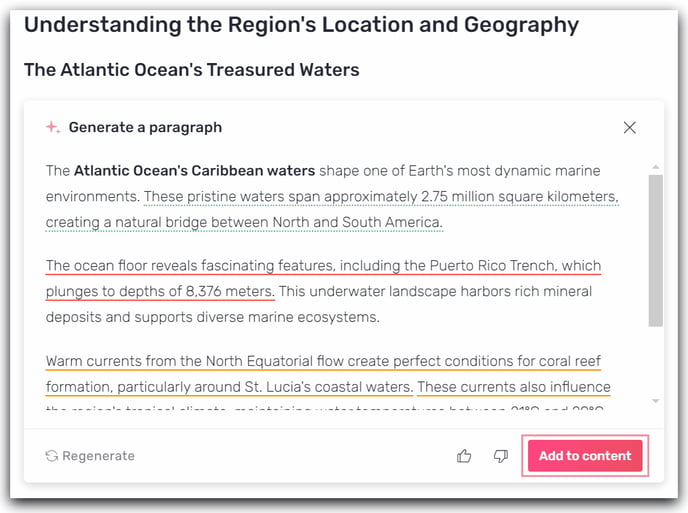
**3 source statuses are available:**
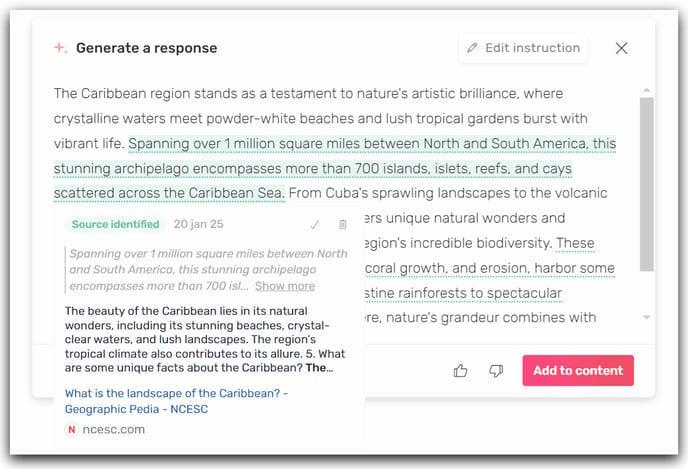
- Green: A source has been identified. It is verified and reliable.
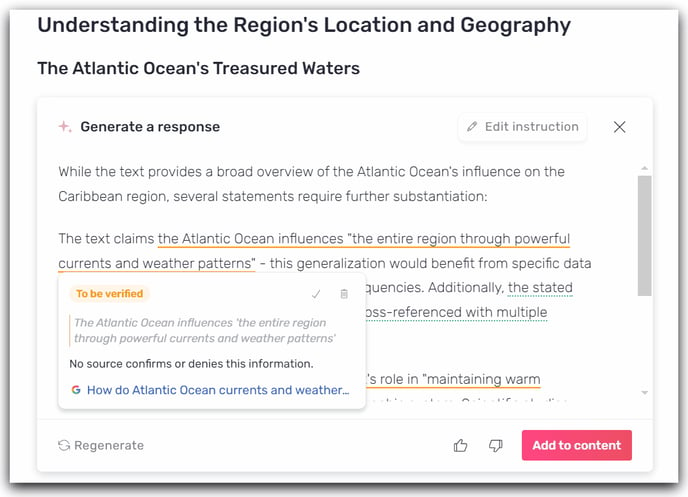
- Orange: This source needs to be verified. Semji makes it easy for you by integrating an associated Google search.
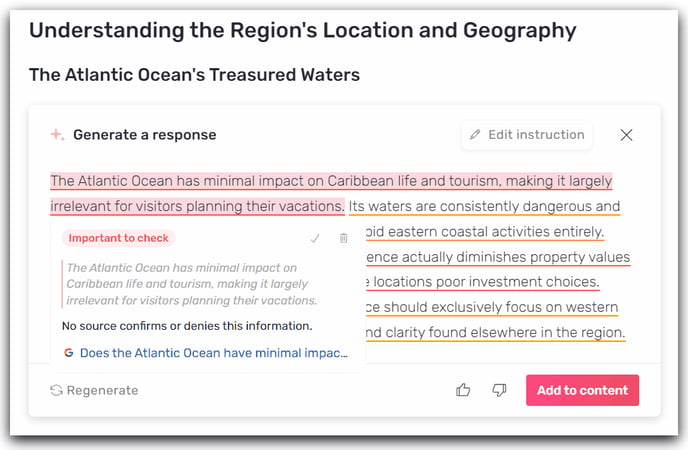
- Red: This information is not reliable. It is important to verify this information using the associated search.
Next to each "Type of Fact Checking", you will find indicated the date of the SERP where the information was visible.
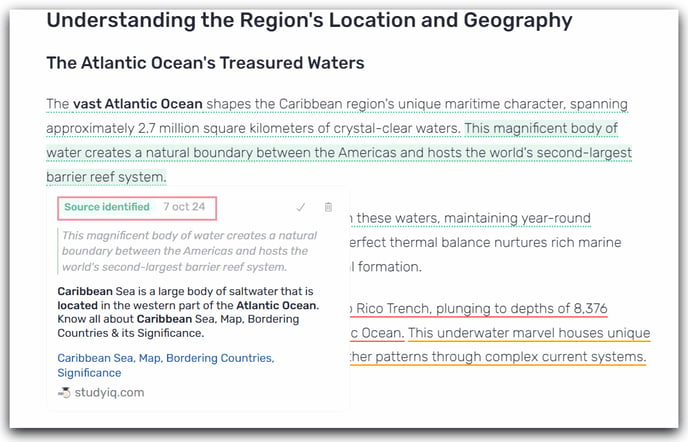
While browsing search engine results relevant to your query, sites considered "reliable" are identified to corroborate the verified information.
You will save time in identifying false information and reliable data, while avoiding the risks of hallucinations. Semji conducts for you a search of the sources that validate the claims generated by AI. In the sourced content, the relevant information is highlighted, making it easier to identify.
How do I use Fact Checking?
Step 1: Activate Fact Checking
Before launching a text generation, activate the feature by clicking on the button to the right of Atomic Content.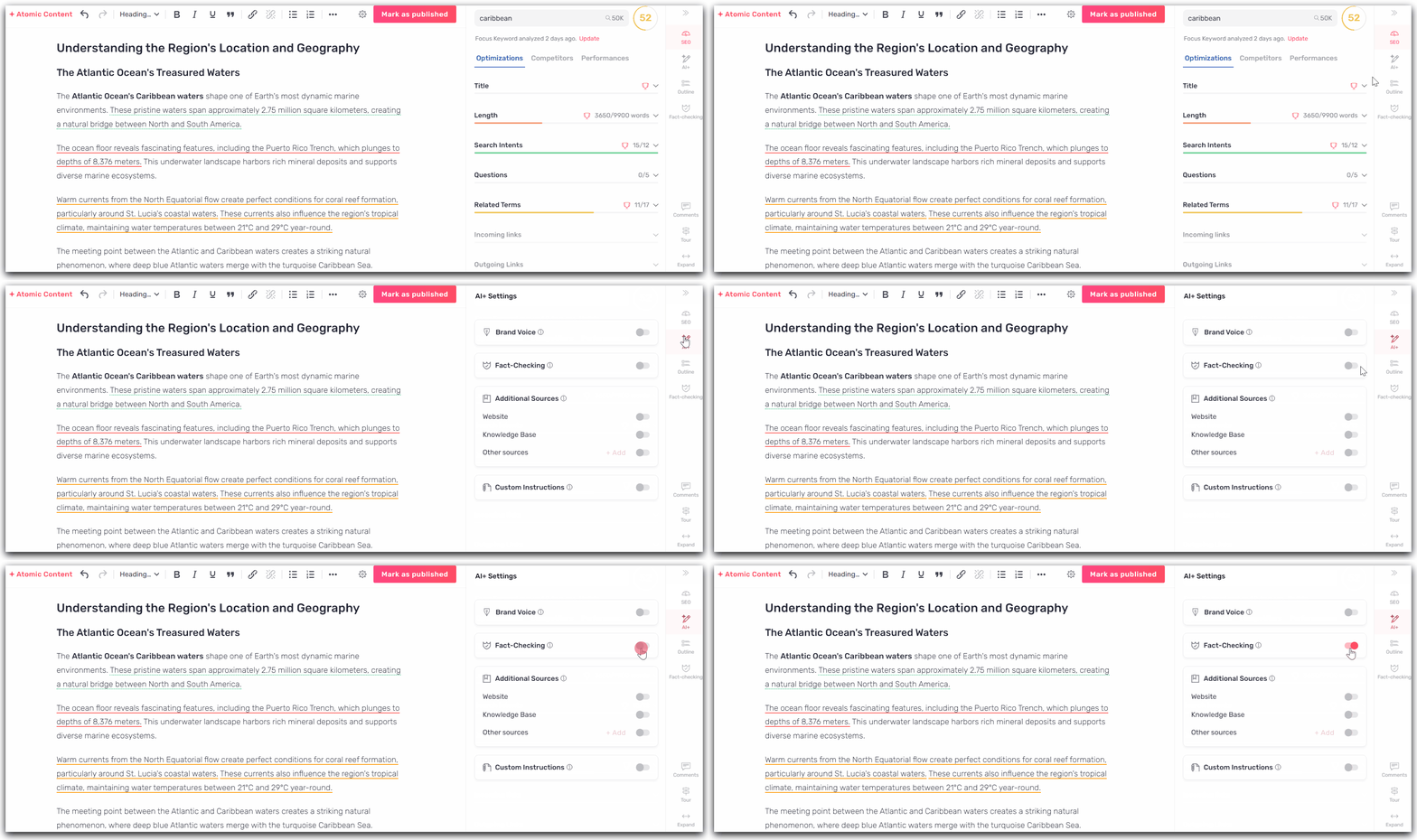
#### Step 2: Start text generation with Atomic Content or AI+Content
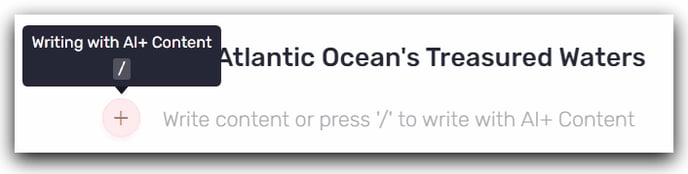
#### AI+ Content:
Type `/` or click on `+` to start text generation.
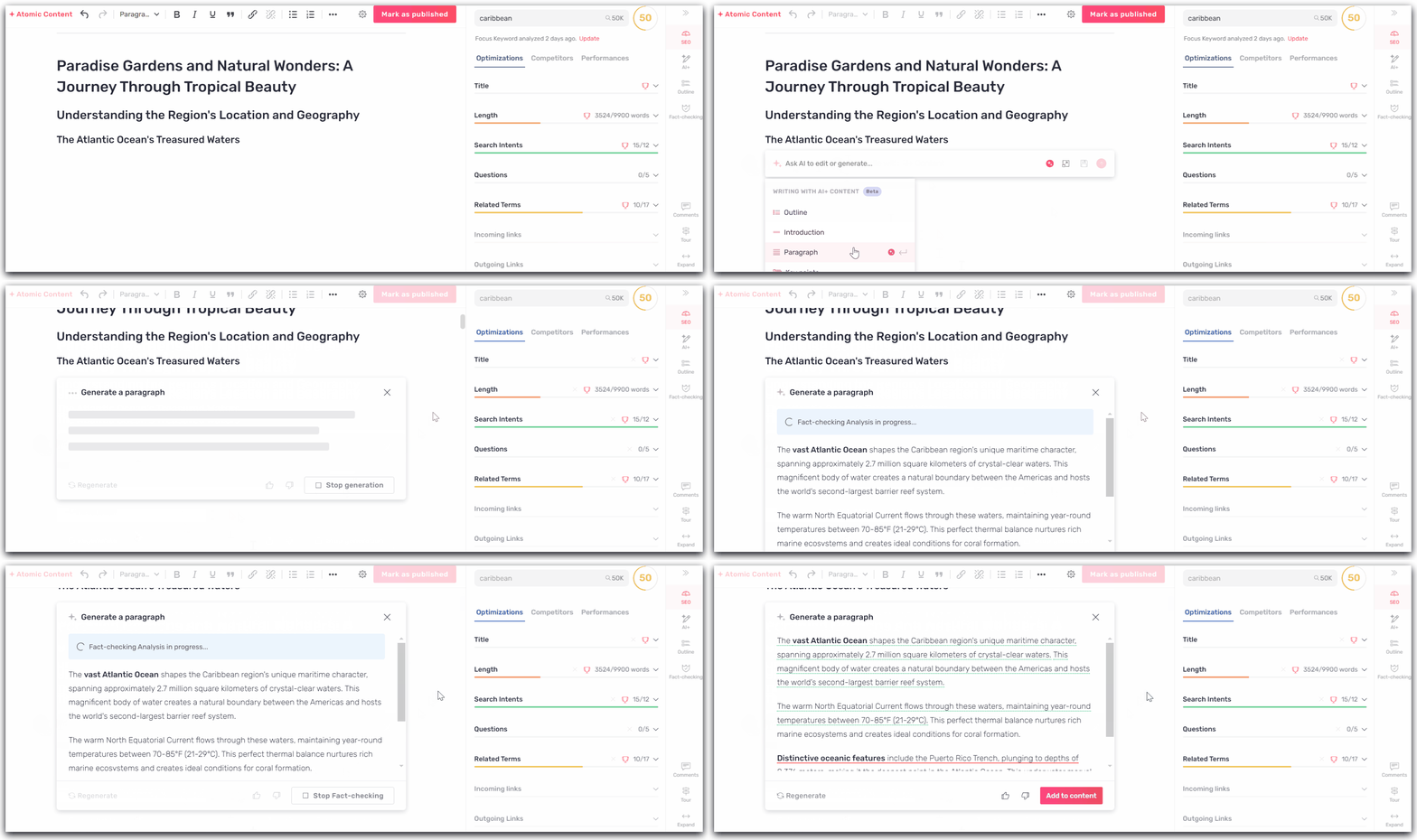
Atomic Content:
Click on "Atomic Content" to initiate a complete and optimized text generation.
Generate your text:
#### Step 3: Integrate the text into your draft and analyze the reliability of the information
Once the content has been produced, you can add it to your content and view the different levels of Fact Checking: [verified source](https://help.semji.com/en/en/produce-quality-verified-content-with-fact-checking#green), [to be verified](https://help.semji.com/en/en/produce-quality-verified-content-with-fact-checking#orange) and [important to verify](https://help.semji.com/en/en/produce-quality-verified-content-with-fact-checking#red).
#### Step 4: Edit content and ensure the production of quality content for your audience.
Once your content is integrated into the editor, you can proceed with source analysis and content modification.
Each source can be accessed by clicking on the link. You can view all sources in the sidebar on the right under the "Fact Checking" menu.
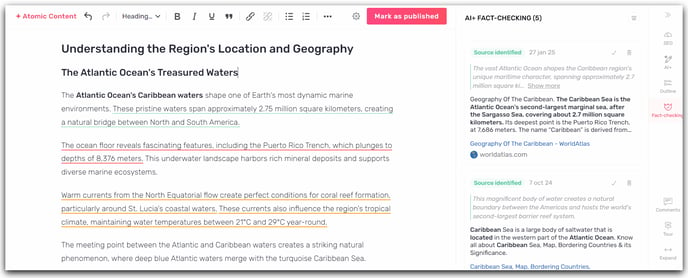
All that remains is for you to identify the modifications and improvements to your content while bringing your personal expertise to the subject!
Good to know 💡:
- You cannot use this feature on text previously generated by AI, or on text that you have written yourself.
- The Fact Checking feature applies to [Atomic Content](https://help.semji.com/en/how-to-use-semjis-ai-content?hsLang=en), [AI+Content](https://help.semji.com/en/how-to-use-semjis-ai-content?hsLang=en) (title, meta description, introduction, outline, paragraph) and FAQ generation.
- Using Fact Checking results in a doubling of [credit](https://help.semji.com/en/comment-visualiser-le-nombre-de-cr%C3%A9dits-restants?hsLang=en) consumption.
- [Getting started with Semji](https://help.semji.com/en/getting-started-with-semji?hsLang=en#main-content)
- [Create your account and log in](https://help.semji.com/en/getting-started-with-semji?hsLang=en#create-your-account-and-log-in)
- [Identifying opportunities](https://help.semji.com/en/identifying-opportunities?hsLang=en#main-content)
- [Identify opportunities](https://help.semji.com/en/identifying-opportunities?hsLang=en#identify-opportunities)
- [Exploring your pages in Semji](https://help.semji.com/en/identifying-opportunities?hsLang=en#exploring-your-pages-in-semji)
- [Managing your editorial planning](https://help.semji.com/en/managing-your-editorial-planning?hsLang=en#main-content)
- [Adapting the planning to your production workflow](https://help.semji.com/en/managing-your-editorial-planning?hsLang=en#adapting-the-planning-to-your-production-workflow)
- [Understanding the planning view](https://help.semji.com/en/managing-your-editorial-planning?hsLang=en#understanding-the-planning-view)
- [Optimizing and publishing content](https://help.semji.com/en/optimizing-and-publishing-content?hsLang=en#main-content)
- [Prepare & write](https://help.semji.com/en/optimizing-and-publishing-content?hsLang=en#prepare-write)
- [Optimize for SEO](https://help.semji.com/en/optimizing-and-publishing-content?hsLang=en#optimize-for-seo)
- [Update & publish](https://help.semji.com/en/optimizing-and-publishing-content?hsLang=en#update-publish)
- [Optimize for GEO](https://help.semji.com/en/optimizing-and-publishing-content?hsLang=en#optimize-for-geo)
- [AI+ Agents](https://help.semji.com/en/ai-agents?hsLang=en#main-content)
- [Getting Started & Guides](https://help.semji.com/en/ai-agents?hsLang=en#getting-started-guides)
- [Pre-configured Agents](https://help.semji.com/en/ai-agents?hsLang=en#pre-configured-agents)
- [Advanced Use Cases](https://help.semji.com/en/ai-agents?hsLang=en#advanced-use-cases)
- [Maximize your efficiency with AI](https://help.semji.com/en/maximize-your-efficiency-with-ai?hsLang=en#main-content)
- [Setting up your AI environment](https://help.semji.com/en/maximize-your-efficiency-with-ai?hsLang=en#setting-up-your-ai-environment)
- [Generate content with AI](https://help.semji.com/en/maximize-your-efficiency-with-ai?hsLang=en#generate-content-with-ai)
- [Track and analyze your competitors](https://help.semji.com/en/track-and-analyze-your-competitors?hsLang=en#main-content)
- [SEO](https://help.semji.com/en/track-and-analyze-your-competitors?hsLang=en#seo)
- [GEO](https://help.semji.com/en/track-and-analyze-your-competitors?hsLang=en#geo)
- [Track and analyze your performance](https://help.semji.com/en/track-and-analyze-your-performance?hsLang=en#main-content)
- [Understanding performance metrics](https://help.semji.com/en/track-and-analyze-your-performance?hsLang=en#understanding-performance-metrics)
- [Managing your SEO performance](https://help.semji.com/en/track-and-analyze-your-performance?hsLang=en#managing-your-seo-performance)
- [Connecting your tools](https://help.semji.com/en/connecting-your-tools?hsLang=en#main-content)
- [SSO & authentication](https://help.semji.com/en/connecting-your-tools?hsLang=en#sso-authentication)
- [Connect analytics & GSC](https://help.semji.com/en/connecting-your-tools?hsLang=en#connect-analytics-gsc)
- [CMS Integration](https://help.semji.com/en/connecting-your-tools?hsLang=en#cms-integration)
- [Semji & your CMS](https://help.semji.com/en/connecting-your-tools?hsLang=en#semji-your-cms)
- [Semji extension](https://help.semji.com/en/connecting-your-tools?hsLang=en#semji-extension)
- [Semji API](https://help.semji.com/en/connecting-your-tools?hsLang=en#semji-api)
- [Administration & global preferences](https://help.semji.com/en/administration-global-preferences?hsLang=en#main-content)
- [Users & roles](https://help.semji.com/en/administration-global-preferences?hsLang=en#users-roles)
- [Languages & general preferences](https://help.semji.com/en/administration-global-preferences?hsLang=en#languages-general-preferences)
- [Resources & Webinars](https://help.semji.com/en/resources-webinars?hsLang=en#main-content)
- [Webinar 2025](https://help.semji.com/en/resources-webinars?hsLang=en#webinar-2025)
- [Assistance & FAQs](https://help.semji.com/en/assistance-faqs?hsLang=en#main-content)
- [Data privacy & security](https://help.semji.com/en/assistance-faqs?hsLang=en#data-privacy-security)
- [Frequently Asked Questions](https://help.semji.com/en/assistance-faqs?hsLang=en#frequently-asked-questions)
[](http://semji.com?hsLang=en)
[mailto:email@email.com](mailto:email@email.com)
Copyright © 2026, Semji