---
title: Analyze your SEO performance on Google
description: Learn to analyze your SEO performance directly in Semji through the centralization of Google Search Console and Analytics data. Track your positions, clicks, impressions and CTR, identify your best-performing content, spot your optimization opportunities and measure the impact of your actions to improve your organic visibility.
---
[Skip to content](https://help.semji.com/en/guide-2-analyze-your-seo-performance-on-google#main-content)
- [English](https://help.semji.com/en/guide-2-analyze-your-seo-performance-on-google)
- [Français](https://help.semji.com/fr/guide-2-analyser-votre-performance-seo-sur-google)
English
Show submenu for translations

Open main navigation
Close main navigation
- - [English](https://help.semji.com/en/guide-2-analyze-your-seo-performance-on-google)
- [Français](https://help.semji.com/fr/guide-2-analyser-votre-performance-seo-sur-google)
English
Show submenu for translations
- Contact us
Contact us
How can we help you?
- There are no suggestions because the search field is empty.
1. [Help Center](https://help.semji.com/en?hsLang=en)
2. [Track and analyze your performance](https://help.semji.com/en/track-and-analyze-your-performance?hsLang=en)
3. [Managing your SEO performance](https://help.semji.com/en/track-and-analyze-your-performance?hsLang=en#managing-your-seo-performance)
# Analyze your SEO performance on Google
## Learn to analyze your SEO performance directly in Semji through the centralization of Google Search Console and Analytics data. Track your positions, clicks, impressions and CTR, identify your best-performing content, spot your optimization opportunities and measure the impact of your actions to improve your organic visibility.
[In summary](https://help.semji.com/en/guide-2-analyze-your-seo-performance-on-google#Summary)
[What this changes for you](https://help.semji.com/en/guide-2-analyze-your-seo-performance-on-google#whatthischanges)
[In-depth analysis of SEO performance by organic channel](https://help.semji.com/en/guide-2-analyze-your-seo-performance-on-google#indepth)
[Use case: Identifying a priority optimization opportunity](https://help.semji.com/en/guide-2-analyze-your-seo-performance-on-google#usecase)
[FAQ](https://help.semji.com/en/guide-2-analyze-your-seo-performance-on-google#FAQ)
[Optimize your organic visibility](https://help.semji.com/en/guide-2-analyze-your-seo-performance-on-google#optimize)
### In summary
**What you can do**: Track and analyze your SEO performance (positions, clicks, impressions) directly in Semji without switching back and forth between Search Console and Analytics
**For whom**: Content managers, SEO managers and marketing teams who manage the organic visibility of their content
**Why it's useful**: Centralize all your essential SEO metrics in one place to quickly identify your optimization opportunities and measure the impact of your efforts
### What this changes for you
**SEO often forms the core of your acquisition strategy**. But navigating between Google Search Console for rankings and Google Analytics for traffic complicates the overall analysis of your organic performance. How can you quickly know which content generates the most clicks, which content is progressing in rankings, or identify your next priority optimizations?
**Semji centralizes all your essential SEO indicators in a unified interface**. Keyword positions, click evolution, click-through rates, impressions... you have a complete view of your organic performance to make informed optimization decisions.
**Concrete result**: you identify your top-performing content in just a few clicks, spot your improvement opportunities, and track the impact of your SEO optimizations.
### In-depth analysis of SEO performance by organic channel
#### Step 1: Isolate "Organic Search" data
**First step: access your SEO data.** To specifically analyze your performance on search engines, go to the "Channel Analysis" section and click on the **"Organic Search"** tab.
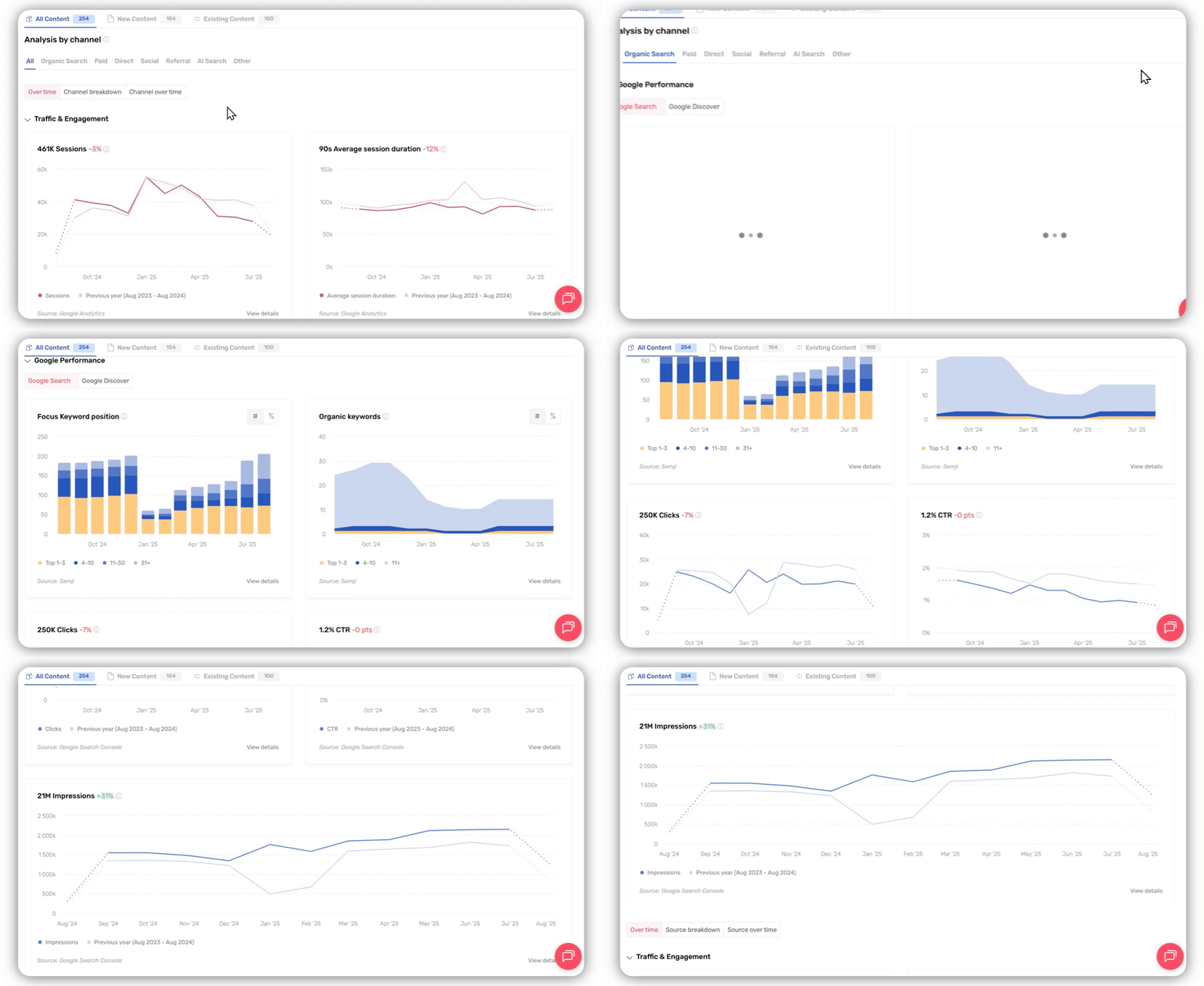
**Why this segmentation is crucial**: By isolating the "Organic Search" channel, you eliminate the noise generated by other traffic sources (social, direct, paid, etc.) to focus solely on the effectiveness of your SEO strategy. This allows you to objectively evaluate the impact of your content optimizations.
**Available data**: Once on this channel, you access metrics specific to organic search: keyword positions, organic clicks, impressions, click-through rate (CTR), and temporal evolution of these indicators.
#### Step 2: Visualize your Google performance at a glance
#### Track your keyword positions
**The reference indicator for measuring your visibility.** Two complementary metrics give you a precise view of your positioning:
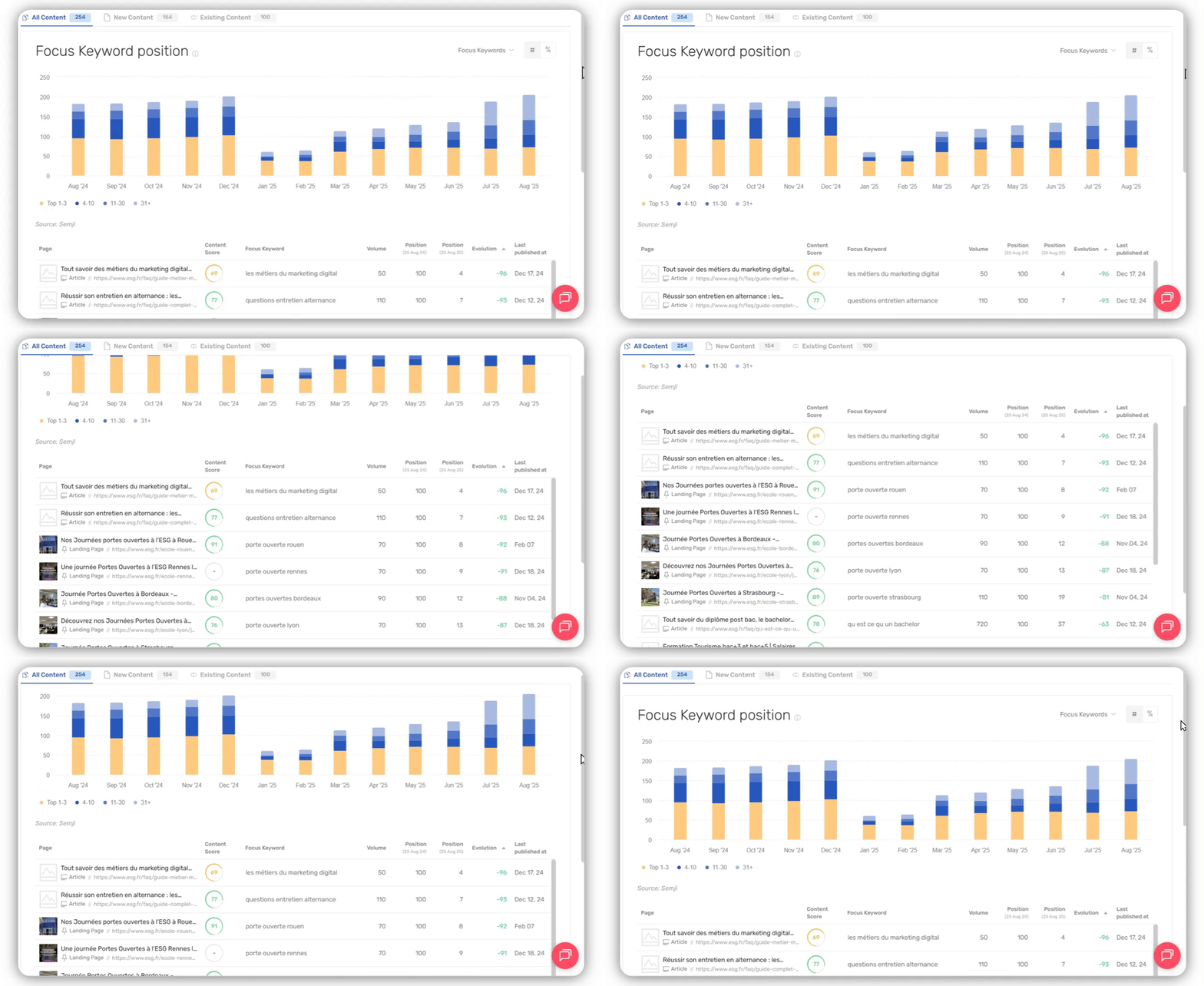
**Main keyword position:** Tracks the evolution of your focus keyword's position on Google. This metric allows you to directly measure the impact of your on-page optimizations on the ranking of your priority content.
**Organic keywords**: Shows the total number of keywords for which your content ranks within Google’s top 100 results. This metric reveals the extent of your semantic visibility and your ability to capture traffic on varied queries.
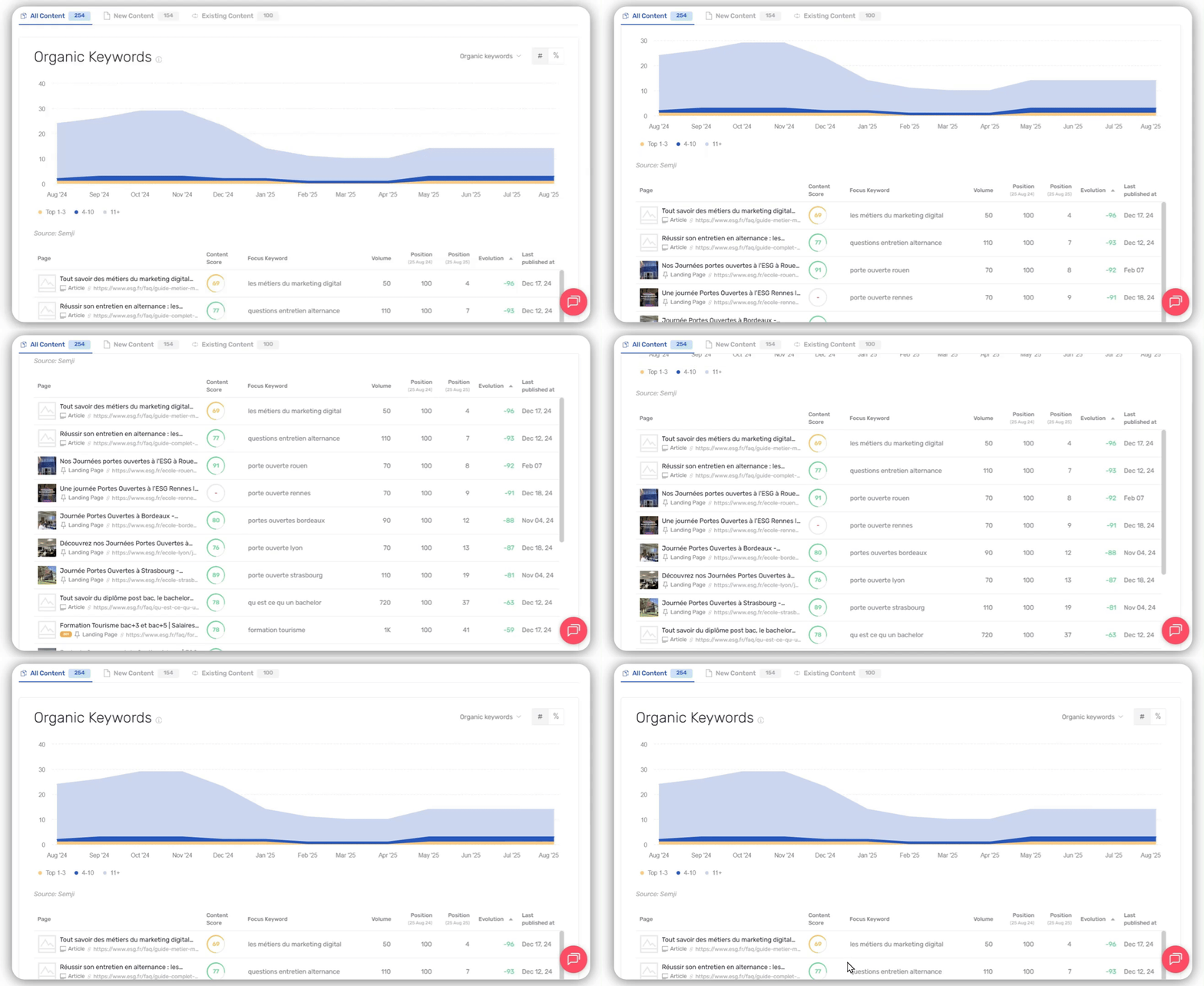
**Our recommendation**: Pay particular attention to content positioned between 4th and 10th position - they often represent your best opportunities for quick traffic gains with some targeted optimizations.
#### Measure clicks, impressions, and CTR
**The performance metrics that truly matter**. Beyond positioning, these indicators reveal the real attractiveness of your content in search results:
**Clicks**: Number of visitors who actually clicked on your Google results. This is your SEO conversion metric: it measures your ability to transform visibility into qualified traffic.
**Impressions**: Number of times your content appeared in search results. This metric reveals your visibility potential: content with many impressions but few clicks may indicates an opportunity to optimize titles and meta-descriptions.
**CTR (click-through rate)**: Percentage of people who click on your result after seeing it. A low CTR compared to your average position often indicates an unattractive title or meta-description.

**Comparative analysis**: Use the annual comparison function to identify your progression trends and measure the impact of your optimizations over time.
#### Step 3: Refine the analysis by page
**Dive into the details of your performance**. To precisely identify which content to optimize as a priority, click on **"Clicks"** or **"Positions"** in the left menu. You will then access the detailed table of your pages with their individual metrics.

**The table adapts according to the selected metric**. The main columns give you the essential information to prioritize your optimizations:
- **Page**: URL of your content with direct access to the editor
- **Content Score**: Current SEO quality of the page
- **Main keyword**: Priority query targeted by this content
- **Volume**: Number of monthly searches for this keyword
- **Average position**: Current ranking on Google
- **Specific metric**: Clicks, CTR, Impressions or Positions depending on your selection
- **Evolution**: Progress trend of the chosen metric
**Sorting features**: Use column headers to sort your data - for example, sort by "Impressions" in descending order to identify your most visible content, or by "CTR" in ascending order to spot your optimization opportunities.
### Use case: Identifying a priority optimization opportunity
**Concrete scenario**: You're looking to quickly boost your SEO traffic without creating new content. This method consists of identifying pages with strong potential for immediate improvement.
**3-step method:**
1. **Filter by high impressions**: In the page table, sort by "Impressions" in descending order. Focus on pages that generate more than 1,000 monthly impressions: they have already proven their visibility potential.
2. **Identify low CTRs**: Among these visible pages, spot those with a CTR below 2%. These are your priority opportunities - visible but not very attractive.
3. **Optimize title and meta-description**: For these identified pages, rewrite more compelling titles and more enticing meta-descriptions. This optimization can double your CTR within a few weeks.
**Example**: A page with 2000 impressions and 1% CTR (20 clicks) can increase to 2% CTR (40 clicks) simply by optimizing its title. That's a 100% traffic gain without any major technical effort.
**Results tracking**: Measure the impact of your optimizations 2-4 weeks after publication by comparing the evolution of CTR and clicks for the optimized pages.
### FAQ
**Where do position and click data come from?** The data comes directly from Google Search Console, connected to your Semji account. We retrieve official information from Google about your organic performance, without estimation or approximation.
**What is the difference between Google Search and Google Discover?**
- **Google Search**: Traffic generated by active user queries on the search engine
- **Google Discover**: Traffic coming from Google's personalized feed that proactively suggests content to users based on their interests
You can switch between these two sources in the interface to specifically analyze each type of organic traffic.
**Why does my average position sometimes differ from my manual observations?** The average position is calculated across all your keywords and over the entire selected period. It may differ from a spot check because it takes into account daily ranking variations and the keyword set of your page.
### Optimize your organic visibility
**You now master the essential metrics to effectively manage your SEO**. Analyzing your organic performance becomes a systematic process: identify your most visible content, optimize those with the best potential for gains, and measure the impact of your actions.
**Our recommendation**: Perform this analysis monthly to maintain a trajectory of continuous improvement of your SEO performance. Focus on 3-5 optimizations per month rather than spreading your efforts.
**Next step:** Now that you have mastered your SEO performance, analyze how your other acquisition channels contribute to your overall content strategy.
➡️ [**Guide 3: Understand the performance of each acquisition channel**](https://help.semji.com/en/guide-3-understanding-the-performance-of-each-acquisition-channel?hsLang=en)
Identify your most profitable traffic sources and optimize your marketing mix
- [Getting started with Semji](https://help.semji.com/en/getting-started-with-semji?hsLang=en#main-content)
- [Create your account and log in](https://help.semji.com/en/getting-started-with-semji?hsLang=en#create-your-account-and-log-in)
- [Identifying opportunities](https://help.semji.com/en/identifying-opportunities?hsLang=en#main-content)
- [Identify opportunities](https://help.semji.com/en/identifying-opportunities?hsLang=en#identify-opportunities)
- [Exploring your pages in Semji](https://help.semji.com/en/identifying-opportunities?hsLang=en#exploring-your-pages-in-semji)
- [Managing your editorial planning](https://help.semji.com/en/managing-your-editorial-planning?hsLang=en#main-content)
- [Adapting the planning to your production workflow](https://help.semji.com/en/managing-your-editorial-planning?hsLang=en#adapting-the-planning-to-your-production-workflow)
- [Understanding the planning view](https://help.semji.com/en/managing-your-editorial-planning?hsLang=en#understanding-the-planning-view)
- [Optimizing and publishing content](https://help.semji.com/en/optimizing-and-publishing-content?hsLang=en#main-content)
- [Prepare & write](https://help.semji.com/en/optimizing-and-publishing-content?hsLang=en#prepare-write)
- [Optimize for SEO](https://help.semji.com/en/optimizing-and-publishing-content?hsLang=en#optimize-for-seo)
- [Update & publish](https://help.semji.com/en/optimizing-and-publishing-content?hsLang=en#update-publish)
- [Optimize for GEO](https://help.semji.com/en/optimizing-and-publishing-content?hsLang=en#optimize-for-geo)
- [AI+ Agents](https://help.semji.com/en/ai-agents?hsLang=en#main-content)
- [Getting Started & Guides](https://help.semji.com/en/ai-agents?hsLang=en#getting-started-guides)
- [Pre-configured Agents](https://help.semji.com/en/ai-agents?hsLang=en#pre-configured-agents)
- [Advanced Use Cases](https://help.semji.com/en/ai-agents?hsLang=en#advanced-use-cases)
- [Maximize your efficiency with AI](https://help.semji.com/en/maximize-your-efficiency-with-ai?hsLang=en#main-content)
- [Setting up your AI environment](https://help.semji.com/en/maximize-your-efficiency-with-ai?hsLang=en#setting-up-your-ai-environment)
- [Generate content with AI](https://help.semji.com/en/maximize-your-efficiency-with-ai?hsLang=en#generate-content-with-ai)
- [Track and analyze your competitors](https://help.semji.com/en/track-and-analyze-your-competitors?hsLang=en#main-content)
- [SEO](https://help.semji.com/en/track-and-analyze-your-competitors?hsLang=en#seo)
- [GEO](https://help.semji.com/en/track-and-analyze-your-competitors?hsLang=en#geo)
- [Track and analyze your performance](https://help.semji.com/en/track-and-analyze-your-performance?hsLang=en#main-content)
- [Understanding performance metrics](https://help.semji.com/en/track-and-analyze-your-performance?hsLang=en#understanding-performance-metrics)
- [Managing your SEO performance](https://help.semji.com/en/track-and-analyze-your-performance?hsLang=en#managing-your-seo-performance)
- [Connecting your tools](https://help.semji.com/en/connecting-your-tools?hsLang=en#main-content)
- [SSO & authentication](https://help.semji.com/en/connecting-your-tools?hsLang=en#sso-authentication)
- [Connect analytics & GSC](https://help.semji.com/en/connecting-your-tools?hsLang=en#connect-analytics-gsc)
- [CMS Integration](https://help.semji.com/en/connecting-your-tools?hsLang=en#cms-integration)
- [Semji & your CMS](https://help.semji.com/en/connecting-your-tools?hsLang=en#semji-your-cms)
- [Semji extension](https://help.semji.com/en/connecting-your-tools?hsLang=en#semji-extension)
- [Semji API](https://help.semji.com/en/connecting-your-tools?hsLang=en#semji-api)
- [Administration & global preferences](https://help.semji.com/en/administration-global-preferences?hsLang=en#main-content)
- [Users & roles](https://help.semji.com/en/administration-global-preferences?hsLang=en#users-roles)
- [Languages & general preferences](https://help.semji.com/en/administration-global-preferences?hsLang=en#languages-general-preferences)
- [Resources & Webinars](https://help.semji.com/en/resources-webinars?hsLang=en#main-content)
- [Webinar 2025](https://help.semji.com/en/resources-webinars?hsLang=en#webinar-2025)
- [Assistance & FAQs](https://help.semji.com/en/assistance-faqs?hsLang=en#main-content)
- [Data privacy & security](https://help.semji.com/en/assistance-faqs?hsLang=en#data-privacy-security)
- [Frequently Asked Questions](https://help.semji.com/en/assistance-faqs?hsLang=en#frequently-asked-questions)
[](http://semji.com?hsLang=en)
[mailto:email@email.com](mailto:email@email.com)
Copyright © 2026, Semji