---
title: "Legal compliance expert agent: Securing and validating your content"
description: Pre-check your content before legal approval and cut your back-and-forths by 10
---
[Skip to content](https://help.semji.com/en/how-to-set-up-the-legal-compliance-agent-for-your-articles#main-content)
- [English](https://help.semji.com/en/how-to-set-up-the-legal-compliance-agent-for-your-articles)
- [Français](https://help.semji.com/fr/comment-paramétrer-lagent-consultant-en-conformité-légale-pour-vos-articles)
English
Show submenu for translations

Open main navigation
Close main navigation
- - [English](https://help.semji.com/en/how-to-set-up-the-legal-compliance-agent-for-your-articles)
- [Français](https://help.semji.com/fr/comment-paramétrer-lagent-consultant-en-conformité-légale-pour-vos-articles)
English
Show submenu for translations
- Contact us
Contact us
How can we help you?
- There are no suggestions because the search field is empty.
1. [Help Center](https://help.semji.com/en?hsLang=en)
2. [AI+ Agents](https://help.semji.com/en/ai-agents?hsLang=en)
3. [Pre-configured Agents](https://help.semji.com/en/ai-agents?hsLang=en#pre-configured-agents)
# Legal compliance expert agent: Securing and validating your content
## Pre-verify your content before legal validation and reduce your back-and-forth by 10
Table of contents
---
[In summary](https://help.semji.com/en/how-to-set-up-the-legal-compliance-agent-for-your-articles#insummary)
[What this changes for you](https://help.semji.com/en/how-to-set-up-the-legal-compliance-agent-for-your-articles#whatthis)
[How to configure the legal compliance expert agent](https://help.semji.com/en/how-to-set-up-the-legal-compliance-agent-for-your-articles#howto)
[How to use the agent on a daily basis](https://help.semji.com/en/how-to-set-up-the-legal-compliance-agent-for-your-articles#commentutiliser)
### In summary
What you can do: Automatically check the legal compliance of your content before publication according to the regulations in your sector.
Who it's for: Marketing and editorial teams in regulated industries (insurance, healthcare, finance, food, real estate, etc.).
Why it's useful: Significantly reduce your legal validation timelines and limit the risk of regulatory sanctions.
### What this changes for you
**The problem:** In regulated industries, every piece of content must go through legal review before publication. This process is lengthy and causes:
- Multiple back-and-forths between writing, legal, and validation teams
- Publication blockages if a non-compliance issue is detected late
- Risk of sanctions from DGCCRF, ACPR or AMF if an error goes unnoticed
- Publication inertia: the longer the delay between creation and validation, the more the content may lose SEO relevance (changes in search intent, new trends, updated SERPs, etc.)
**The solution:** The Legal Compliance Consultant agent analyzes your content in real time and automatically identifies compliance issues before sending it to your legal department.
**The impact:**
- Reduced validation time: automated first check before legal review
- Minimized risks: early detection of non-compliances before publication
- Fewer back-and-forths: content sent to legal is pre-checked
- Lower costs: less legal time spent on checks that can be automated
### How to configure the legal compliance expert agent
#### Step 1: Create your agent
In the Semji editor, click on **"Agents"** in the right sidebar, then select the **"Legal Compliance Expert"** template.
Click on the template to configure and create your agent.
\[Insérer capture EN\]
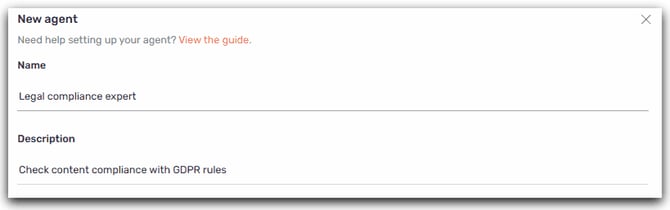
#### Step 2: Name your agent
**Name:** Choose a clear name such as "Legal Compliance Expert" or "Health Legal Validation".
**Description:** Specify the scope, for example "Checks health compliance (HAS, ANSM, health GDPR)"
#### Step 3: Define your compliance rules
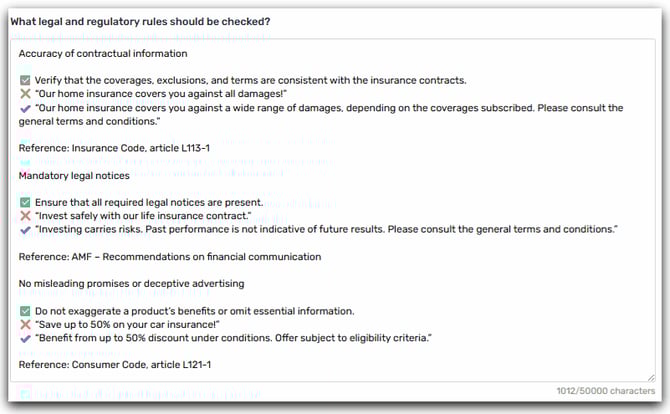
This is the key step: you will list the legal rules specific to your industry that the agent must check.
> **Tip:** Take the time upfront to list the key rules with your legal or compliance department. Setting up the agent together with the relevant stakeholders will help you gain relevance and efficiency from the very first checks.
**How to structure your rules:**
Each rule must contain:
- **The name of the rule** (clear and identifiable)
- **What is prohibited OR required**
- **The reference regulation** (optional, but recommended)
**Recommended format:**
Each rule should be written clearly and operationally so the agent can interpret it easily.
**We recommend using the following structure:**
**\[NAME OF THE RULE\]**
**✅ What must be checked or complied with**
**❌ Example of non-compliance**
**✔️ Example of compliant wording**
**📘 Regulatory reference (optional)**
💡 **Tip:** Start with 5 to 10 essential rules, then gradually expand your list. The goal is to keep the checks simple, progressive, and tailored to your industry.
#### Step 4: Specify the applicable regulations
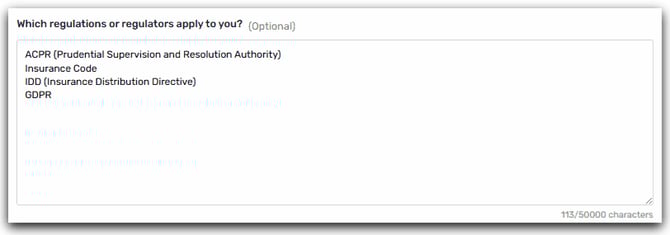
This optional step lets you specify the regulations or regulators that apply to your sector.
**Section "Which regulations or regulators apply to you?"**
Indicate the relevant reference texts and supervisory authorities for your activity.
**Examples:**
**Insurance sector:**
- ACPR (Prudential Supervision and Resolution Authority)
- Insurance Code
- IDD (Insurance Distribution Directive)
- GDPR
**Health sector:**
- HAS (French National Authority for Health)
- ANSM (French National Agency for the Safety of Medicines and Health Products)
- Public Health Code
- Health-related GDPR
**Cosmetics sector:**
- DGCCRF (Directorate-General for Competition, Consumer Affairs and Fraud Control)
- Cosmetics Regulation (EU) No 1223/2009
- ANSM (for certain products)
**Finance sector:**
- AMF (Financial Markets Authority)
- Monetary and Financial Code
- MiFID II Directive
- GDPR
💡 **Tip :** The agent will automatically adapt its level of scrutiny and recommendations according to the relevant regulator.
#### Step 5: Add additional instructions (optional)
If you have cross-cutting rules or general guidelines:
General instructions:
- Always check for the presence of legal notices at the end of the article
- Alert if the tone is too commercial or promotional
- Flag the use of superlatives ("best", "unique", "revolutionary")
- Verify that sources for statistics are cited
- Ensure that technical terms are explained for a general audience
#### Step 6: Save
Click **"Create"**. Your agent is now available and accessible to your team.
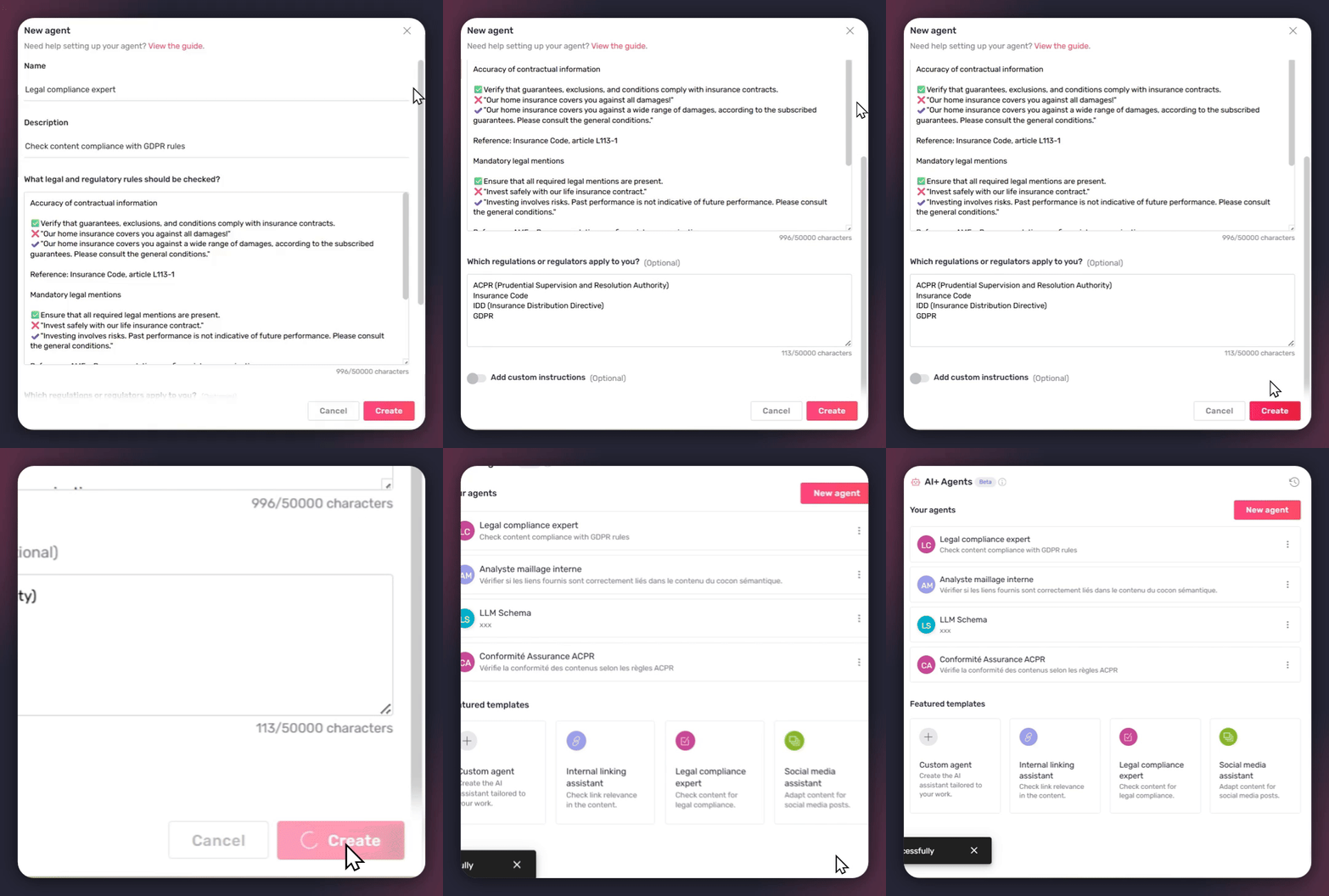
**Sharing:** All team members can run the agent. Only roles with editing rights can modify the rules.
### How to use the agent on a daily basis
#### Run the check
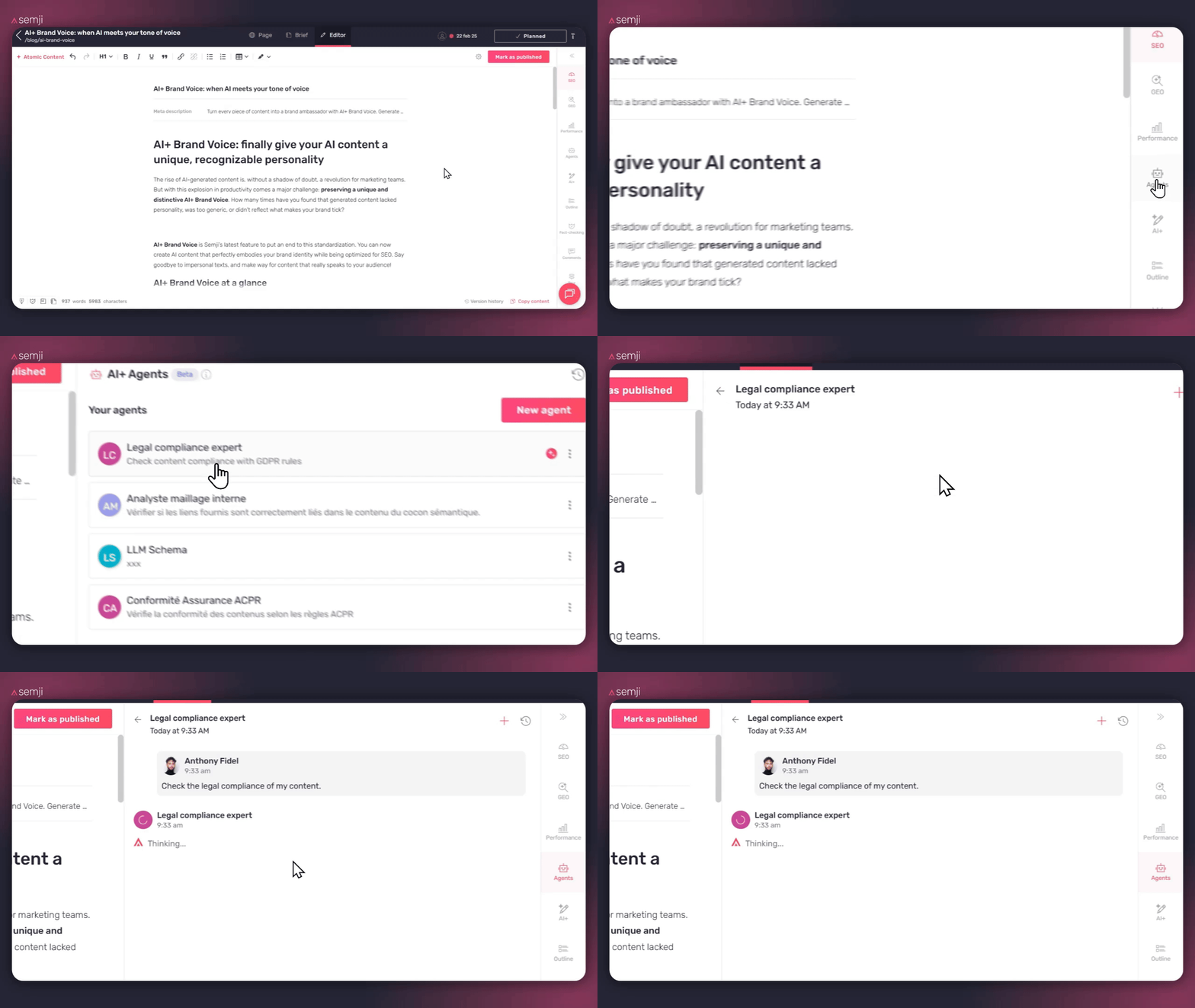
- **Finalize your article** in the Semji editor
- **Click on "Agents"** in the sidebar
- **Select your Legal Compliance Consultant agent**
- **The agent launches automatically when you click on it**
**Duration:** 30–60 seconds depending on the length of the article
**Cost:** 10 AI credits per run
#### Understanding the generated report
The agent produces a report structured in 3 sections:
##### 1. Overall compliance
**Status:** ✅ Compliant / ⚠️ Needs review / ❌ Non-compliant
##### Rule-by-rule details
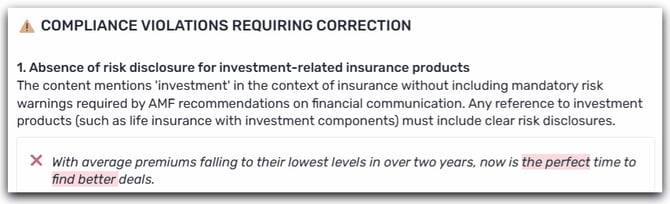
For each configured rule, the agent indicates:
- ✅ Respected: No issue detected
- ⚠️ Needs review: Ambiguous element or requires confirmation
- ❌ Violated: Non-compliance detected
**Example:**
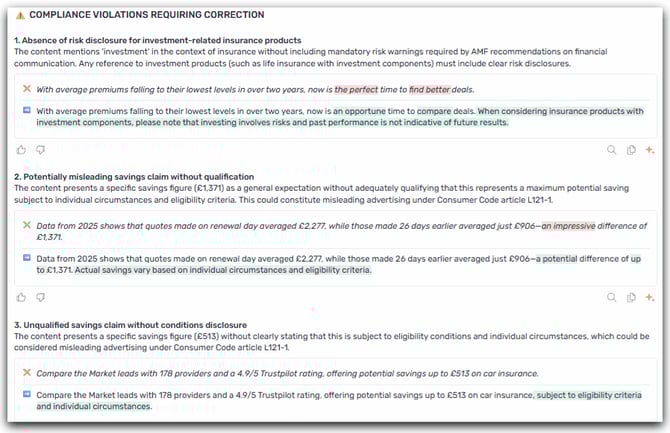
##### 3. Recommendations
The agent proposes concrete actions:
#### Applying corrections
**Recommended workflow:**
1. **Read the report:** Identify critical non-compliances (❌)
2. **Correct directly:** Modify your article according to the recommendations
3. **Re-run the agent:** Verify that the corrections are compliant
4. **Send to legal:** Once the agent validates, forward to the legal department for final validation
⚠️ **Important:** The agent is a decision-support tool. Final legal validation remains mandatory.
💡 **Time savings:** Legal receives content that has already been pre-verified, which drastically reduces back-and-forth.
#### Refining through discussion
You can ask the agent questions to clarify:
> "Why does 'best rate' pose a problem?"
> "Can you give me 3 compliant alternatives to the sentence on line 45?"
> "Where exactly should the ORIAS reference be placed?"
**Cost:** 10 AI credits per message
💡 **Next steps:** Now that your legal compliance agent is configured, discover how other agents can optimize your content production: social media adaptation, internal linking improvement, or creation of 100% customized agents.
👉 [**\[Back to the complete AI+ Agents guide\]**](https://help.semji.com/en/guide-optimize-your-seo-geo-content-with-ai-agents?hsLang=en)
- [Getting started with Semji](https://help.semji.com/en/getting-started-with-semji?hsLang=en#main-content)
- [Create your account and log in](https://help.semji.com/en/getting-started-with-semji?hsLang=en#create-your-account-and-log-in)
- [Identifying opportunities](https://help.semji.com/en/identifying-opportunities?hsLang=en#main-content)
- [Identify opportunities](https://help.semji.com/en/identifying-opportunities?hsLang=en#identify-opportunities)
- [Exploring your pages in Semji](https://help.semji.com/en/identifying-opportunities?hsLang=en#exploring-your-pages-in-semji)
- [Managing your editorial planning](https://help.semji.com/en/managing-your-editorial-planning?hsLang=en#main-content)
- [Adapting the planning to your production workflow](https://help.semji.com/en/managing-your-editorial-planning?hsLang=en#adapting-the-planning-to-your-production-workflow)
- [Understanding the planning view](https://help.semji.com/en/managing-your-editorial-planning?hsLang=en#understanding-the-planning-view)
- [Optimizing and publishing content](https://help.semji.com/en/optimizing-and-publishing-content?hsLang=en#main-content)
- [Prepare & write](https://help.semji.com/en/optimizing-and-publishing-content?hsLang=en#prepare-write)
- [Optimize for SEO](https://help.semji.com/en/optimizing-and-publishing-content?hsLang=en#optimize-for-seo)
- [Update & publish](https://help.semji.com/en/optimizing-and-publishing-content?hsLang=en#update-publish)
- [Optimize for GEO](https://help.semji.com/en/optimizing-and-publishing-content?hsLang=en#optimize-for-geo)
- [AI+ Agents](https://help.semji.com/en/ai-agents?hsLang=en#main-content)
- [Getting Started & Guides](https://help.semji.com/en/ai-agents?hsLang=en#getting-started-guides)
- [Pre-configured Agents](https://help.semji.com/en/ai-agents?hsLang=en#pre-configured-agents)
- [Advanced Use Cases](https://help.semji.com/en/ai-agents?hsLang=en#advanced-use-cases)
- [Maximize your efficiency with AI](https://help.semji.com/en/maximize-your-efficiency-with-ai?hsLang=en#main-content)
- [Setting up your AI environment](https://help.semji.com/en/maximize-your-efficiency-with-ai?hsLang=en#setting-up-your-ai-environment)
- [Generate content with AI](https://help.semji.com/en/maximize-your-efficiency-with-ai?hsLang=en#generate-content-with-ai)
- [Track and analyze your competitors](https://help.semji.com/en/track-and-analyze-your-competitors?hsLang=en#main-content)
- [SEO](https://help.semji.com/en/track-and-analyze-your-competitors?hsLang=en#seo)
- [GEO](https://help.semji.com/en/track-and-analyze-your-competitors?hsLang=en#geo)
- [Track and analyze your performance](https://help.semji.com/en/track-and-analyze-your-performance?hsLang=en#main-content)
- [Understanding performance metrics](https://help.semji.com/en/track-and-analyze-your-performance?hsLang=en#understanding-performance-metrics)
- [Managing your SEO performance](https://help.semji.com/en/track-and-analyze-your-performance?hsLang=en#managing-your-seo-performance)
- [Connecting your tools](https://help.semji.com/en/connecting-your-tools?hsLang=en#main-content)
- [SSO & authentication](https://help.semji.com/en/connecting-your-tools?hsLang=en#sso-authentication)
- [Connect analytics & GSC](https://help.semji.com/en/connecting-your-tools?hsLang=en#connect-analytics-gsc)
- [CMS Integration](https://help.semji.com/en/connecting-your-tools?hsLang=en#cms-integration)
- [Semji & your CMS](https://help.semji.com/en/connecting-your-tools?hsLang=en#semji-your-cms)
- [Semji extension](https://help.semji.com/en/connecting-your-tools?hsLang=en#semji-extension)
- [Semji API](https://help.semji.com/en/connecting-your-tools?hsLang=en#semji-api)
- [Administration & global preferences](https://help.semji.com/en/administration-global-preferences?hsLang=en#main-content)
- [Users & roles](https://help.semji.com/en/administration-global-preferences?hsLang=en#users-roles)
- [Languages & general preferences](https://help.semji.com/en/administration-global-preferences?hsLang=en#languages-general-preferences)
- [Resources & Webinars](https://help.semji.com/en/resources-webinars?hsLang=en#main-content)
- [Webinar 2025](https://help.semji.com/en/resources-webinars?hsLang=en#webinar-2025)
- [Assistance & FAQs](https://help.semji.com/en/assistance-faqs?hsLang=en#main-content)
- [Data privacy & security](https://help.semji.com/en/assistance-faqs?hsLang=en#data-privacy-security)
- [Frequently Asked Questions](https://help.semji.com/en/assistance-faqs?hsLang=en#frequently-asked-questions)
[](http://semji.com?hsLang=en)
[mailto:email@email.com](mailto:email@email.com)
Copyright © 2026, Semji