> ## Documentation Index
> Fetch the complete documentation index at: https://help.semji.com/llms.txt
> Use this file to discover all available pages before exploring further.
# Content doesn't appear (or appears partially) in Semji — what to do
> Diagnose and fix common causes of incomplete content extraction in Semji
### Content Extraction Verification
First thing to check — relaunch a page crawl
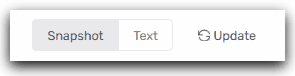
* From Page: click on **Update** and check if your content is being retrieved correctly.
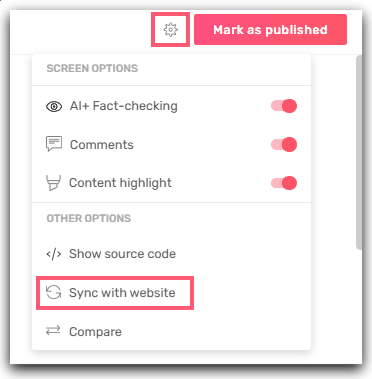
 * From the editor: **Gear icon → Sync with website**.
 > ⚠️ Any change to your pages or your CMS (e.g. adding a column/block, modifying the template, CSS classes, JS components, URL), the extractor configuration may no longer work and the content may no longer appear in Semji.
### What breaks the extraction (examples)
* Template or HTML markup change
* Renaming CSS classes or IDs
* Adding/removing blocks, columns, sections
* Client-side rendered content (JavaScript)
* Lazy-loading, accordions, carousels, content rendered after interaction
* Access restrictions and security
* Pages behind login, IP allowlist, paywall, SSO
* WAF/CDN, anti-bot, CAPTCHA, User-Agent blocking
* SEO directives and robots
* robots.txt (Disallow), meta robots, X-Robots-Tag
* URL variations and canonicals
* URL change without 301, canonical pointing elsewhere
### What to do if the content no longer appears
* After a template/markup change (even minor: adding a block, a column, modifying a CSS class)
* Share the relevant URLs with [Semji support](mailto:support@semji.com). We will update the extractor configuration.
* If the content is injected via JS
* Prefer server-side rendering of critical blocks or provide the selectors and display conditions.
* If access is restricted
* Allow the extraction User-Agent, add an IP allowlist, or provide dedicated access.
* If robots/canonicals block
* Adjust robots.txt, meta/X-Robots-Tag and canonicals to target the analyzed page.
* If the URL has changed
* Set up stable 301 redirects. Avoid unwanted temporary 302 redirects.
### Information to provide to Semji support
* Affected URLs
* Precise description of the change (template, CSS, robots, redirects) and the blocks/information you no longer see appearing
This documentation is built and hosted on [Mintlify](https://mintlify.com), a developer documentation platform.
> ⚠️ Any change to your pages or your CMS (e.g. adding a column/block, modifying the template, CSS classes, JS components, URL), the extractor configuration may no longer work and the content may no longer appear in Semji.
### What breaks the extraction (examples)
* Template or HTML markup change
* Renaming CSS classes or IDs
* Adding/removing blocks, columns, sections
* Client-side rendered content (JavaScript)
* Lazy-loading, accordions, carousels, content rendered after interaction
* Access restrictions and security
* Pages behind login, IP allowlist, paywall, SSO
* WAF/CDN, anti-bot, CAPTCHA, User-Agent blocking
* SEO directives and robots
* robots.txt (Disallow), meta robots, X-Robots-Tag
* URL variations and canonicals
* URL change without 301, canonical pointing elsewhere
### What to do if the content no longer appears
* After a template/markup change (even minor: adding a block, a column, modifying a CSS class)
* Share the relevant URLs with [Semji support](mailto:support@semji.com). We will update the extractor configuration.
* If the content is injected via JS
* Prefer server-side rendering of critical blocks or provide the selectors and display conditions.
* If access is restricted
* Allow the extraction User-Agent, add an IP allowlist, or provide dedicated access.
* If robots/canonicals block
* Adjust robots.txt, meta/X-Robots-Tag and canonicals to target the analyzed page.
* If the URL has changed
* Set up stable 301 redirects. Avoid unwanted temporary 302 redirects.
### Information to provide to Semji support
* Affected URLs
* Precise description of the change (template, CSS, robots, redirects) and the blocks/information you no longer see appearing
This documentation is built and hosted on [Mintlify](https://mintlify.com), a developer documentation platform.