> ## Documentation Index
> Fetch the complete documentation index at: https://help.semji.com/llms.txt
> Use this file to discover all available pages before exploring further.
# How to create and optimize your SEO content using AI with Atomic Content?
> Generate and optimize your SEO content in just a few clicks to boost your performance
### Summary
**What you can do:** Generate SEO-optimized content from scratch or optimize your existing content with one click using AI.
**Who it's for:** Content managers, SEO writers, CMOs and marketing managers who want to speed up their content production.
**Why it's useful:** Cut your production time by 3 while ensuring SEO quality thanks to recommendations based on SERP analysis.
### Prerequisites for optimal results
To get the most out of Atomic Content, we recommend configuring these elements beforehand. AI is powerful and fast, but, like a beginner assistant, it needs a clear brief to produce relevant content.
**Poor brief** = vague, generic result: a mismatch between the content and audience expectations.
**Precise brief** = relevant, faithful content: accurate targeting of the audience and objectives.
#### **[✅ Brand Voice configured](/en/work-faster-with-ai/how-to-use-semjis-ai-brand-voice)**
**Why:** Ensures consistency of tone and style with your brand
**Pro tip:** Configure different Brand Voices according to your page types:
* An expert tone for your technical guides
* A more accessible tone for your general articles
* A commercial tone for your product pages
#### **[✅ Knowledge Base](/en/work-faster-with-ai/ai-knowledge-base-create-a-knowledge-base)**
**Why:** Enriches generated content with your proprietary data and expertise
**Tip:** Feed your Knowledge Base with:
* Your product sheets
* Your customer case studies
* Your technical documentation
* Your exclusive numerical data
#### **[✅ Fact-checking enabled (Optional but recommended)](/en/work-faster-with-ai/produce-quality-verified-content-with-fact-checking)**
**Why:** Automatically verifies generated information to avoid AI hallucinations
**Recommendation:** Enable it systematically for factual content (numbers, dates, studies)
#### **[✅ Custom instructions](/en/work-faster-with-ai/custom-instructions-take-full-control-of-your-content)**
**Why:** Refines generations according to your specific needs (structure, length, editorial angle)
**Usage example:** "Always include a paragraph on business benefits" or "Structure using a maximum of 4 H2s"
> ⚠️ Also make sure to properly configure your [*Excluded Terms*](/en/admin-and-settings/why-and-how-to-exclude-keywords-from-semji-recommendations). A correct configuration prevents the AI from including or recommending competitors or out-of-scope topics, ensuring content that complies with your guidelines and objectives.
### How it works?
**Purpose:** You can either create entirely new content from a blank page or optimize existing content to improve its performance.
**Typical use case:** This can be useful when launching a new topic, creating content for a new product, or developing your editorial calendar, as well as to give new life to an old article, improve content that is stuck on page 2, or recover lost rankings.
#### Usage steps:
#### **Step 1:** Go to your content (Existing or Blank)
* Run the main keyword analysis or rerun the analysis if the last one is older than 30 days
* Sort through the proposed recommendations if you want some of them not to be taken into account
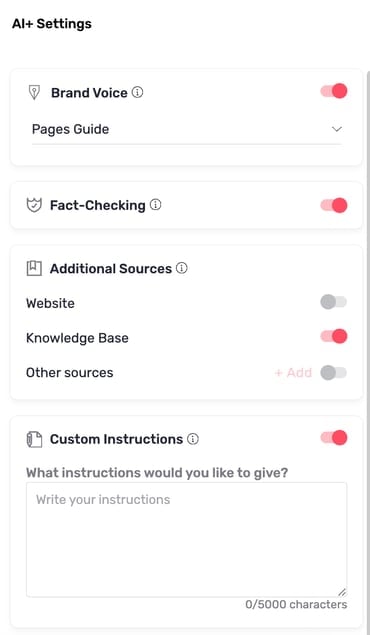
#### **Step 2:** Configure the generation
* Make sure you have the prerequisites for optimal generation
* Choose your Brand Voice (if several are configured)
* Enable the options: Knowledge Base, Fact-checking and Custom Instructions
 #### Step 3: Generation and optimization
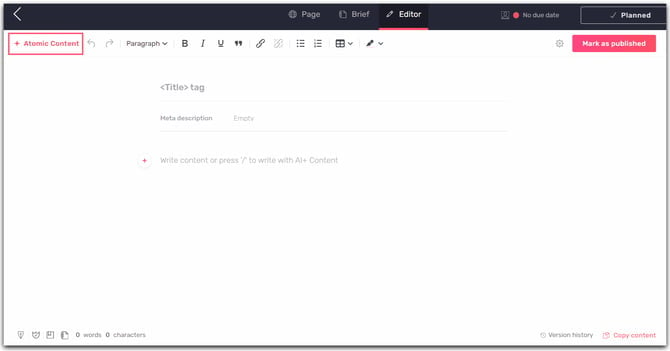
* Click on *"Atomic Content"*
* If your content is blank, the generation will start automatically
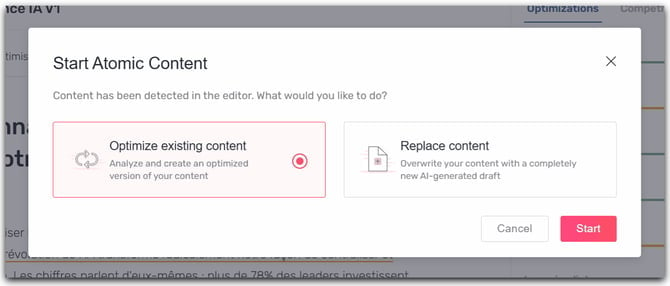
* If you are editing existing content, a modal will appear asking whether you want to Optimize or Replace your existing content
#### Step 3: Generation and optimization
* Click on *"Atomic Content"*
* If your content is blank, the generation will start automatically
* If you are editing existing content, a modal will appear asking whether you want to Optimize or Replace your existing content
 #### **
 **
* Once the generation or optimization has started, please wait a few minutes
> The last two steps are dedicated to optimizing existing content
#### Step 4: Review the results
* The optimized content appears in the editor
* Use "Show changes" to view the modifications made
#### Step 5: Validate or adjust
* Click the cross to the right of "Show changes" to be able to edit the content if needed
* Access the version history to compare or revert to a previous version
Atomic Content transforms your approach to SEO content creation by combining speed and quality. Explore its advanced capabilities now!
**📚 Discover additional features:**
* **[Atomic Content Bulk: Generate dozens of pieces of content with one click](/en/work-faster-with-ai/how-to-industrialize-your-content-production-using-ai)**
This documentation is built and hosted on [Mintlify](https://mintlify.com), a developer documentation platform.
**
* Once the generation or optimization has started, please wait a few minutes
> The last two steps are dedicated to optimizing existing content
#### Step 4: Review the results
* The optimized content appears in the editor
* Use "Show changes" to view the modifications made
#### Step 5: Validate or adjust
* Click the cross to the right of "Show changes" to be able to edit the content if needed
* Access the version history to compare or revert to a previous version
Atomic Content transforms your approach to SEO content creation by combining speed and quality. Explore its advanced capabilities now!
**📚 Discover additional features:**
* **[Atomic Content Bulk: Generate dozens of pieces of content with one click](/en/work-faster-with-ai/how-to-industrialize-your-content-production-using-ai)**
This documentation is built and hosted on [Mintlify](https://mintlify.com), a developer documentation platform.