> ## Documentation Index
> Fetch the complete documentation index at: https://help.semji.com/llms.txt
> Use this file to discover all available pages before exploring further.
# How to configure your Brand Voice?
> AI+ Brand Voice will transform your content by adding your brand's unique tone.
Train the AI and give it instructions to write in your unique tone of voice
### Configure your Brand Voice in 3 minutes :
### Why use AI+ Brand Voice
AI+ Brand Voice solves a major challenge: maintaining brand consistency when multiple people create content with AI.
Unlike generic AIs that produce formatted content, Semji analyzes the entirety of your reference content to reproduce your unique style while preserving SEO optimization.
### What it's for
* Brand consistency: Your AI+ Content and Atomic Content automatically adopt your editorial identity.
* Efficiency gain: Accelerate your production without compromising quality, even with multiple writers.
* Preserved SEO optimization: SEO recommendations remain integrated into your personalized content.
### AI+ Brand Voice Configuration
#### Step 1: Access the configuration
From the main menu of the application, click on **AI+** then select **Brand Voice.**
****
#### Step 2: Create your first voice tone
Click on "New Voice" to create a new brand voice\
Give an explicit name to your Brand Voice (e.g., "Semji Editorial Tone")
#### Step 3: Feed your Brand Voice with your content
The effectiveness of AI+ Brand Voice relies on the quality of the examples you provide. You can add content in three ways:
**Option 1: Web page URLs**
* Add the URLs of your best published content
* The AI analyzes the content of these pages directly
**Option 2: Raw text**
* Copy-paste your reference texts directly
* Limit: 20,000 characters maximum per addition
**Option 3: Files**
* Upload your PDF or TXT documents
* Maximum weight: 10 MB per file
#### Recommendations for optimal voice tone
For your Brand Voice to be as effective as possible, we recommend including **at minimum:**
* **3 introductions** from your most representative content
* **3 outlines** (H1, H2, H3 structures) from your articles
* **9 paragraphs** from different content pieces
These elements allow the AI to finely analyze your writing style on the key sections of content.
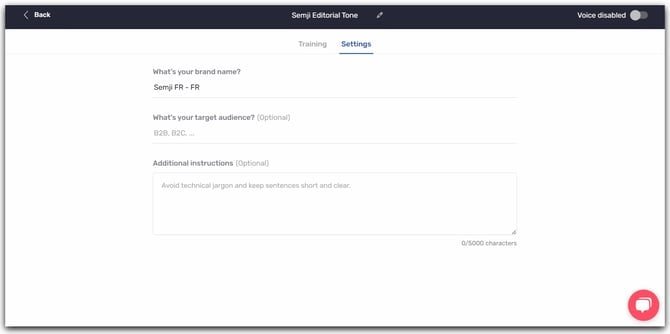
#### Step 4: Configure advanced settings
Complete the following information to refine your Brand Voice:
**Brand name:** Corresponds by default to your Workspace name, modifiable according to your needs.
**Target audience:** Describe precisely who you want to reach (e.g., "Digital marketing professionals, aged 25 to 45").
**Additional instructions (optional):** Add specific directives to further personalize your tone. Examples:
* "Adopt a pedagogical tone with concrete analogies"
* "Regularly integrate references to our 15 years of SEO expertise"
* "Use the 'Problem > Solution > Benefit' formula to structure arguments"
> *Good to know 💡: Once the configuration is complete, make sure to activate your voice tone by clicking on the icon in the top right corner.*
#### Step 5: Activate in the editor
Once your Brand Voice is configured:
1. Go to the Semji content editor
2. In the **AI+ Settings** sidebar, locate the **Brand Voice** section
3. Select your Brand Voice from the dropdown menu
4. From now on, all your **AI+ Content** and **Atomic Content** generations will automatically apply your brand tone
### FAQ
#### Can I create multiple Brand Voices?
Yes, you can configure multiple brand voices for each Workspace. This allows you to adapt your tone according to different types of content or audiences.
#### Can I modify an existing Brand Voice?
Yes, you can edit, delete, or disable an existing brand voice at any time via the configuration interface.
#### Are SEO recommendations maintained?
Absolutely. AI+ Brand Voice seamlessly integrates Semji's SEO recommendations into the generation process, ensuring you get optimized content that respects your brand identity
This documentation is built and hosted on [Mintlify](https://mintlify.com), a developer documentation platform.
 > *Good to know 💡: Once the configuration is complete, make sure to activate your voice tone by clicking on the icon in the top right corner.*
#### Step 5: Activate in the editor
Once your Brand Voice is configured:
1. Go to the Semji content editor
2. In the **AI+ Settings** sidebar, locate the **Brand Voice** section
3. Select your Brand Voice from the dropdown menu
4. From now on, all your **AI+ Content** and **Atomic Content** generations will automatically apply your brand tone
### FAQ
#### Can I create multiple Brand Voices?
Yes, you can configure multiple brand voices for each Workspace. This allows you to adapt your tone according to different types of content or audiences.
#### Can I modify an existing Brand Voice?
Yes, you can edit, delete, or disable an existing brand voice at any time via the configuration interface.
#### Are SEO recommendations maintained?
Absolutely. AI+ Brand Voice seamlessly integrates Semji's SEO recommendations into the generation process, ensuring you get optimized content that respects your brand identity
This documentation is built and hosted on [Mintlify](https://mintlify.com), a developer documentation platform.
> *Good to know 💡: Once the configuration is complete, make sure to activate your voice tone by clicking on the icon in the top right corner.*
#### Step 5: Activate in the editor
Once your Brand Voice is configured:
1. Go to the Semji content editor
2. In the **AI+ Settings** sidebar, locate the **Brand Voice** section
3. Select your Brand Voice from the dropdown menu
4. From now on, all your **AI+ Content** and **Atomic Content** generations will automatically apply your brand tone
### FAQ
#### Can I create multiple Brand Voices?
Yes, you can configure multiple brand voices for each Workspace. This allows you to adapt your tone according to different types of content or audiences.
#### Can I modify an existing Brand Voice?
Yes, you can edit, delete, or disable an existing brand voice at any time via the configuration interface.
#### Are SEO recommendations maintained?
Absolutely. AI+ Brand Voice seamlessly integrates Semji's SEO recommendations into the generation process, ensuring you get optimized content that respects your brand identity
This documentation is built and hosted on [Mintlify](https://mintlify.com), a developer documentation platform.