> ## Documentation Index
> Fetch the complete documentation index at: https://help.semji.com/llms.txt
> Use this file to discover all available pages before exploring further.
# Comment gérer la langue de son interface de travail ?
> Semji vous offre la possibilité de travailler en anglais, en espagnol, en italien ou en français selon votre convenance.
### Quelles sont les langues générées par la plateforme ?
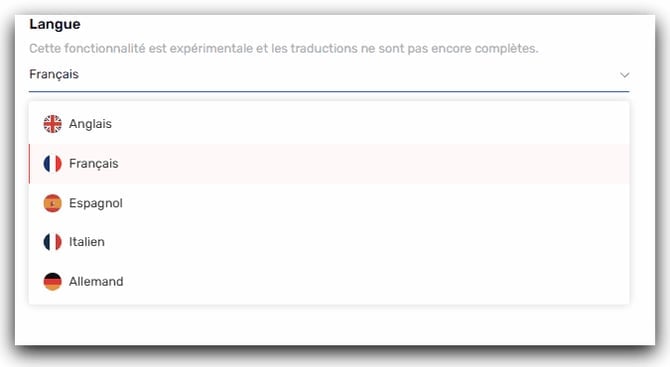
Semji propose 5 langues d'interface au sein de la plateforme :
* Anglais
* Allemand
* Français
* Espagnol
* Italien
 ### Comment configurer la langue de son interface de travail ?
Afin de paramétrer la langue, il vous faut suivre ces différentes étapes :
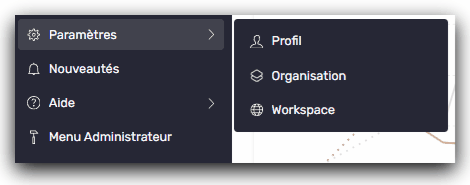
1. Rendez vous dans le menu latéral gauche
2. Cliquez sur Paramètres -> Profil\\
### Comment configurer la langue de son interface de travail ?
Afin de paramétrer la langue, il vous faut suivre ces différentes étapes :
1. Rendez vous dans le menu latéral gauche
2. Cliquez sur Paramètres -> Profil\\
 3. Définissez la langue de votre choix
Le changement de langue s’enregistre automatiquement.
Ce réglage n’aura d'impact que sur votre utilisation de la plateforme. Ce sont vos paramétrages et ils n’auront aucun impact sur vos collaborateurs.
Vous pouvez maintenant travailler dans la langue que vous souhaitez au sein de la plateforme !
> *Découvrez également ici [: Q](/fr/admin-and-settings/what-languages-and-localizations-does-semji-support)*[uelles sont les langues et localisations gérées par Semji ?](/fr/admin-and-settings/what-languages-and-localizations-does-semji-support)
This documentation is built and hosted on [Mintlify](https://mintlify.com), a developer documentation platform.
3. Définissez la langue de votre choix
Le changement de langue s’enregistre automatiquement.
Ce réglage n’aura d'impact que sur votre utilisation de la plateforme. Ce sont vos paramétrages et ils n’auront aucun impact sur vos collaborateurs.
Vous pouvez maintenant travailler dans la langue que vous souhaitez au sein de la plateforme !
> *Découvrez également ici [: Q](/fr/admin-and-settings/what-languages-and-localizations-does-semji-support)*[uelles sont les langues et localisations gérées par Semji ?](/fr/admin-and-settings/what-languages-and-localizations-does-semji-support)
This documentation is built and hosted on [Mintlify](https://mintlify.com), a developer documentation platform.