> ## Documentation Index
> Fetch the complete documentation index at: https://help.semji.com/llms.txt
> Use this file to discover all available pages before exploring further.
# Comment exporter son contenu de l'éditeur Semji
> Pour pouvoir publier mon contenu optimisé sur mon site
### Pourquoi exporter son contenu ?
Une fois votre contenu optimisé, il vous faut le publier sur votre site. \
Cette étape est importante afin de rendre visible votre travail et gagner en performances par la suite.
Il est donc important d'exporter son contenu vers son CMS. Pensez bien également à [Marquer comme publié](/fr/create-optimize-and-publish/when-should-i-click-on-mark-as-published) votre contenu dans le but d'assurer le suivi de vos performances.
### Comment exporter son contenu ?
Plusieurs méthodes sont disponibles pour récupérer votre contenu :
#### 1. Via le bouton "**Copier le contenu**"
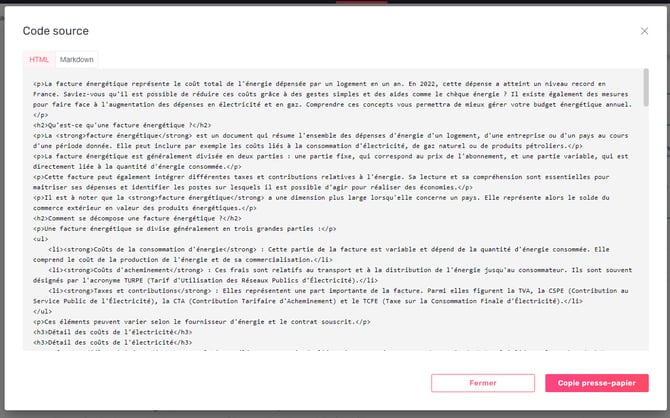
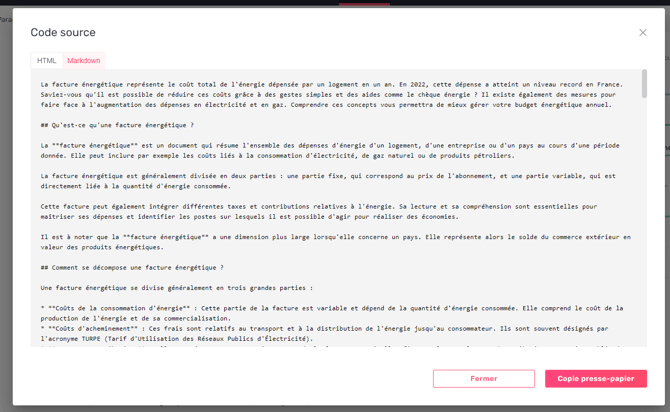
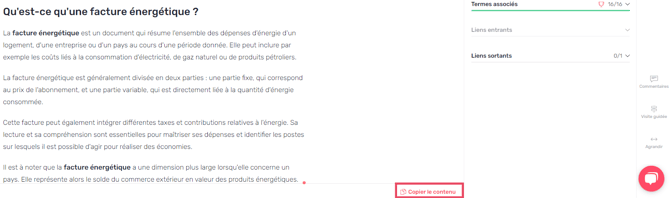 Au sein du menu d'options situé à gauche du bouton "Marquer comme publié" vous pouvez visualiser et copier vers le presse-papier votre contenu en HTML ou en Markdown.
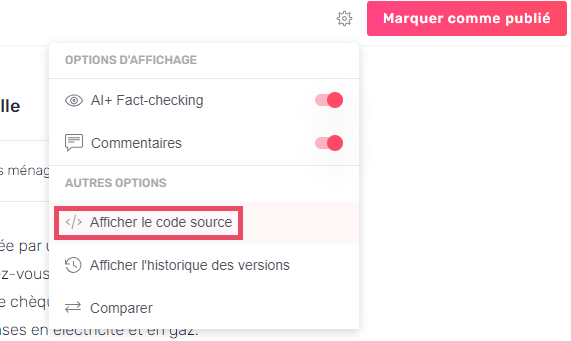 #### 2. Via le **Code source**
 #### 3. Via le **Markdown**
> *Bon à savoir 💡: Le Markdown est un langage de balisage léger qui permet de formater du texte en utilisant des caractères simples et lisibles.*
#### 3. Via le **Markdown**
> *Bon à savoir 💡: Le Markdown est un langage de balisage léger qui permet de formater du texte en utilisant des caractères simples et lisibles.*
 Ces différentes méthodes vous permettent de choisir celle qui vous correspond le mieux pour obtenir une intégration fluide au sein de votre site.
This documentation is built and hosted on [Mintlify](https://mintlify.com), a developer documentation platform.
Ces différentes méthodes vous permettent de choisir celle qui vous correspond le mieux pour obtenir une intégration fluide au sein de votre site.
This documentation is built and hosted on [Mintlify](https://mintlify.com), a developer documentation platform.