---
title: "Localization expert agent: Adapting your content for international audiences"
description: Reduce your localization timelines from several days to just a few hours while preserving your SEO
---
[Skip to content](https://help.semji.com/en/adapt-your-content-for-your-international-markets#main-content)
- [English](https://help.semji.com/en/adapt-your-content-for-your-international-markets)
- [Français](https://help.semji.com/fr/adapter-vos-contenus-pour-vos-marchés-internationaux)
English
Show submenu for translations

Open main navigation
Close main navigation
- - [English](https://help.semji.com/en/adapt-your-content-for-your-international-markets)
- [Français](https://help.semji.com/fr/adapter-vos-contenus-pour-vos-marchés-internationaux)
English
Show submenu for translations
- Contact us
Contact us
How can we help you?
- There are no suggestions because the search field is empty.
1. [Help Center](https://help.semji.com/en?hsLang=en)
2. [AI+ Agents](https://help.semji.com/en/ai-agents?hsLang=en)
3. [Pre-configured Agents](https://help.semji.com/en/ai-agents?hsLang=en#pre-configured-agents)
# Localization expert agent: Adapting your content for international audiences
## Reduce your localization timelines from several days to just a few hours while preserving your SEO
Table of contents
---
[In summary](https://help.semji.com/en/adapt-your-content-for-your-international-markets#enresume)
[What it changes for you](https://help.semji.com/en/adapt-your-content-for-your-international-markets#ceque)
[How to configure the Localization Expert agent](https://help.semji.com/en/adapt-your-content-for-your-international-markets#comment)
[How to use the agent on a daily basis](https://help.semji.com/en/adapt-your-content-for-your-international-markets#commentutiliser)
### In summary
**What you can do:** Adapt your existing content for international markets while preserving SEO intent and respecting the cultural, linguistic, and regulatory specificities of each target market.
**For whom:** Marketing and editorial teams managing multilingual or multi-market content (international e-commerce, multinational companies, international content hubs).
**Why it's useful:** Drastically reduce the time needed to adapt content to a new market while ensuring a Content Score between 75-85.
### What it changes for you
**The problem:** Content localization is traditionally long and costly. To adapt a high-performing article from one market to another, your teams must:
- **Translate** the content into the target language
- **Adapt** cultural references, units of measurement, local standards
- **Re-optimize** the content for local SEO (new keywords, different search intents)
- **Verify** regulatory constraints of the target market
- **Validate** terminological consistency and brand voice
This process can take **several days per piece of content** and often requires the involvement of translators, SEO managers, and local experts.
**The solution:** The Localization Expert agent transforms this process into a guided and automated workflow. It analyzes your source content, researches target market standards, automatically adapts the content by integrating Semji SEO recommendations, and alerts you to local regulatory constraints.
**The impact:**
- **Drastic acceleration:** From several days to just a few hours to localize content
- **SEO preservation:** Automatically integrates Semji SEO recommendations (search intents, related terms, questions, recommended length) to target a Content Score between 75-85
- **Complete cultural adaptation:** Cultural references, units of measurement (miles → km, °F → °C), local standards, date/currency formats
- **Terminological consistency:** Uses the Knowledge Base and researches target market standards to ensure appropriate vocabulary
- **Total transparency:** Workflow in 4 visible phases (source analysis, local research, adaptation, verification)
### How to configure the Localization Expert agent
#### Step 1: Create your agent
In the Semji editor, click on **"Agents"** in the right sidebar, then select the **"Localization Expert"** template.
Click on the template to configure and create your agent.
> **Good to know ℹ️** :The agent works in the **current workspace**, which represents your target market. Example: if you're working in a workspace configured for France, the agent will adapt your content for the French market by integrating FR SEO recommendations.
#### Step 2: Name your agent
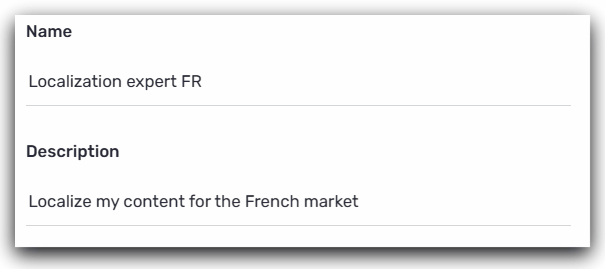
**Name:** Choose an explicit name that clearly indicates the target market or language pair.
**Examples of good names:**
- "Localization expert FR" (to adapt for the French market)
- "Expert in localization ES" (for the Spanish market)
- "Content adapter DE" (for the German market)
- "Localization UK → FR" (to indicate the source → target pair)
**Description:** Explain in one sentence what your agent does.
**Examples :**
- "Localize my content for the French market"
- "Adapt my US content for the German market"
- "Transform my UK articles into content optimized for France"
💡**Tip:** If you manage multiple target markets, create a dedicated agent for each market. This will allow you to customize the adaptation guidelines for every country.
#### Step 3: Define specific adaptation guidelines
This is the key step: you will specify the adaptation rules that the agent must follow to transform your source content into localized content.
This section allows you to guide the agent on the elements to adapt or preserve.
**How to structure your guidelines:**
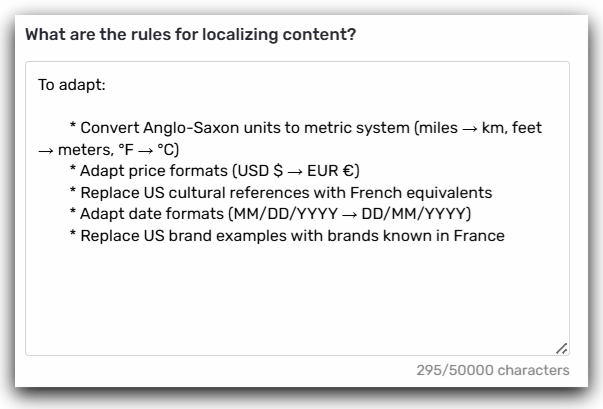
**1. What should be adapted:**
List the elements that must be modified for the target market:
**Example for the French market:**
****
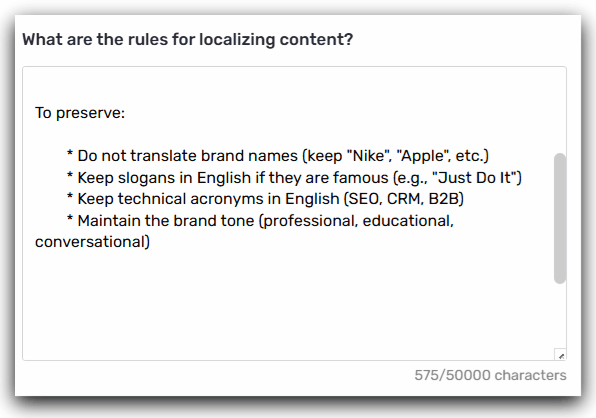
**2. What should be preserved:**
Indicate the elements to keep unchanged:
> **Tip💡** : Be precise in your guidelines. The more detailed they are, the more relevant the adaptation will be. Don't hesitate to give concrete examples of the adaptations you want.
#### Step 4: Specify terminologies and regulatory constraints
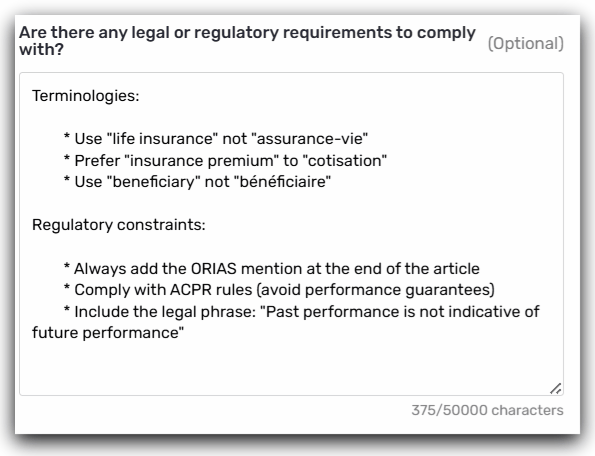
This step allows you to specify:
- Specific vocabularies to comply with
- Regulatory constraints of the target market
- Mandatory legal notices
**Examples for the Insurance sector (France):**
> **Good to know ℹ️** : The agent will use this information to adapt the vocabulary and flag any potential regulatory non-compliances. This section is particularly important for regulated sectors.
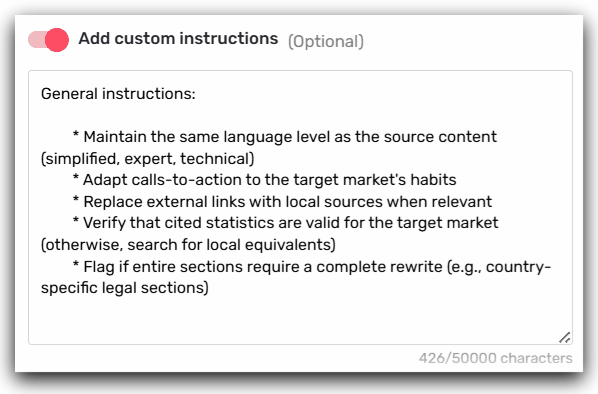
#### Step 5: Add additional instructions
If you have overarching guidelines that apply to all your localized content:
**Examples of additional instructions:**
****
#### Step 6: Save
Click **"Create."** Your agent is now available and accessible to your team.
💡 **Sharing:** All members of your team can run the agent. Only users with editing rights can modify the configuration.
### How to use the agent on a daily basis
#### Start localization
**Recommended workflow:**
1. **Prepare your target content:**
- Create a new draft in the **workspace of the target market** (e.g., the FR workspace to localize for France)
- Define the **Focus keyword** adapted to the target market (e.g., "assurance auto" for the French market if your source US content is about "auto insurance")
- Semji SEO recommendations will be automatically loaded for this local primary Keyword
2. **Copy your source content:**
- Open your master content (e.g., US article on "auto insurance")
- Copy the entire content
- Paste it into your new FR draft
3. **Launch the agent:**
- Click on **"Agents"** in the sidebar
- Select your agent **"Localization expert FR"**
- The agent launches automatically
⏱️ **Duration:** 60–120 seconds depending on content length
**ℹ️** **Cost:** 10 AI credits per run
> **Tip 💡** : Make sure your main target keyword is clearly defined before running the agent. This keyword will trigger the local SEO analysis and the optimization recommendations.
- [Getting started with Semji](https://help.semji.com/en/getting-started-with-semji?hsLang=en#main-content)
- [Create your account and log in](https://help.semji.com/en/getting-started-with-semji?hsLang=en#create-your-account-and-log-in)
- [Identifying opportunities](https://help.semji.com/en/identifying-opportunities?hsLang=en#main-content)
- [Identify opportunities](https://help.semji.com/en/identifying-opportunities?hsLang=en#identify-opportunities)
- [Exploring your pages in Semji](https://help.semji.com/en/identifying-opportunities?hsLang=en#exploring-your-pages-in-semji)
- [Managing your editorial planning](https://help.semji.com/en/managing-your-editorial-planning?hsLang=en#main-content)
- [Adapting the planning to your production workflow](https://help.semji.com/en/managing-your-editorial-planning?hsLang=en#adapting-the-planning-to-your-production-workflow)
- [Understanding the planning view](https://help.semji.com/en/managing-your-editorial-planning?hsLang=en#understanding-the-planning-view)
- [Optimizing and publishing content](https://help.semji.com/en/optimizing-and-publishing-content?hsLang=en#main-content)
- [Prepare & write](https://help.semji.com/en/optimizing-and-publishing-content?hsLang=en#prepare-write)
- [Optimize for SEO](https://help.semji.com/en/optimizing-and-publishing-content?hsLang=en#optimize-for-seo)
- [Update & publish](https://help.semji.com/en/optimizing-and-publishing-content?hsLang=en#update-publish)
- [Optimize for GEO](https://help.semji.com/en/optimizing-and-publishing-content?hsLang=en#optimize-for-geo)
- [AI+ Agents](https://help.semji.com/en/ai-agents?hsLang=en#main-content)
- [Getting Started & Guides](https://help.semji.com/en/ai-agents?hsLang=en#getting-started-guides)
- [Pre-configured Agents](https://help.semji.com/en/ai-agents?hsLang=en#pre-configured-agents)
- [Advanced Use Cases](https://help.semji.com/en/ai-agents?hsLang=en#advanced-use-cases)
- [Maximize your efficiency with AI](https://help.semji.com/en/maximize-your-efficiency-with-ai?hsLang=en#main-content)
- [Setting up your AI environment](https://help.semji.com/en/maximize-your-efficiency-with-ai?hsLang=en#setting-up-your-ai-environment)
- [Generate content with AI](https://help.semji.com/en/maximize-your-efficiency-with-ai?hsLang=en#generate-content-with-ai)
- [Track and analyze your competitors](https://help.semji.com/en/track-and-analyze-your-competitors?hsLang=en#main-content)
- [SEO](https://help.semji.com/en/track-and-analyze-your-competitors?hsLang=en#seo)
- [GEO](https://help.semji.com/en/track-and-analyze-your-competitors?hsLang=en#geo)
- [Track and analyze your performance](https://help.semji.com/en/track-and-analyze-your-performance?hsLang=en#main-content)
- [Understanding performance metrics](https://help.semji.com/en/track-and-analyze-your-performance?hsLang=en#understanding-performance-metrics)
- [Managing your SEO performance](https://help.semji.com/en/track-and-analyze-your-performance?hsLang=en#managing-your-seo-performance)
- [Connecting your tools](https://help.semji.com/en/connecting-your-tools?hsLang=en#main-content)
- [SSO & authentication](https://help.semji.com/en/connecting-your-tools?hsLang=en#sso-authentication)
- [Connect analytics & GSC](https://help.semji.com/en/connecting-your-tools?hsLang=en#connect-analytics-gsc)
- [CMS Integration](https://help.semji.com/en/connecting-your-tools?hsLang=en#cms-integration)
- [Semji & your CMS](https://help.semji.com/en/connecting-your-tools?hsLang=en#semji-your-cms)
- [Semji extension](https://help.semji.com/en/connecting-your-tools?hsLang=en#semji-extension)
- [Semji API](https://help.semji.com/en/connecting-your-tools?hsLang=en#semji-api)
- [Administration & global preferences](https://help.semji.com/en/administration-global-preferences?hsLang=en#main-content)
- [Users & roles](https://help.semji.com/en/administration-global-preferences?hsLang=en#users-roles)
- [Languages & general preferences](https://help.semji.com/en/administration-global-preferences?hsLang=en#languages-general-preferences)
- [Resources & Webinars](https://help.semji.com/en/resources-webinars?hsLang=en#main-content)
- [Webinar 2025](https://help.semji.com/en/resources-webinars?hsLang=en#webinar-2025)
- [Assistance & FAQs](https://help.semji.com/en/assistance-faqs?hsLang=en#main-content)
- [Data privacy & security](https://help.semji.com/en/assistance-faqs?hsLang=en#data-privacy-security)
- [Frequently Asked Questions](https://help.semji.com/en/assistance-faqs?hsLang=en#frequently-asked-questions)
[](http://semji.com?hsLang=en)
[mailto:email@email.com](mailto:email@email.com)
Copyright © 2026, Semji