

 Home
Home Getting Started
 Help Center
 Developer
 Status
In summary
What you can do: With one click, transform your blog posts into optimized posts for each social network (LinkedIn, X, Facebook, Instagram, Newsletter) without losing your brand voice. For whom: Content Managers, Social Media Managers and Copywriters who manage multiple communication channels. Why it’s useful: Save hours of manual work while maximizing your content’s reach. The agent automatically adapts tone, format, and hashtags for each platform.What this changes for you
The challenge: Manually repurposing a 1,500-word article into posts for each social platform is extremely time-consuming. You have to summarize the article, adjust the tone for each network, follow platform-specific formats, add relevant hashtags, and create engaging hooks. The solution: The Social Media Assistant Agent automatically generates all your posts. Simply copy and paste them into your scheduling tools and add your visuals.How to set up the Social Media Assistant Agent
Step 1: Create your agent
In the Semji editor, click on “Agents” in the right sidebar, then select the “Social Media Assistant” template. Click the template to configure and create your agent.Step 2: Name your agent
Name: Choose a clear, descriptive name. You can keep the default one. Description: Explain in one sentence what your agent does. Example: “Transforms my blog articles into posts adapted for LinkedIn, X, Facebook, and Instagram”.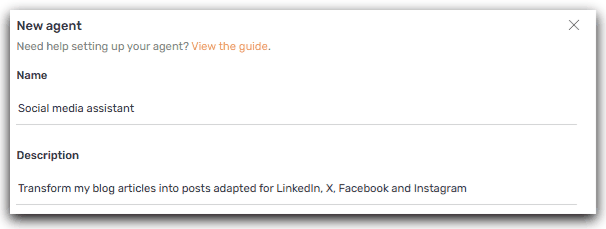
Step 3: Select your platforms
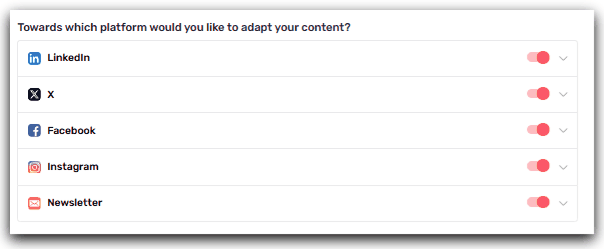
Check the social networks where you want to publish:- ☑️ LinkedIn: Long posts, professional tone (ideal for B2B)
- ☑️ X / Twitter: Short tweets or threads (280 characters)
- ☑️ Facebook: Medium-length posts, conversational tone
- ☑️ Instagram: Captions + hashtags (150–300 words)
- ☑️ Newsletter: Editorial summary (200–400 words)
Step 4: Customize with your examples
The simple method: Add 2 to 3 examples of your best posts. The agent will learn your tone, expressions and style to generate posts 100% aligned with your brand. How to do it:- Go to your LinkedIn, Facebook, or Instagram page
- Identify 2–3 posts that performed well (good engagement)
- Copy the full text of those posts
- Paste them into the corresponding section of the agent
Step 5: Save
Click Create: your agent is ready to use! You can now test it on an article to see the magic happen.🚀 Try it now: Once your agent is created, run it on a recent article. In a few seconds, you’ll get your first ready-to-publish posts!
How to use the agent in daily practice
Launch the article transformation
- Finalize your article in the Semji editor
- Click on “Agents” in the sidebar
- Select your Agent and click on it to launch your Agent
Refine with the conversation
You can continue the conversation with the agent to adjust the posts:“Can you make the LinkedIn post shorter (max 1,000 characters)?”
“Propose me 3 variations of the Instagram hook”
Add the statistic ‘73% of companies’ to the LinkedIn postℹ️ Cost: 10 AI credits per adjustment message
Use case example: Black Friday social media expert
Agent configuration:- Platforms: Instagram, Facebook
- Examples provided: 3 existing Instagram posts that performed well
- Additional instructions:
-
- “Use a short, impactful tone”
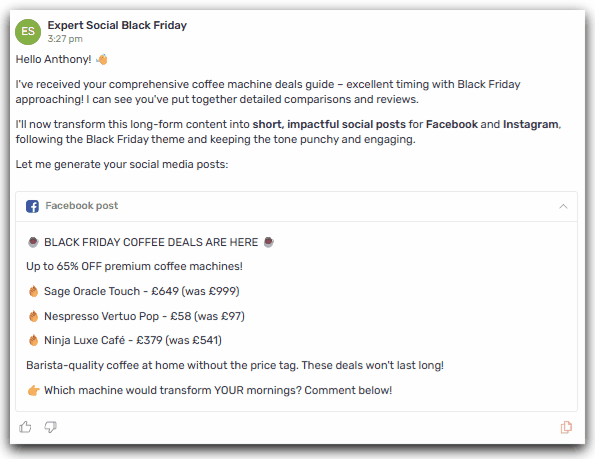

- Automatically generated posts adapted for each channel
- Copy-paste directly into your scheduling tools
- Significant time savings on social media production
Result: multiplied reach and immediate time savings for your social media operations.