

 Home
Home Getting Started
 Help Center
 Developer
 Status
At a glance
- What you can do: review metrics for an individual prompt, read the LLM responses captured, and understand exactly why your brand is present or absent on that query.
- Who it’s for: content managers, heads of SEO, and SEO project leads.
- Why it matters: the Prompt view gives you the deepest level of detail in the module. You can read word for word what ChatGPT or Google AI Overviews responds to a strategic query, and see exactly how your brand and competitors appear in that response.
What changes for you
Before Intelligence Hub GEO, it was impossible to read the actual responses produced by LLMs on your strategic queries, to know whether your brand was mentioned in the text or cited as a source, or to identify which competitors appeared in those responses. Before: a black box. You knew LLMs were answering questions about your industry, but had no access to the content of those responses or any measure of your presence in them. Now: for every monitored prompt, you have access to the history of captured responses with the full text, your brand’s and competitors’ presence flags, and the sources cited.What you’ll get
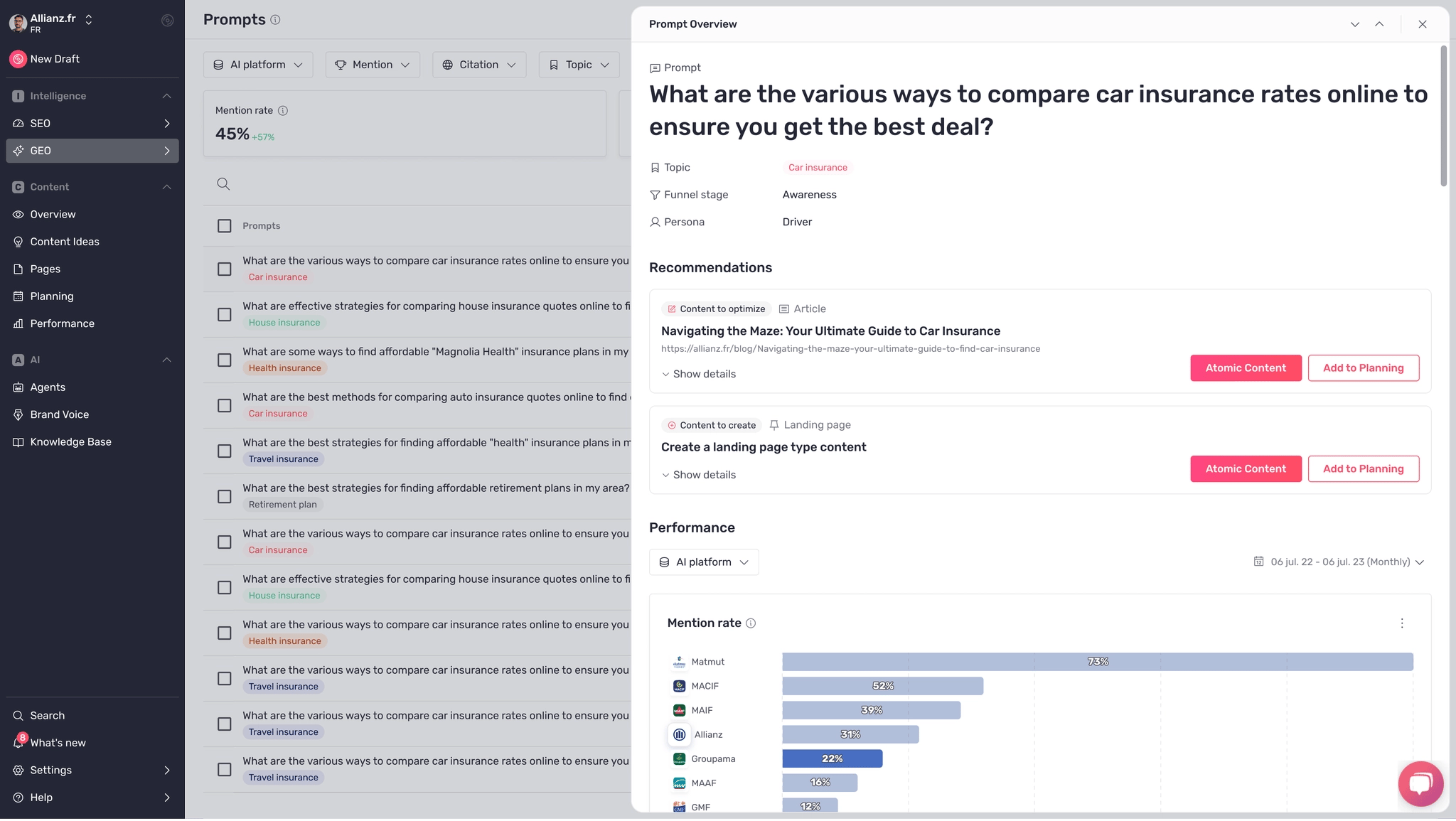
The Prompt view has three sections. Prompt metadata: the topic, funnel stage, and persona associated with this query. Performance widgets: the same charts as on the AI Visibility screen (mention rate, citation rate, trends over time), but scoped to this prompt only. A dedicated AI platform filter lets you switch between ChatGPT and Google AI Overviews. The Latest responses table: the list of responses recently captured for this prompt, each showing a text preview and four flags: Mentions you, Mentions a competitor, Cites you, Cites a competitor.How to use it (step by step)
1) Open the Prompt view
From the Prompts screen, click on a prompt row in the table. The Prompt view panel opens on the right side of the screen.2) Read the recommendations and take action
The Recommendations section shows the content actions Semji suggests to improve your visibility on this prompt. A Content to optimize card means Semji has identified an existing page on your site that would benefit from being improved for this prompt. Click Atomic Content to open that page directly in the editor and start optimizing. A Content to create card means Semji recommends producing a new piece of content targeting this prompt. Click Add to Planning to create a task in your Semji editorial planning, or Atomic Content to start writing directly. Click Show details under each recommendation to see Semji’s reasoning and the elements that justify this recommendation.Tip ✅: prioritize recommendations on prompts where you are neither mentioned nor cited. These are the most impactful gaps where a content action has the highest chance of improving your visibility.
3) Read the prompt’s performance metrics
The Performance section shows this prompt’s individual metrics: mention rate, citation rate, mention rate trend, and citation rate trend for you and your competitors. Use the AI platform filter in the panel to compare results on ChatGPT only or Google AI Overviews only. This lets you know whether your visibility gaps are specific to one LLM or common to both.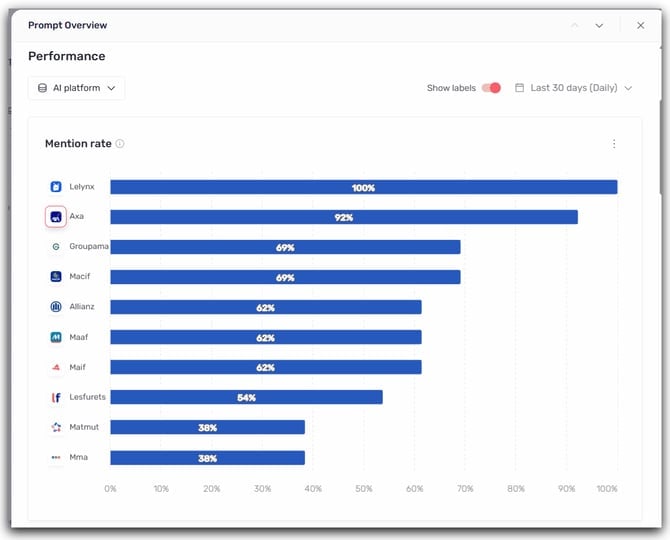
4) Analyze the latest captured responses
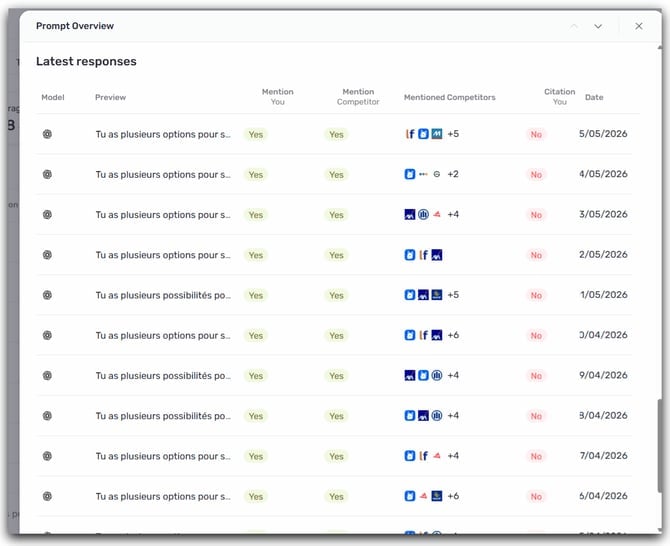
The Latest responses table lists the responses recently retrieved by Semji for this prompt. For each response you can see:- the model that generated it (ChatGPT or Google AI Overviews, identifiable by their icon),
- a preview of the opening text of the response,
- four flags: Mentions you (your brand appears in the text), Mentions a competitor (at least one competitor is named), Cites you (a URL from your domain is cited as a source), Cites a competitor (at least one competitor is cited as a source),
- the date the response was captured.
Good to know ℹ️: when Google AI Overviews did not generate a response for this prompt on a given date, the row displays “No AI Overview” and the flags appear empty.
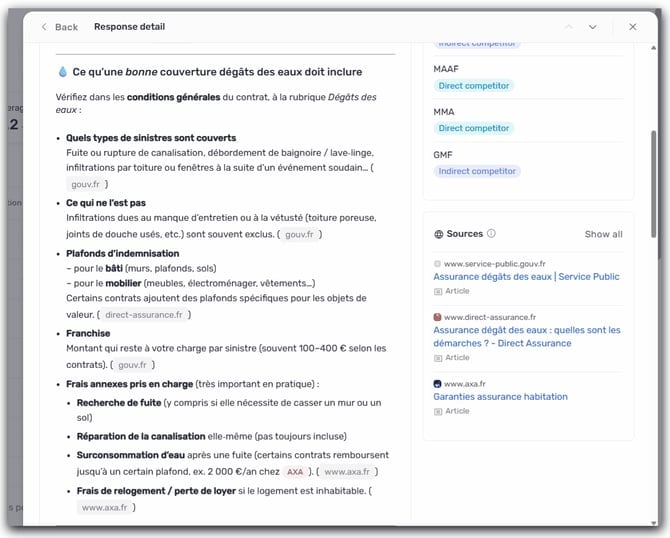
5) Read a full LLM response
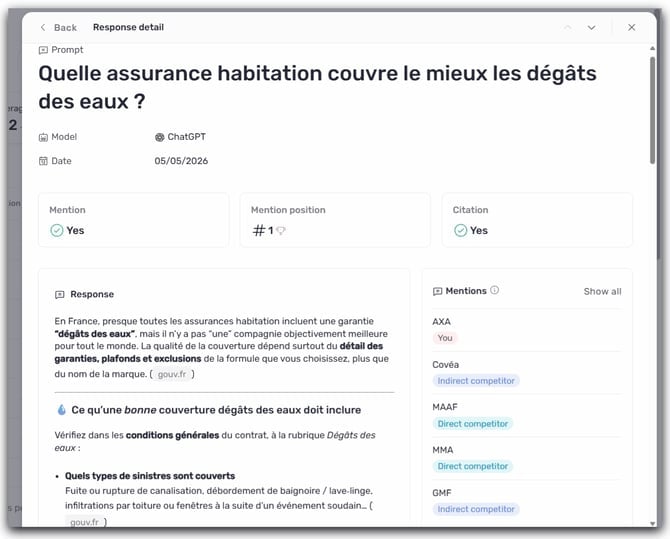
Click on a row in the table to open the response detail. This view shows:- the model and capture date,
- three flags at the top: Mention (Yes / No), Mention position (rank of your brand’s appearance in the text, trophy icon if #1), Citation (Yes / No),
- the full response text with detected brands highlighted and cited domains displayed as clickable chips,
- the Mentions panel (right): all brands detected in the response, listed in order of appearance and categorized (You, Direct competitor, Indirect competitor, Other),
- the Sources panel (right): the list of cited URLs with the page title and category (Article, E-commerce page…).
Tips for getting the most out of it
Start with responses where you’re not mentioned. Focus on rows where “Mentions you” is No to quickly identify responses where your brand is absent. Then look at which competitors are present and which sources they cite. This gives you a clear direction for your content strategy on that prompt. Compare ChatGPT and Google AI Overviews. On the same prompt, the two LLMs can produce very different responses. Use the AI platform filter to isolate each model’s responses and check whether your gaps are specific to one or common to both. Analyze the cited sources. The Sources panel tells you what types of content the LLMs prefer to cite on this query (articles, category pages, guides…). This is a direct signal on which content format to prioritize to gain visibility.Tip 💡: a brand ranked #1 in mention position is named first in the response text — giving it the highest visibility. If a competitor is consistently #1 on your strategic prompts, study their cited sources to understand what earns them that position.