

 Home
Home Getting Started
 Help Center
 Developer
 Status
What are AI Properties?
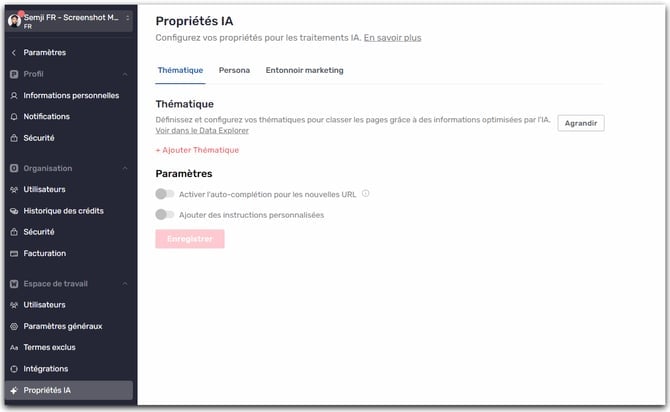
AI Properties are AI-driven automatic classifications that enrich each URL across three dimensions:- Topics: the subject covered by the page.
- Personas: the primary audience targeted.
- Marketing funnel stages: where the content sits in the customer journey (Awareness → Retention).
Why is it important?
A solid setup is essential because it determines the quality of the analyses in the Reports, Competition, and Data Explorer screens.What you gain
- More reliable comparisons between you and your competitors.
- A clear view of performance by topic, persona, and funnel stage.
- Faster decisions (editorial priorities, angles to strengthen, gaps to fill).
Risks if the setup is imprecise
- Biased analyses: pages classified under the wrong topic or for the wrong persona.
- False signals: you think you’re leading on a topic while content has been misallocated.
- Less relevant decisions: content prioritization based on inconsistent classifications.
How does AI classification work?
Data used
To classify each URL, the AI relies in particular on:- the page URL
- the top associated keyword
- the Title tag
- the meta description (or SERP snippet)
Context provided during setup
Quality also depends on what you define upfront:- detailed descriptions for each property to classify
- examples and counter-examples of queries for the relevant properties
- additional instructions and rules you provide
How to customize your AI Properties (step by step)
- Go to Settings > Workspace > AI Properties.
Topics
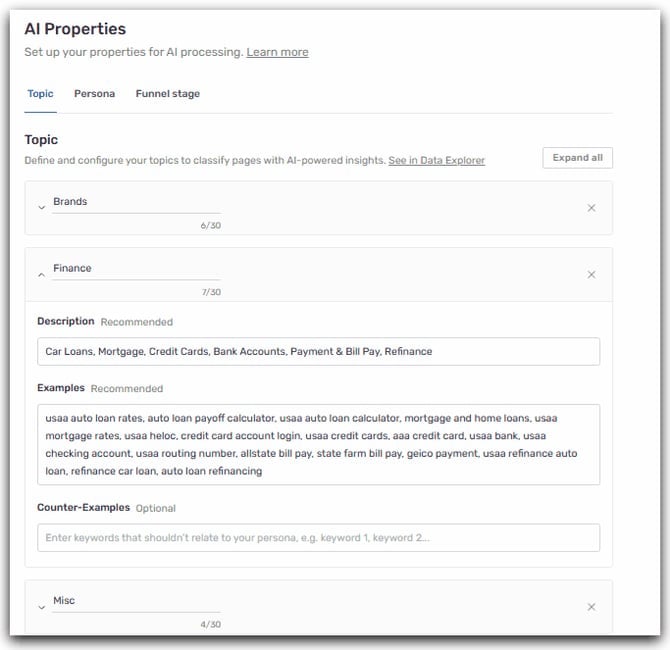
Fields to fill in
For each topic, plan for:- Name: short and explicit.
- Description: to define the scope.
- Keyword examples: a representative set (at least around twenty example keywords).
- Counter-examples: what must not be classified in this topic.
Best practices
- Think business strategy: topics should reflect your priorities and enable operational decisions.
- Avoid overlapping topics and duplicate keywords that would fit into multiple topics.
- Create an “Other” topic to group subjects that do not directly concern you (a catch-all category).
Personas
What makes a good persona?
A persona that’s useful for Intelligence Hub should be:- Distinct and identifiable
- Actionable (helps decide which content to produce / optimize)
- Data-driven (CRM, customer feedback, studies, analytics, marketing data)
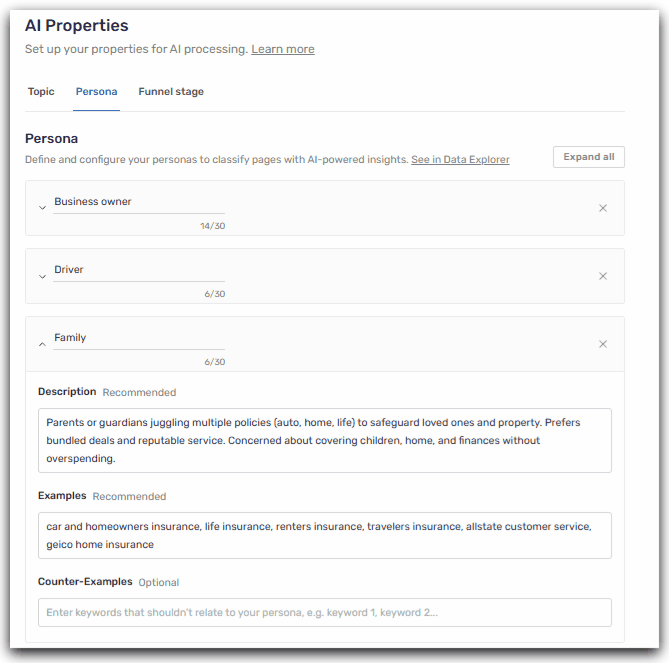
Fields to fill in
For each persona, provide:- Persona name
- Description: add enough detail so the AI has as much context as possible
- Keyword examples: a representative set (at least around twenty example keywords linked to this persona)
- Counter-examples: what must not be classified in this persona
Best practices
- Avoid personas that are too broad or too narrow.
- Avoid duplicate keywords that would fit into multiple personas.
- Consider adding a “Multi-persona” persona to classify pages that do not match a single specific persona. This can also reveal opportunities—for example, if a competitor doesn’t offer content for a given persona or targets personas inconsistently.
Funnel stages
Unlike topics and personas, funnel stages are standardized. You don’t need to define them. The AI automatically classifies content into 4 stages:- Awareness
- Consideration
- Decision
- Retention
Industry / business context
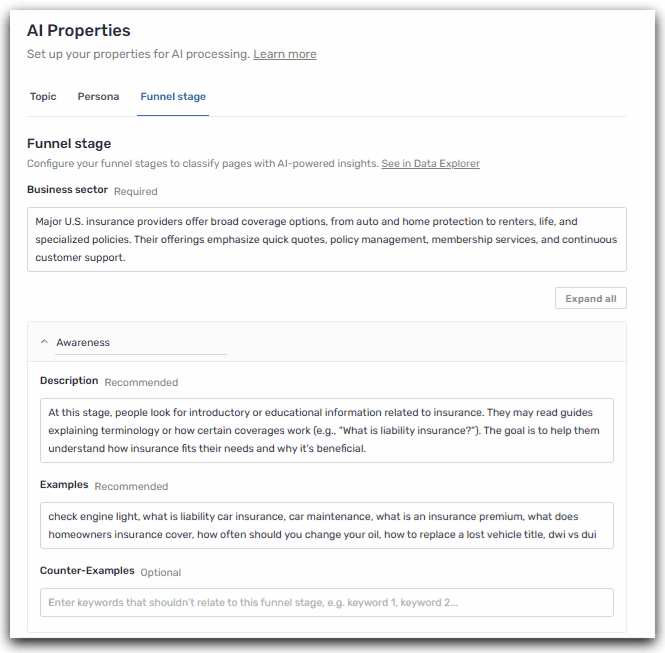
Also add a short paragraph (5 to 10 lines) to present your business to the AI. Specify what you sell, to whom, in which geographies/markets, and what differentiates you. Mention your main offers or product ranges, as well as your customer types (B2B or B2C, industries, company sizes). If useful, include your brands and key categories. The goal is to help the AI understand your context so it can better classify content across your customer journey.Fields to fill in
For each of the 4 stages, provide:- Description: what types of pages should fall into this funnel stage
- Keyword examples: a representative set (at least around twenty example keywords linked to this stage)
- Counter-examples: what must not be classified in this stage
Best practices
- Avoid duplicate keywords that would fit into multiple funnel stages.
Custom instructions
For each property, you can add custom instructions. These are simple, reusable rules that apply to all your URLs and help the AI decide in ambiguous cases and apply your business rules.When to use them
- When certain pages follow recurring patterns (templates, folders, parameters).
- When you have frequent exceptions (brand pages, support, recruiting, legal notices).
- When you want to prioritize one signal over another (e.g., URL takes precedence over Title).
Best practices
- Write rules that are short, explicit, and unambiguous.
- Provide a verifiable criterion (keyword, folder, URL pattern, recurring expression).
- Add 1–2 examples and, if useful, a counter-example.
- Avoid contradictory rules. If needed, specify priority (e.g., “this rule overrides…”).
Example instructions
- If the URL matches the
/city/pattern or contains a “brand + city” combination, then classify as the “Local” topic. - If the URL contains
/pricing,/rates, or “price”, then set the funnel stage to “Decision”. - If the page contains “FAQ” or the URL contains
/faq, then set the funnel stage to “Consideration”. - If the URL contains
/careers,/recruitment, or “jobs”, then classify as “Recruitment” (or “Other”).
Auto-completion and classification quality
Auto-completion for new URLs
Once the setup is finalized and validated, auto-completion can be enabled in the AI Properties settings. What it does:- Each time a monthly report is generated, new URLs that are detected are automatically classified.
- Classifications remain consistent from one month to the next.
- In AI Properties, enable “Auto-completion” for each dimension (Topics, Personas, Marketing funnel).
Why does the AI sometimes get it wrong?
- Ambiguous content: a page can cover multiple subjects or target multiple audiences.
- Insufficient definitions: not enough examples, scope too vague.
- Atypical content: unusual or highly technical formats.
- Incomplete base data: weak Title/meta description, uninformative URL.
What to do in case of recurring errors
Refine your settings (description, examples, counter-examples) based on the errors you observe. For example, if a keyword is misclassified:- Add it to the examples of the correct topic / persona / funnel stage.
- Add it to the counter-examples of the option where it was wrongly classified.
- Add a simple, verifiable rule in the custom instructions (URL pattern, presence of a term in the Title, folder, etc.) to help the AI decide.
- Check that there is no overlap (similar keywords in multiple options) and, if needed, tighten scopes or merge options that are too close.