
Table of contents
What this changes for you
How to set up the internal linking assistant agent
How to use the agent day-to-day
In summary
What you can do: Automatically identify internal linking opportunities to your strategic pages and boost their SEO visibility.
Who it's for: SEO Managers, Content Managers and editorial teams managing sites with many category or product pages.
Why it's useful: Optimize your internal linking without tedious manual research and increase traffic to your strategic pages.
What this changes for you
The problem: Internal linking is crucial for SEO, but managing it manually takes time. Without a clear method, some pages lack links, others are over-optimized, and many opportunities go unnoticed.
The solution: The Internal Linking Assistant agent automatically analyzes your content and identifies the best linking opportunities to your priority pages. It detects relevant anchors already present in your text, suggests light edits to optimize context, and even proposes adding new sentences when appropriate.
Impact:
- Enhanced SEO performance: your priority pages gain visibility through optimized internal linking.
- Significant time savings: automated analysis replaces tedious manual research.
- Consistent strategy: each published piece of content supports your key pages strategically.
- Quality preserved: suggestions respect tone, context, and reading flow.
How to set up the Internal Linking Assistant agent
Step 1: Create your agent
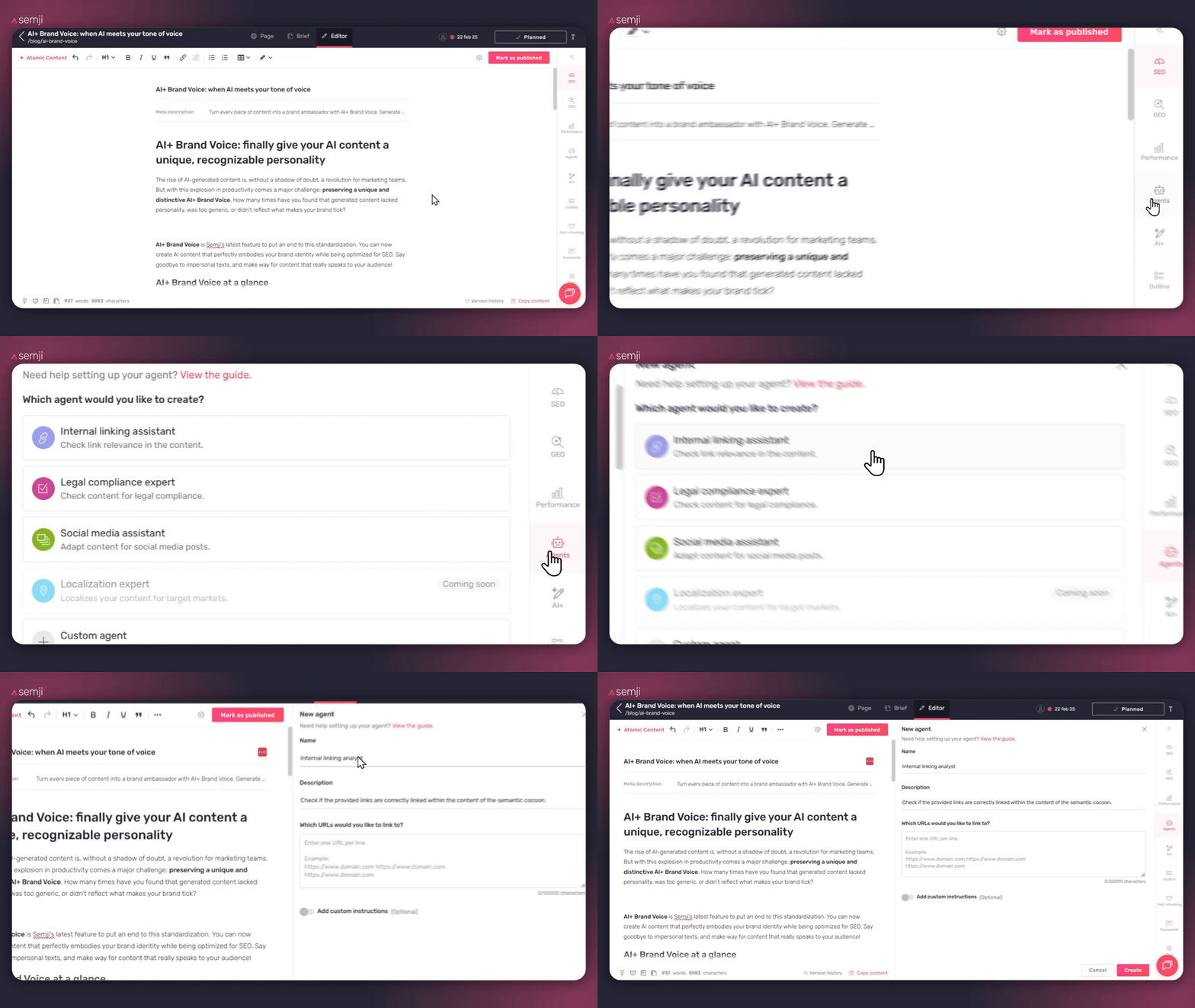
In the Semji editor, click on "Agents" in the right sidebar, then select the "Internal Linking Assistant" template.
Step 2: Name your agent
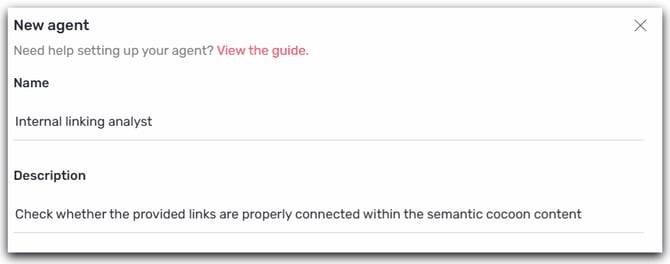
Name: Choose a clear name. You can keep the default one.
Description: Explain in one sentence the goal of your agent. Examples:
- "Identify linking opportunities to my 50 priority category pages"
- "Optimize internal links to my best-selling product pages"
- "Strengthen linking to my strategic SEO landing pages"
Step 3: Add your priority URLs
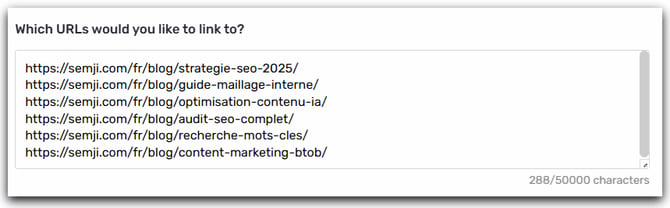
This is the key step: you will specify to the agent which pages on your site should receive more internal links.
How to structure your list of URLs:
List your priority URLs, one per line, in the designated field.
Tips for selecting the right target pages:
- Prioritize pages with high SEO potential:
- Category pages with good search volume but average rankings (positions 5–15)
- Strategic thematic landing pages
- Best-selling product pages or high-margin products
- Limit yourself to your true priorities:
- Start with a maximum of 20–50 URLs for relevant suggestions
- Too many URLs dilute the relevance of the recommendations
- Organize by theme:
- If you manage multiple categories, create one agent per theme
- Example: one "Running Internal Linking" agent + one "Cycling Internal Linking" agent
- Update regularly:
- Add your new strategic pages
- Remove obsolete URLs or those that have achieved their goals
Step 4: Add additional instructions (optional)
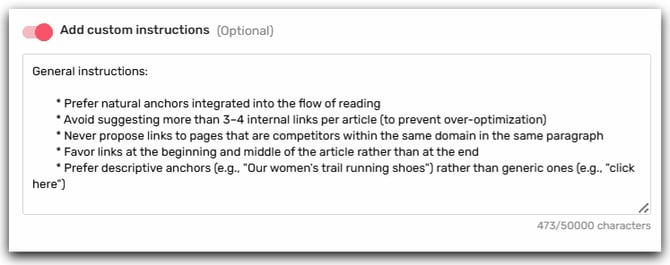
If you have specific rules for your internal linking, please specify them here:
Examples of additional instructions:
💡 Tip: These instructions refine the agent's behavior according to your internal SEO best practices.
Step 5: Save
Click "Create". Your agent is now available in the "Agents" tab and accessible to your entire team.
💡 Sharing: All members of your team can use this agent. Only users with editing rights can modify it.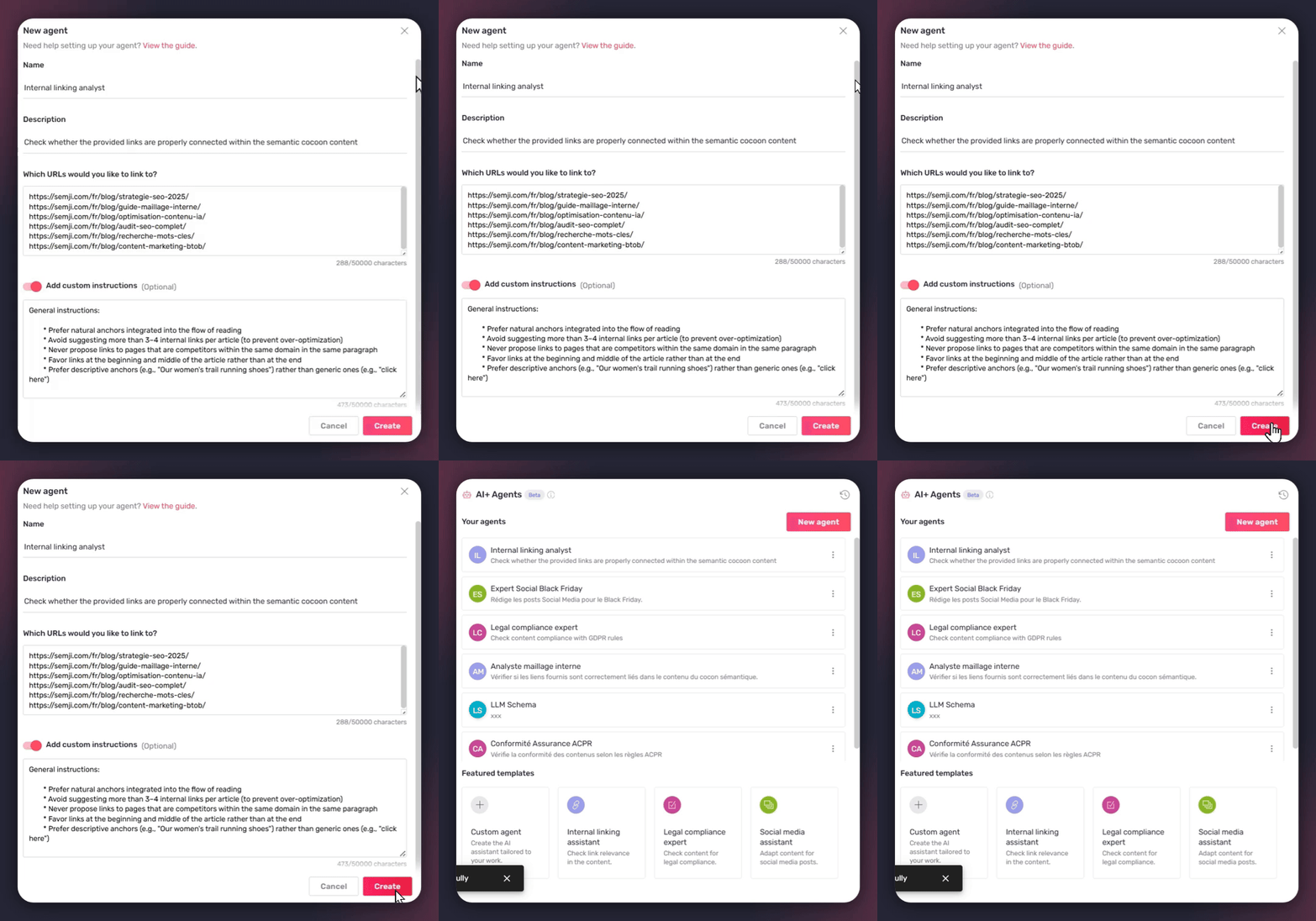
How to use the agent day-to-day
Run the linking analysis
- Finalize your article in the Semji editor
- Click "Agents" in the right sidebar
- Select your Internal Linking Assistant agent and click it to run
⏱️ Duration: 30–60 seconds depending on the length of the article
ℹ️Cost: 10 AI credits per run
Understanding the generated report
The agent analyzes your content and identifies several types of internal linking opportunities.
Types of opportunities detected
1. Perfect anchors already present
The agent identifies sentences in your text that already contain perfect terms to turn into a link.
2. Phrases to slightly modify
The agent suggests slightly modifying an existing sentence to integrate an optimized anchor.
3. Addition of new sentences
The agent suggests adding an entirely new sentence to create a relevant contextual link.
Report format
For each opportunity, the agent provides:
- 📍 Precise location: paragraph number or exact sentence
- 🔗 Target URL: which priority page to link to
- ⚓ Suggested anchor: the exact text to turn into a link
- 💡 Justification: why this suggestion is relevant
- 🎯 Action type: existing anchor / modification / addition
Apply the suggestions
Recommended workflow:
- Read all the suggestions to get an overview
- Prioritize the opportunities:
- ✅ Natural anchors already present → Immediate application
- ⚡Light edits → Check reading flow
- ➕ Additions of sentences → Check contextual coherence
- Apply the links one by one:
- Find the sentence concerned in your text
- Select the suggested anchor
- Create the hyperlink to the target URL
- Check that the link opens in a new tab if that is your convention
- Limit to a maximum of 3–5 internal links per article to avoid over-optimization
💡 Good practice: Never force a link that feels artificial. Contextual relevance always takes precedence over quantity.
Refine with the discussion
You can continue the conversation with the agent to adjust the suggestions:
Sample questions:
"Can you suggest an alternative anchor for the link to the 'shoes' category?"
"The sentence added in paragraph 7 feels a bit forced to me; can you propose a more natural wording?"
"What are the 3 most strategic opportunities in your opinion?"
ℹ️ Cost: 10 AI credits per discussion message
💡 Optimization: Group multiple requests into a single message to save your credits.
Learn more
Activate the Internal Linking Assistant agent now to automate and strengthen your internal linking strategy continuously. Activate the agent now. Result: measurable growth in organic traffic and a significant time savings for your teams.
Continue your optimization with other complementary agents:
👉 Guide: Optimize Your SEO/GEO Content with AI+ Agents
👉 [How to set up the Legal compliance expert Agent for your articles]
👉 [AI+ Agent: transform your articles into social media posts automatically]