

 Home
Home Getting Started
 Help Center
 Developer
 Status
Why connect your PIANO Analytics account?
Piano Analytics is an advanced web analytics tool. It allows you to measure traffic and analyze the performance of a website or an application. In this regard, it is similar to other tools like Google Analytics (UA, GA4), Matomo or Adobe Analytics. In addition to helping you create and optimize your content, Semji helps you track your results and performance at a glance. The platform retrieves data from such tools, in order to display the performance of the worked contents. Without a connection to your statistical tools, you cannot follow your KPIs (Key Primary Indicators) directly in your interface. The advantages of using Piano Analytics with Semji :- Easily upload your data to the platform
- Select your KPIs to track
- Take advantage of detailed reporting following the optimization of each content

How to connect your PIANO Analytics account to Semji?
1) Pre-requisites
- An PIANO Analytics API key
- The Custom plan on Semji
- An Owner Account
2) Set up
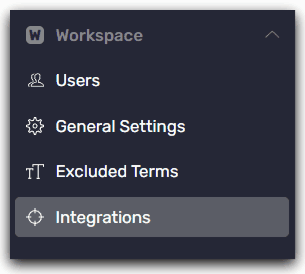
**Step 1 **Go to the left sidebar menu, click on Settings -> Workspace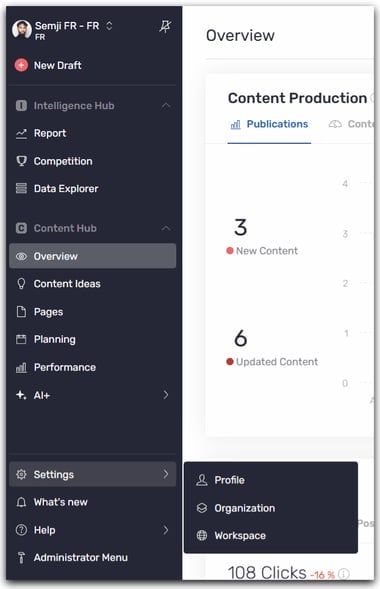
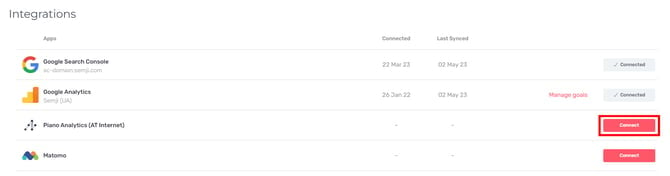
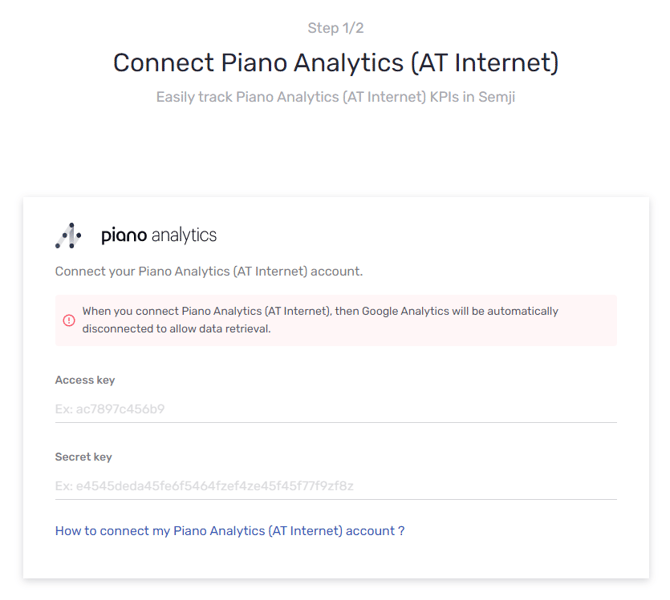
Where to view PIANO Analytics data in the Semji platform?
Once your PIANO Analytics account is connected to the Semji platform, you can view the traffic generated by each content in :- The Overview tab
- The Performance tab
- The Performance tab accessible from the editor of a content draft