---
title: "Social media assistant agent: Transforming an article into social posts"
description: Repurpose your content across 5 channels while keeping your brand voice
---
[Skip to content](https://help.semji.com/en/tutorial-automatically-turn-your-articles-into-social-media-posts#main-content)
- [English](https://help.semji.com/en/tutorial-automatically-turn-your-articles-into-social-media-posts)
- [Français](https://help.semji.com/fr/tutoriel-transformer-vos-articles-en-posts-sociaux-automatiquement)
English
Show submenu for translations

Open main navigation
Close main navigation
- - [English](https://help.semji.com/en/tutorial-automatically-turn-your-articles-into-social-media-posts)
- [Français](https://help.semji.com/fr/tutoriel-transformer-vos-articles-en-posts-sociaux-automatiquement)
English
Show submenu for translations
- Contact us
Contact us
How can we help you?
- There are no suggestions because the search field is empty.
1. [Help Center](https://help.semji.com/en?hsLang=en)
2. [AI+ Agents](https://help.semji.com/en/ai-agents?hsLang=en)
3. [Pre-configured Agents](https://help.semji.com/en/ai-agents?hsLang=en#pre-configured-agents)
# Social media assistant agent: Transforming an article into social posts
## Repurpose your content across 5 channels while keeping your brand voice
Table of contents
---
[In summary](https://help.semji.com/en/tutorial-automatically-turn-your-articles-into-social-media-posts#insummary)
[What this changes for you](https://help.semji.com/en/tutorial-automatically-turn-your-articles-into-social-media-posts#whatthis)
[How to set up the social media assistant agent](https://help.semji.com/en/tutorial-automatically-turn-your-articles-into-social-media-posts#howtoset)
[How to use the agent in daily practice](https://help.semji.com/en/tutorial-automatically-turn-your-articles-into-social-media-posts#howtodaiily)
[Example of use](https://help.semji.com/en/tutorial-automatically-turn-your-articles-into-social-media-posts#usecase)
### In summary
**What you can do:** With one click, transform your blog posts into optimized posts for each social network (LinkedIn, X, Facebook, Instagram, Newsletter) without losing your brand voice.
**For whom:** Content Managers, Social Media Managers and Copywriters who manage multiple communication channels.
**Why it’s useful:** Save hours of manual work while maximizing your content’s reach. The agent automatically adapts tone, format, and hashtags for each platform.
### What this changes for you
**The challenge:** Manually repurposing a 1,500-word article into posts for each social platform is extremely time-consuming. You have to summarize the article, adjust the tone for each network, follow platform-specific formats, add relevant hashtags, and create engaging hooks.
**The solution:** The Social Media Assistant Agent automatically generates all your posts. Simply copy and paste them into your scheduling tools and add your visuals.
### How to set up the Social Media Assistant Agent
#### Step 1: Create your agent
In the Semji editor, click on **"Agents"** in the right sidebar, then select the **"Social Media Assistant"** template.
Click the template to configure and create your agent.
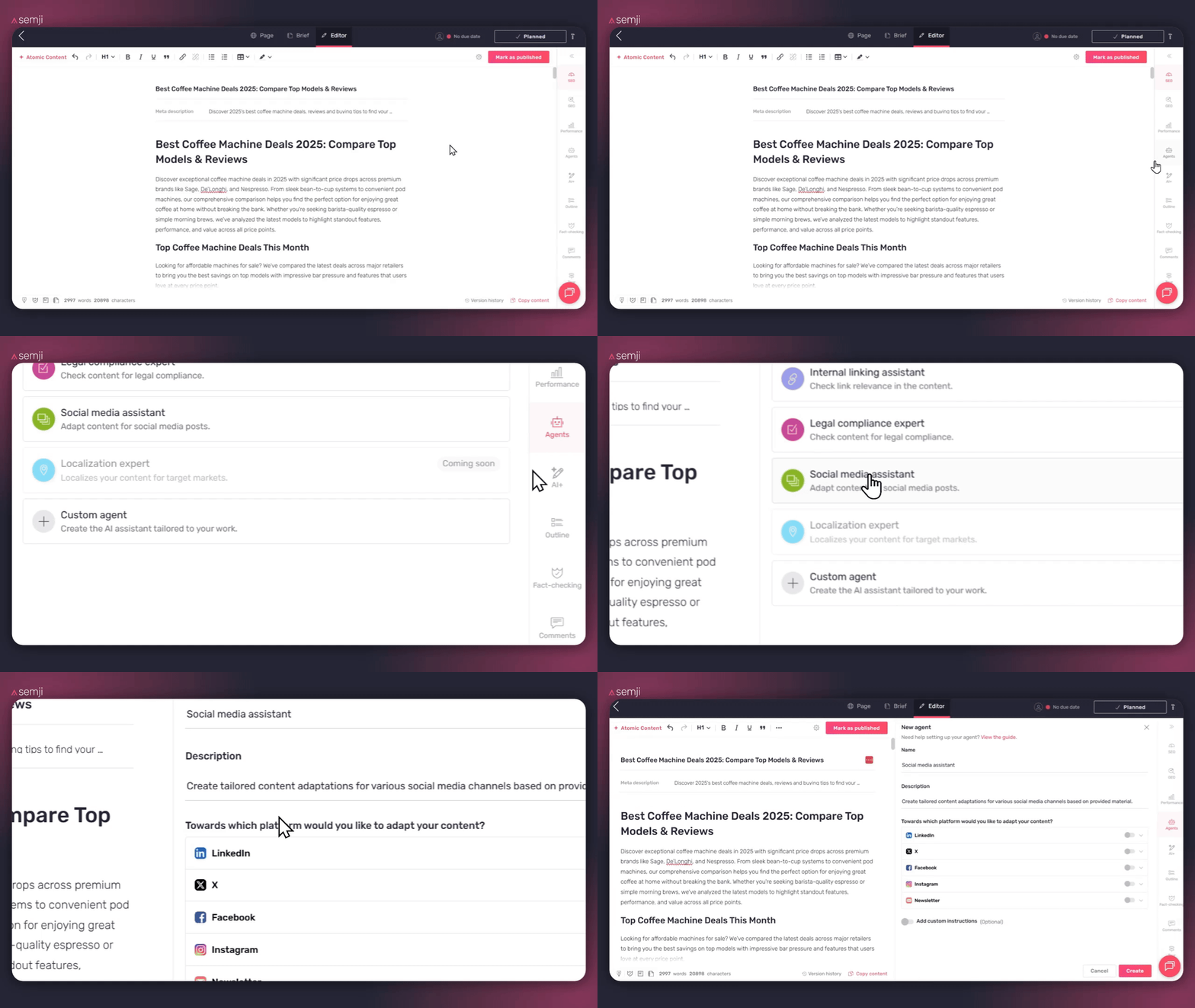
#### Step 2: Name your agent
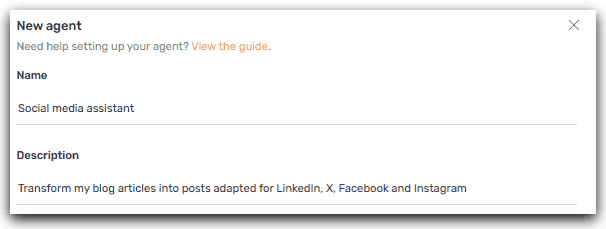
**Name:** Choose a clear, descriptive name. You can keep the default one.
**Description:** Explain in one sentence what your agent does. Example: "Transforms my blog articles into posts adapted for LinkedIn, X, Facebook, and Instagram".
#### Step 3: Select your platforms
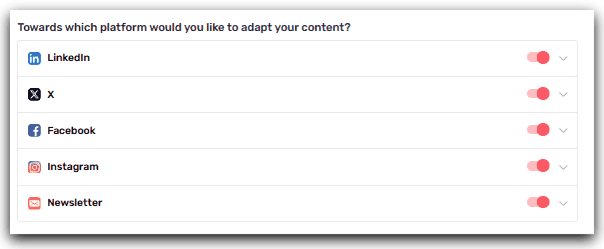
Check the social networks where you want to publish:
- ☑️ LinkedIn: Long posts, professional tone (ideal for B2B)
- ☑️ X / Twitter: Short tweets or threads (280 characters)
- ☑️ Facebook: Medium-length posts, conversational tone
- ☑️ Instagram: Captions + hashtags (150–300 words)
- ☑️ Newsletter: Editorial summary (200–400 words)
#### Step 4: Customize with your examples
**The simple method:** Add 2 to 3 examples of your best posts. The agent will learn your tone, expressions and style to generate posts 100% aligned with your brand.
**How to do it:**
1. Go to your LinkedIn, Facebook, or Instagram page
2. Identify 2–3 posts that performed well (good engagement)
3. Copy the full text of those posts
4. Paste them into the corresponding section of the agent
#### Step 5: Save
Click **Create**: your agent is ready to use! You can now test it on an article to see the magic happen.
🚀 **Try it now:** Once your agent is created, run it on a recent article. In a few seconds, you'll get your first ready-to-publish posts!
### How to use the agent in daily practice
#### Launch the article transformation
1. **Finalize your article** in the Semji editor
2. **Click on "Agents"** in the sidebar
3. **Select** your Agent and **click** on it to launch your Agent
ℹ️ **Cost:** 10 AI credits per run
#### Refine with the conversation
You can continue the conversation with the agent to adjust the posts:
> "Can you make the LinkedIn post shorter (max 1,000 characters)?"
> "Propose me 3 variations of the Instagram hook"
> Add the statistic '73% of companies' to the LinkedIn post
ℹ️ **Cost:** 10 AI credits per adjustment message
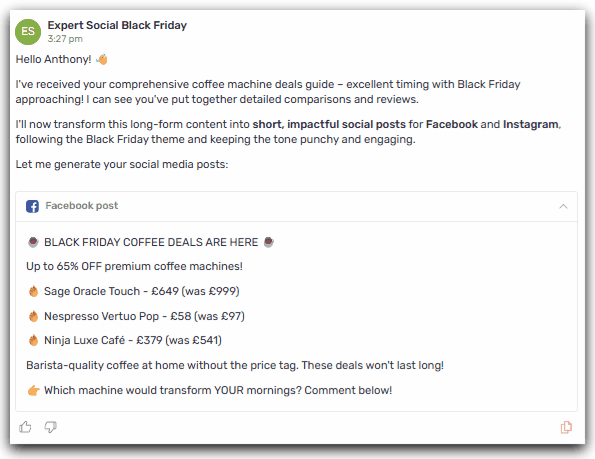
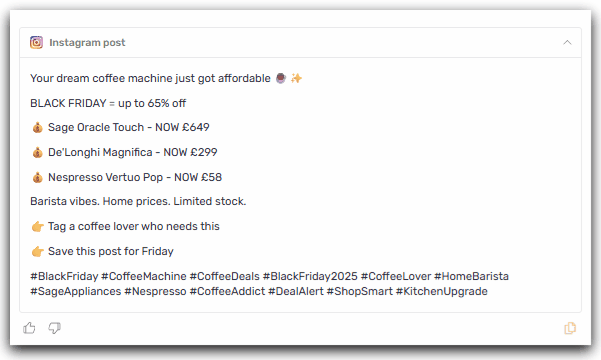
### Use case example: Black Friday social media expert
**Agent configuration:**
- **Platforms:** Instagram, Facebook
- **Examples provided:** 3 existing Instagram posts that performed well
- **Additional instructions:**
- - "Use a short, impactful tone"

**Generated posts:
**
**Result:**
- Automatically generated posts adapted for each channel
- Copy-paste directly into your scheduling tools
- Significant time savings on social media production
Thanks to the Social Media Assistant agent, you industrialize the adaptation of your content across all your channels. Your teams can focus on strategy and performance analysis, while the AI automates post production.
Result: multiplied reach and immediate time savings for your social media operations.
#### Discover the other agents:
[**👉 Guide: Optimize Your SEO/GEO Content with AI+ Agents - Overview of all available agents**](https://help.semji.com/en/guide-optimize-your-seo-geo-content-with-ai-agents?hsLang=en)
**[👉](https://help.semji.com/fr/tutoriel-transformer-vos-articles-en-posts-sociaux-automatiquement?hsLang=en)[\[How to set up the Legal compliance expert Agent for your articles\]](https://help.semji.com/en/how-to-set-up-the-legal-compliance-agent-for-your-articles?hsLang=en)**
**[👉](https://help.semji.com/fr/tutoriel-transformer-vos-articles-en-posts-sociaux-automatiquement?hsLang=en)[\[How to Strengthen Your Internal Links with AI+ Agent\]](https://help.semji.com/en/how-to-strengthen-your-internal-links-with-ai-agent?hsLang=en)**
**[👉](https://help.semji.com/fr/tutoriel-transformer-vos-articles-en-posts-sociaux-automatiquement?hsLang=en) [\[Create and Configure your Custom AI Agent\]](https://help.semji.com/en/create-and-configure-your-custom-ai-agent?hsLang=en)**
- [Getting started with Semji](https://help.semji.com/en/getting-started-with-semji?hsLang=en#main-content)
- [Create your account and log in](https://help.semji.com/en/getting-started-with-semji?hsLang=en#create-your-account-and-log-in)
- [Identifying opportunities](https://help.semji.com/en/identifying-opportunities?hsLang=en#main-content)
- [Identify opportunities](https://help.semji.com/en/identifying-opportunities?hsLang=en#identify-opportunities)
- [Exploring your pages in Semji](https://help.semji.com/en/identifying-opportunities?hsLang=en#exploring-your-pages-in-semji)
- [Managing your editorial planning](https://help.semji.com/en/managing-your-editorial-planning?hsLang=en#main-content)
- [Adapting the planning to your production workflow](https://help.semji.com/en/managing-your-editorial-planning?hsLang=en#adapting-the-planning-to-your-production-workflow)
- [Understanding the planning view](https://help.semji.com/en/managing-your-editorial-planning?hsLang=en#understanding-the-planning-view)
- [Optimizing and publishing content](https://help.semji.com/en/optimizing-and-publishing-content?hsLang=en#main-content)
- [Prepare & write](https://help.semji.com/en/optimizing-and-publishing-content?hsLang=en#prepare-write)
- [Optimize for SEO](https://help.semji.com/en/optimizing-and-publishing-content?hsLang=en#optimize-for-seo)
- [Update & publish](https://help.semji.com/en/optimizing-and-publishing-content?hsLang=en#update-publish)
- [Optimize for GEO](https://help.semji.com/en/optimizing-and-publishing-content?hsLang=en#optimize-for-geo)
- [AI+ Agents](https://help.semji.com/en/ai-agents?hsLang=en#main-content)
- [Getting Started & Guides](https://help.semji.com/en/ai-agents?hsLang=en#getting-started-guides)
- [Pre-configured Agents](https://help.semji.com/en/ai-agents?hsLang=en#pre-configured-agents)
- [Advanced Use Cases](https://help.semji.com/en/ai-agents?hsLang=en#advanced-use-cases)
- [Maximize your efficiency with AI](https://help.semji.com/en/maximize-your-efficiency-with-ai?hsLang=en#main-content)
- [Setting up your AI environment](https://help.semji.com/en/maximize-your-efficiency-with-ai?hsLang=en#setting-up-your-ai-environment)
- [Generate content with AI](https://help.semji.com/en/maximize-your-efficiency-with-ai?hsLang=en#generate-content-with-ai)
- [Track and analyze your competitors](https://help.semji.com/en/track-and-analyze-your-competitors?hsLang=en#main-content)
- [SEO](https://help.semji.com/en/track-and-analyze-your-competitors?hsLang=en#seo)
- [GEO](https://help.semji.com/en/track-and-analyze-your-competitors?hsLang=en#geo)
- [Track and analyze your performance](https://help.semji.com/en/track-and-analyze-your-performance?hsLang=en#main-content)
- [Understanding performance metrics](https://help.semji.com/en/track-and-analyze-your-performance?hsLang=en#understanding-performance-metrics)
- [Managing your SEO performance](https://help.semji.com/en/track-and-analyze-your-performance?hsLang=en#managing-your-seo-performance)
- [Connecting your tools](https://help.semji.com/en/connecting-your-tools?hsLang=en#main-content)
- [SSO & authentication](https://help.semji.com/en/connecting-your-tools?hsLang=en#sso-authentication)
- [Connect analytics & GSC](https://help.semji.com/en/connecting-your-tools?hsLang=en#connect-analytics-gsc)
- [CMS Integration](https://help.semji.com/en/connecting-your-tools?hsLang=en#cms-integration)
- [Semji & your CMS](https://help.semji.com/en/connecting-your-tools?hsLang=en#semji-your-cms)
- [Semji extension](https://help.semji.com/en/connecting-your-tools?hsLang=en#semji-extension)
- [Semji API](https://help.semji.com/en/connecting-your-tools?hsLang=en#semji-api)
- [Administration & global preferences](https://help.semji.com/en/administration-global-preferences?hsLang=en#main-content)
- [Users & roles](https://help.semji.com/en/administration-global-preferences?hsLang=en#users-roles)
- [Languages & general preferences](https://help.semji.com/en/administration-global-preferences?hsLang=en#languages-general-preferences)
- [Resources & Webinars](https://help.semji.com/en/resources-webinars?hsLang=en#main-content)
- [Webinar 2025](https://help.semji.com/en/resources-webinars?hsLang=en#webinar-2025)
- [Assistance & FAQs](https://help.semji.com/en/assistance-faqs?hsLang=en#main-content)
- [Data privacy & security](https://help.semji.com/en/assistance-faqs?hsLang=en#data-privacy-security)
- [Frequently Asked Questions](https://help.semji.com/en/assistance-faqs?hsLang=en#frequently-asked-questions)
[](http://semji.com?hsLang=en)
[mailto:email@email.com](mailto:email@email.com)
Copyright © 2026, Semji