---
title: Comments in Semji
description: Conveniently collaborate with your team to provide edits or writing suggestions to the person in charge of the article.
---

[Skip to content](https://help.semji.com/en/en/comments-in-semji#main-content)

- [English](https://help.semji.com/en/en/comments-in-semji)
- [Français](https://help.semji.com/fr/fr/les-commentaires-au-sein-de-editeur-semji)

English

Show submenu for translations

![logo semji](https://help.semji.com/hs-fs/hubfs/5eb95f02865a7ac1be7c1192.png?width=130&height=49&name=5eb95f02865a7ac1be7c1192.png)

Open main navigation

Close main navigation

- - [English](https://help.semji.com/en/en/comments-in-semji)
    - [Français](https://help.semji.com/fr/fr/les-commentaires-au-sein-de-editeur-semji)

  English
  
  Show submenu for translations
- Contact us

 Contact us

 How can we help you?

- There are no suggestions because the search field is empty.

1. [Help Center](https://help.semji.com/en?hsLang=en)
2. [Optimizing and publishing content](https://help.semji.com/en/optimizing-and-publishing-content?hsLang=en)
3. [Prepare & write](https://help.semji.com/en/optimizing-and-publishing-content?hsLang=en#prepare-write)

# Comments in Semji

## Conveniently collaborate with your team to provide edits or writing suggestions to the person in charge of the article.

Table of contents: 

---

[Why collaborate in Semji?](https://help.semji.com/en/en/comments-in-semji#collaborate-semji)

[How to create and access comments?](https://help.semji.com/en/en/comments-in-semji#Create-comments)

| Free trial | Custom Legacy | Basic | Business | Unlimited |
| --- | --- | --- | --- | --- |
| ✅ | ✅ | ❌ | ✅ | ✅ |

### Why collaborate in Semji?

You can now collaborate in Semji Editor by commenting on drafted content. All users in an organization can comment on the same draft.  

*Note: This feature does not allow simultaneous writing on the same content. If you try to write at the same time as another user, a message will appear informing you that the content is already being optimized. However, several users can comment on the same content, but we do not recommend doing it simultaneously.*

### How to create and access comments?

#### To create a comment, you need to:

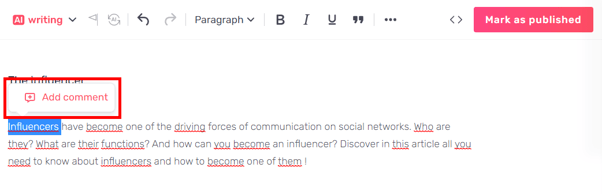
- Select which part you want to comment on;
- Click on “Comment”;
  
  ![](https://help.semji.com/hs-fs/hubfs/undefined-3.png?width=602&height=195&name=undefined-3.png)

*Good to know: You can add a new comment to an existing comment. Simply select the section in which you wish to add a comment.![commentaire dans un commentaire](https://help.semji.com/hs-fs/hubfs/commentaire%20dans%20un%20commentaire.png?width=688&height=193&name=commentaire%20dans%20un%20commentaire.png)*

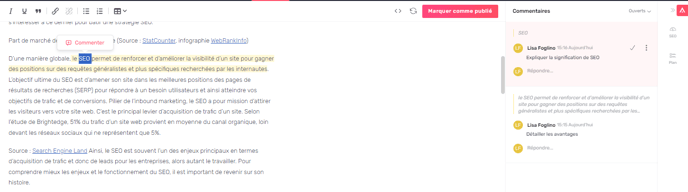
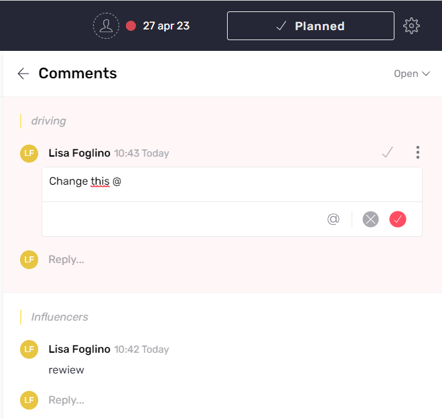
- A sidebar opens and displays all the comments in this draft.
  
  ![](https://help.semji.com/hs-fs/hubfs/undefined-4.png?width=442&height=419&name=undefined-4.png)
- Once a comment is posted, you can delete it or edit it to make a change.  
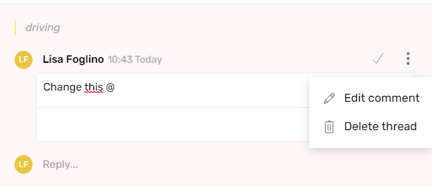
  
  ![](https://help.semji.com/hs-fs/hubfs/undefined-May-05-2023-09-05-15-5762-AM.png?width=432&height=187&name=undefined-May-05-2023-09-05-15-5762-AM.png)
  
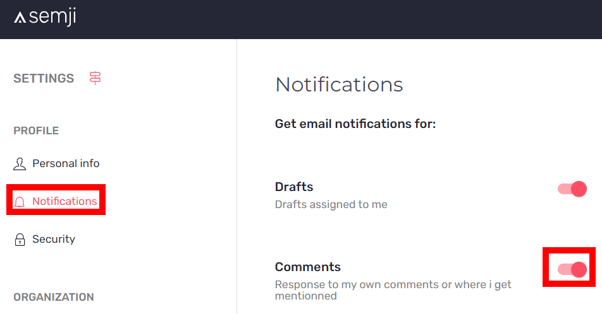
  You can also tag users in comments. The user will receive an email notification when a comment has been added to the draft.

*Note: The user assigned to the draft will automatically receive notifications about their draft.*

*Remember to check if your notifications are enabled in Semji's settings.*

*![](https://help.semji.com/hs-fs/hubfs/undefined-May-05-2023-09-05-34-9899-AM.png?width=602&height=315&name=undefined-May-05-2023-09-05-34-9899-AM.png)*

Once done with a comment, you can "Mark as resolved" to close it. The comment will be grayed-out in the editor, which means that it has been resolved.
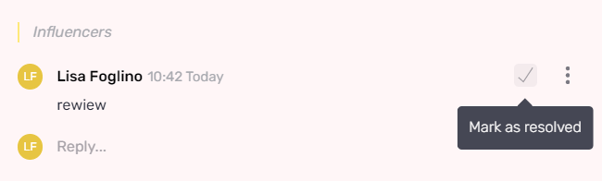
![](https://help.semji.com/hs-fs/hubfs/undefined-May-05-2023-09-05-47-3332-AM.png?width=602&height=181&name=undefined-May-05-2023-09-05-47-3332-AM.png)

#### How to access the comments list:

To find all the comments in a draft, simply click on the tab at the top right of the Content Score to open the comments window.
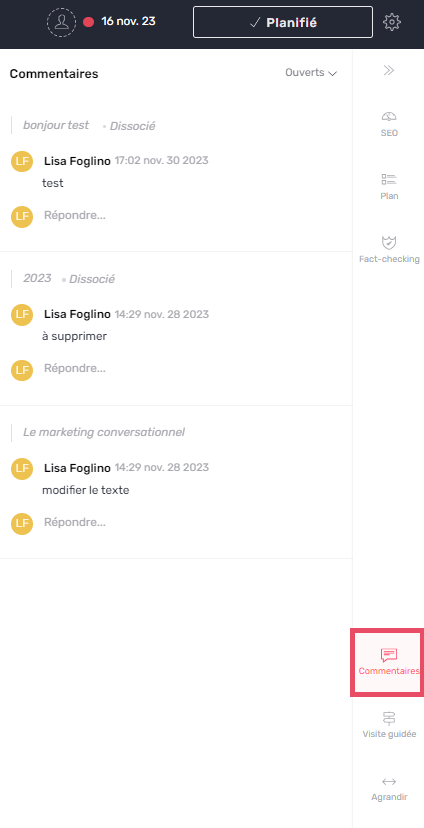
![lisitng commentaires](https://help.semji.com/hs-fs/hubfs/lisitng%20commentaires.png?width=424&height=828&name=lisitng%20commentaires.png)

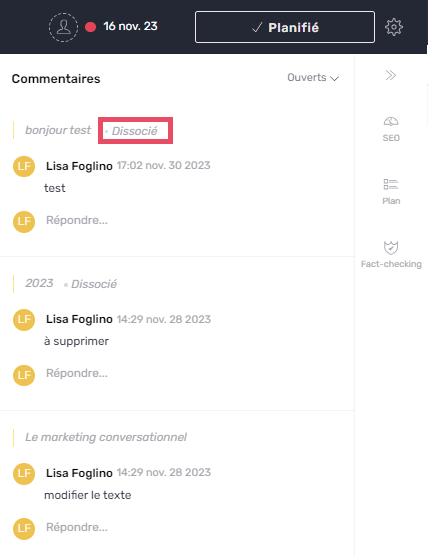
*Good to know: you can now view your comment history. Once a comment has been processed, you can view it as “Disassociated”. This will enable you to see all the comments after the various modifications or deletions of the part concerned.![commentaire dissocié](https://help.semji.com/hs-fs/hubfs/commentaire%20dissoci%C3%A9.png?width=428&height=556&name=commentaire%20dissoci%C3%A9.png)*

#### What are the different types of comments?

In the editor, review the text areas that have been commented on. 

Yellow comments represent open conversations and grayed-out comments are resolved ones.
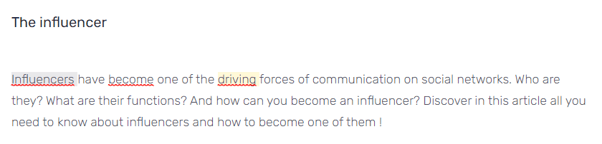
![](https://help.semji.com/hs-fs/hubfs/undefined-May-05-2023-09-06-15-3252-AM.png?width=602&height=145&name=undefined-May-05-2023-09-06-15-3252-AM.png)

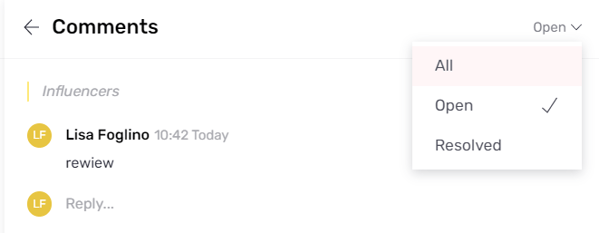
Use the filters to quickly find the different comments: 

All: to find all comments

Active: to find active conversations only

Resolved: to find closed comments

![](https://help.semji.com/hs-fs/hubfs/undefined-May-05-2023-09-06-32-3141-AM.png?width=602&height=233&name=undefined-May-05-2023-09-06-32-3141-AM.png)

*Note: You can add as many comments as you want in a draft.* 

You can now collaborate and comment in the same draft!

- [Getting started with Semji](https://help.semji.com/en/getting-started-with-semji?hsLang=en#main-content)

    - [Create your account and log in](https://help.semji.com/en/getting-started-with-semji?hsLang=en#create-your-account-and-log-in)
- [Identifying opportunities](https://help.semji.com/en/identifying-opportunities?hsLang=en#main-content)

    - [Identify opportunities](https://help.semji.com/en/identifying-opportunities?hsLang=en#identify-opportunities)
    - [Exploring your pages in Semji](https://help.semji.com/en/identifying-opportunities?hsLang=en#exploring-your-pages-in-semji)
- [Managing your editorial planning](https://help.semji.com/en/managing-your-editorial-planning?hsLang=en#main-content)

    - [Adapting the planning to your production workflow](https://help.semji.com/en/managing-your-editorial-planning?hsLang=en#adapting-the-planning-to-your-production-workflow)
    - [Understanding the planning view](https://help.semji.com/en/managing-your-editorial-planning?hsLang=en#understanding-the-planning-view)
- [Optimizing and publishing content](https://help.semji.com/en/optimizing-and-publishing-content?hsLang=en#main-content)

    - [Prepare & write](https://help.semji.com/en/optimizing-and-publishing-content?hsLang=en#prepare-write)
    - [Optimize for SEO](https://help.semji.com/en/optimizing-and-publishing-content?hsLang=en#optimize-for-seo)
    - [Update & publish](https://help.semji.com/en/optimizing-and-publishing-content?hsLang=en#update-publish)
    - [Optimize for GEO](https://help.semji.com/en/optimizing-and-publishing-content?hsLang=en#optimize-for-geo)
- [AI+ Agents](https://help.semji.com/en/ai-agents?hsLang=en#main-content)

    - [Getting Started & Guides](https://help.semji.com/en/ai-agents?hsLang=en#getting-started-guides)
    - [Pre-configured Agents](https://help.semji.com/en/ai-agents?hsLang=en#pre-configured-agents)
    - [Advanced Use Cases](https://help.semji.com/en/ai-agents?hsLang=en#advanced-use-cases)
- [Maximize your efficiency with AI](https://help.semji.com/en/maximize-your-efficiency-with-ai?hsLang=en#main-content)

    - [Setting up your AI environment](https://help.semji.com/en/maximize-your-efficiency-with-ai?hsLang=en#setting-up-your-ai-environment)
    - [Generate content with AI](https://help.semji.com/en/maximize-your-efficiency-with-ai?hsLang=en#generate-content-with-ai)
- [Track and analyze your competitors](https://help.semji.com/en/track-and-analyze-your-competitors?hsLang=en#main-content)

    - [SEO](https://help.semji.com/en/track-and-analyze-your-competitors?hsLang=en#seo)
    - [GEO](https://help.semji.com/en/track-and-analyze-your-competitors?hsLang=en#geo)
- [Track and analyze your performance](https://help.semji.com/en/track-and-analyze-your-performance?hsLang=en#main-content)

    - [Understanding performance metrics](https://help.semji.com/en/track-and-analyze-your-performance?hsLang=en#understanding-performance-metrics)
    - [Managing your SEO performance](https://help.semji.com/en/track-and-analyze-your-performance?hsLang=en#managing-your-seo-performance)
- [Connecting your tools](https://help.semji.com/en/connecting-your-tools?hsLang=en#main-content)

    - [SSO & authentication](https://help.semji.com/en/connecting-your-tools?hsLang=en#sso-authentication)
    - [Connect analytics & GSC](https://help.semji.com/en/connecting-your-tools?hsLang=en#connect-analytics-gsc)
    - [CMS Integration](https://help.semji.com/en/connecting-your-tools?hsLang=en#cms-integration)
    - [Semji & your CMS](https://help.semji.com/en/connecting-your-tools?hsLang=en#semji-your-cms)
    - [Semji extension](https://help.semji.com/en/connecting-your-tools?hsLang=en#semji-extension)
    - [Semji API](https://help.semji.com/en/connecting-your-tools?hsLang=en#semji-api)
- [Administration & global preferences](https://help.semji.com/en/administration-global-preferences?hsLang=en#main-content)

    - [Users & roles](https://help.semji.com/en/administration-global-preferences?hsLang=en#users-roles)
    - [Languages & general preferences](https://help.semji.com/en/administration-global-preferences?hsLang=en#languages-general-preferences)
- [Resources & Webinars](https://help.semji.com/en/resources-webinars?hsLang=en#main-content)

    - [Webinar 2025](https://help.semji.com/en/resources-webinars?hsLang=en#webinar-2025)
- [Assistance & FAQs](https://help.semji.com/en/assistance-faqs?hsLang=en#main-content)

    - [Data privacy & security](https://help.semji.com/en/assistance-faqs?hsLang=en#data-privacy-security)
    - [Frequently Asked Questions](https://help.semji.com/en/assistance-faqs?hsLang=en#frequently-asked-questions)

[![Chill listening crop-3](https://help.semji.com/hs-fs/hubfs/logo-semji-3.png?width=90&height=28&name=logo-semji-3.png "Chill listening crop-3")](http://semji.com?hsLang=en)

<https://www.facebook.com/> <https://www.twitter.com/> <https://www.instagram.com/> <https://podcasts.apple.com/> [mailto:email@email.com](mailto:email@email.com)

Copyright © 2026, Semji