
In summary
What you can do: Improve the quality and consistency of your content with specialized AI agents, directly integrated into the Semji editor
For whom: Content Managers, SEO Writers, SEO Managers, and marketing teams.
Why it's useful: Give your teams the opportunity to focus on strategy and creativity, while AI ensures the rigor, consistency, and quality of every piece of published content.
What this changes for you
No more bottlenecks
Back-and-forth with the legal department slowing down publication? The Legal Compliance Checker agent reduces validation times from 6-12 weeks to just a few minutes by automating compliance verification.
Reclaim valuable time
Transforming an article into social media posts, optimizing internal linking... These time-consuming tasks are now automated. You save up to 2 hours per published piece of content.
Create your own AI assistant
Even without technical skills, configure a 100% personalized agent that responds exactly to your specific needs: competitive analysis, EEAT expert, legal expert...
Find the right agent in a few clicks The Discover gallery centralizes all available templates, organized by use case. No need to configure an agent from scratch for the most common needs: pick a template, adjust the instructions if needed, and run.
The Agents gallery
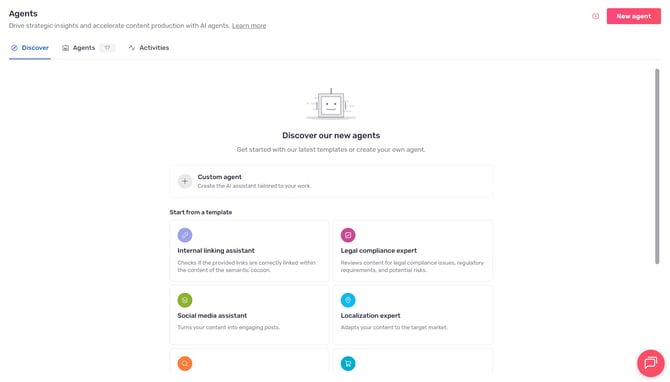
The Agents gallery is the entry point of the Agent Hub. It centralizes the discover, configuration, and tracking of all your AI agents in one place.
The screen is organized into three tabs:
- Discover: the library of preconfigured templates, organized by use case. This is where you browse and launch agents.
- My Agents: the unified listing of all agents you have created or customized, both templates and custom agents. Name, type, creation date, and last activity are visible at a glance.
- Activities: the centralized history of all your agent runs. Processed drafts, results, credits consumed, viewable by agent or across all agents.
Good to know ℹ️: The Agents gallery is visible to all organizations, including those without an agent add-on. Running an agent requires the "AI Agents" add-on. Each run consumes AI credits.
The available Agents
The Discover gallery offers a library of pre-configured templates covering the most common use cases, as well as the ability to create a fully custom agent.
Pre-configured templates
Ready to use with no prior setup. Click a template, adjust the instructions if needed, and run directly from the editor.
👉 Content Master agent: your end-to-end AI editorial advisor Analyzes your content, identifies priorities, and delivers targeted outputs in conversational mode: writing, rewriting, SEO/GEO optimization, E-E-A-T auditing, internal linking.
👉 E-E-A-T Expert agent: strengthen the credibility and authority of your content Audits your content across all 4 E-E-A-T pillars, benchmarks against the top 3 SERP results, and delivers a prioritized action plan to improve your SEO rankings and AI citability.
👉 Product page specialist agent: optimize your e-commerce product pages for SEO and conversion Rewrites and enriches your product pages with SEO-optimized titles, descriptions, attributes, and rich content aligned with your brand guidelines.
👉 Top 3 Hunter agent: align your content with what actually ranks Compares your editorial quality against the top 3 Google pages and delivers prioritized recommendations with before/after rewrite proposals ready to apply.
👉 Legal compliance expert agent: securing and validating your content Automatically checks that your content complies with legal requirements and your company's internal guidelines.
👉 Social media assistant agent: transforming an article into social posts Turns your article into multiple posts tailored to the formats and tones of LinkedIn, X, Facebook, Instagram, and newsletters.
👉 Internal linking assistant agent: strengthening your link structure Analyzes your content and suggests internal linking opportunities toward your strategic pages.
👉 GEO Expert agent: optimizing your visibility on ChatGPT and AI Audits your content for visibility in generative AI responses and suggests optimizations to improve your citation rate.
👉 Localization expert agent: adapting your content for international audiences Adapts your content to the linguistic, cultural, and SEO specificities of each target market.
Custom agent
If no template fits your need, build a fully custom agent by defining your own instructions and combining the available tools.
👉 Create and configure a custom AI agent
How to use AI+ Agents
Step 1: Access the Agents gallery
From the left sidebar, go to the "AI" menu and click on "Agents" to access the agent showcase.
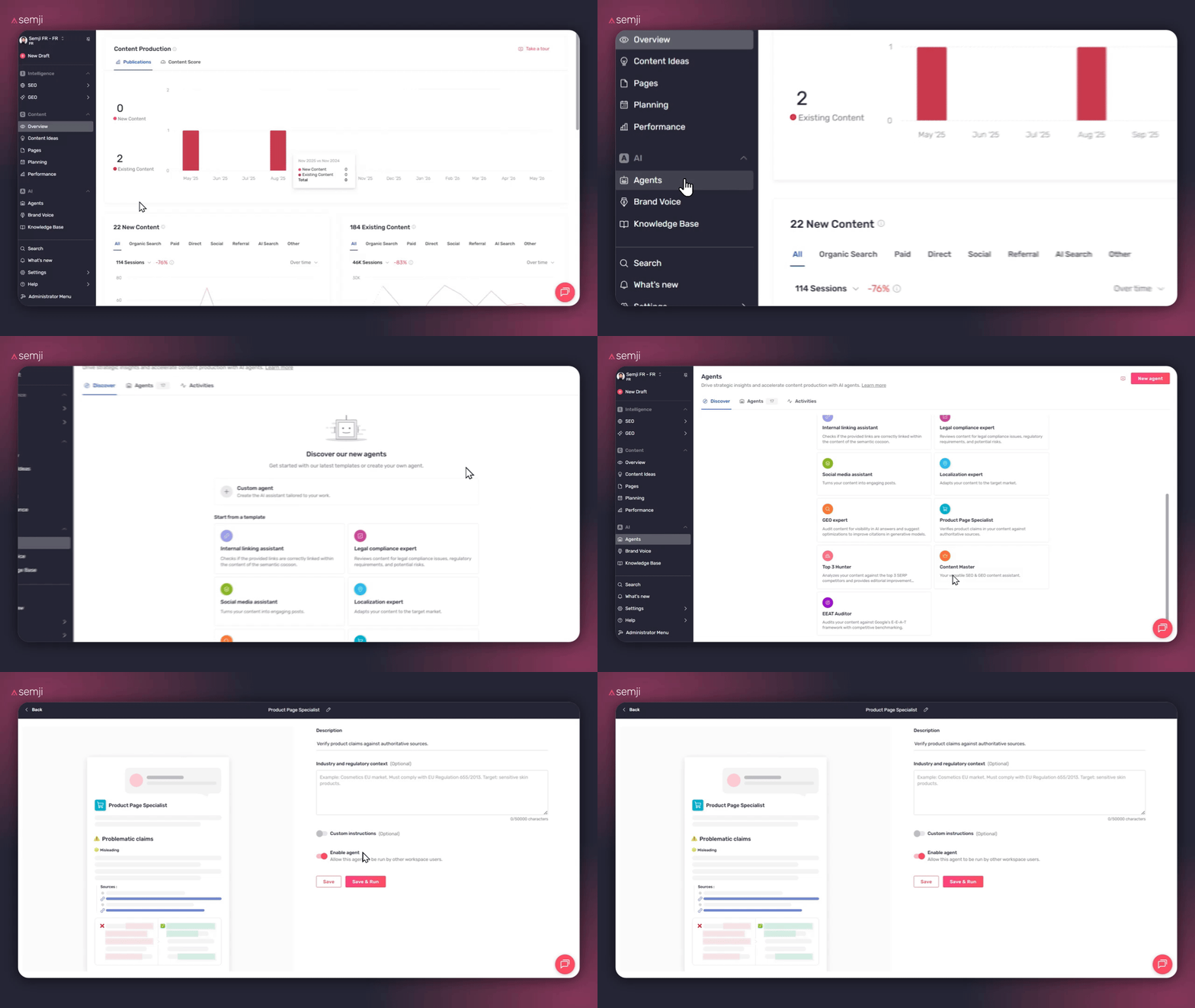
Step 2: choose a template
You have two options:
Option 1: Use the preconfigured agents
Browse the library and click the template that matches your need. The template card describes the problem it solves, the typical use case, and the expected output.
Option 2: Create your own custom agent
If you have specific needs not covered by the preconfigured agents, use the Custom Agent to create a 100% tailored assistant. Define your own instructions, combine the available tools (Search Google, Get web page content), and adapt the AI to your unique workflow.
💡 Find your agents: All agents you create or customize are automatically available to your entire team in the "Agents" tab
Just click on the agent of your choice to select it.
Step 3: Configure the agent
For preconfigured agents:
Customize the agent according to your specific needs by adding:
- Your internal rules (mandatory legal notices, prohibited terms...)
- Your priority URLs for internal linking
- Your brand voice guidelines
- Examples of posts that have performed well on social networks
For the Custom Agent:
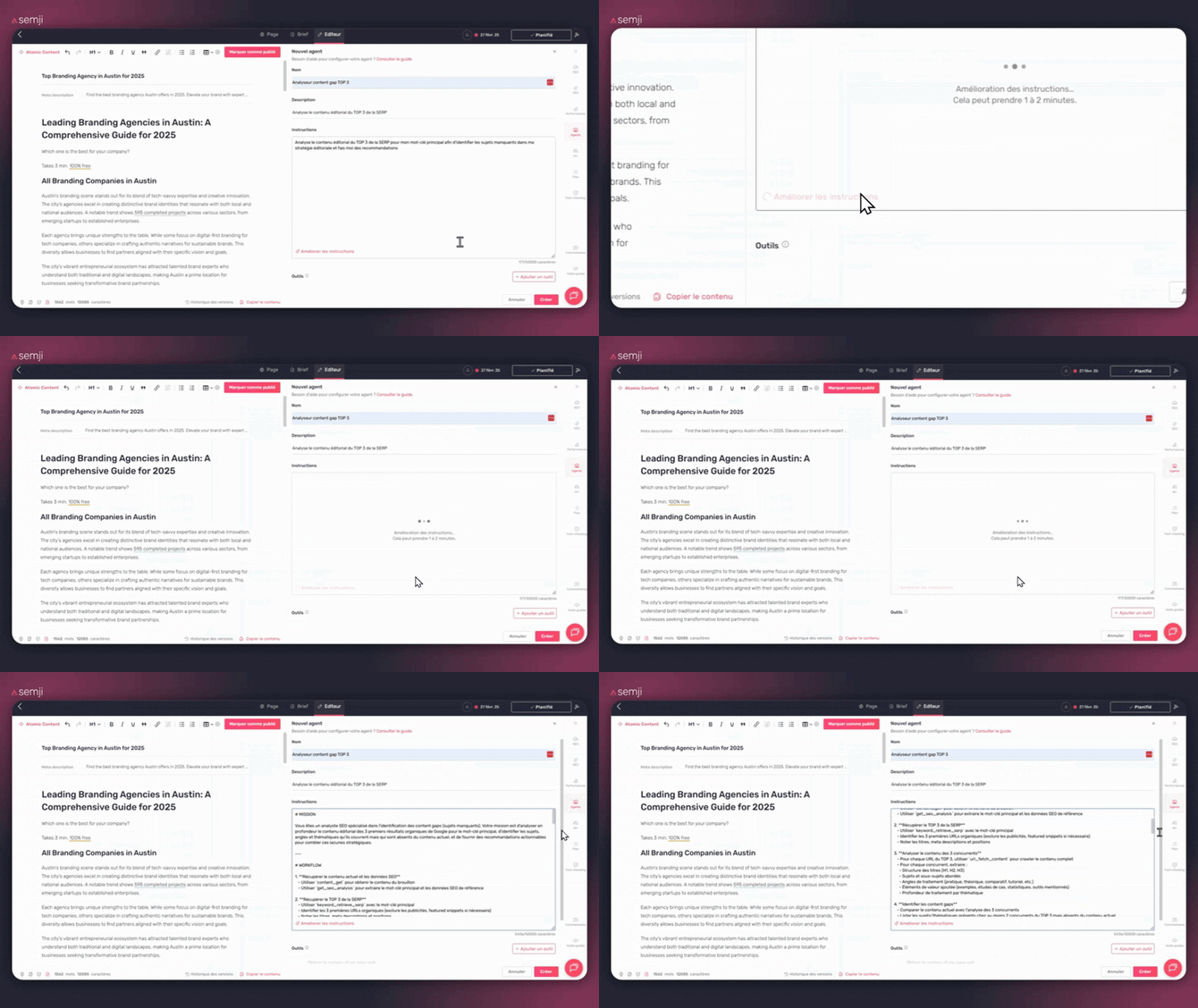
Fully define your agent by filling in:
- Name: Give your agent an explicit name (e.g., "Top 3 Content Gap Analyzer")
- Description: Explain in one sentence what your agent does
- Instructions: Write the detailed instructions the agent must follow
- Tools: Select the tools the agent needs (Search Google, Get web page content)
💡Tip: Be precise in your instructions. The more detailed they are, the more relevant the results will be.
Magic Button: "Improve the instructions": to write better instructions (even if you're a beginner)

The goal isn't just to have ideas, but to transform a "simple" request into clear instructions that the agent can use.
-
Clarify the objective (what you expect exactly)
-
Add a methodology (the steps the agent must follow)
-
Specify the output format (table, checklist, action plan, etc.)
-
Avoid vague instructions that produce inconsistent results
How to use it:
-
Write your instructions specifying your needs and requirements.
-
Click on the "Improve the instructions" button.
-
Review the proposal and adjust it if necessary.
Step 4: Start the analysis
Open the content you want to work on in the Semji editor. Click the "Agents" icon in the right sidebar, select your agent, and click directly on it to launch it.
Cost: 10 AI credits per run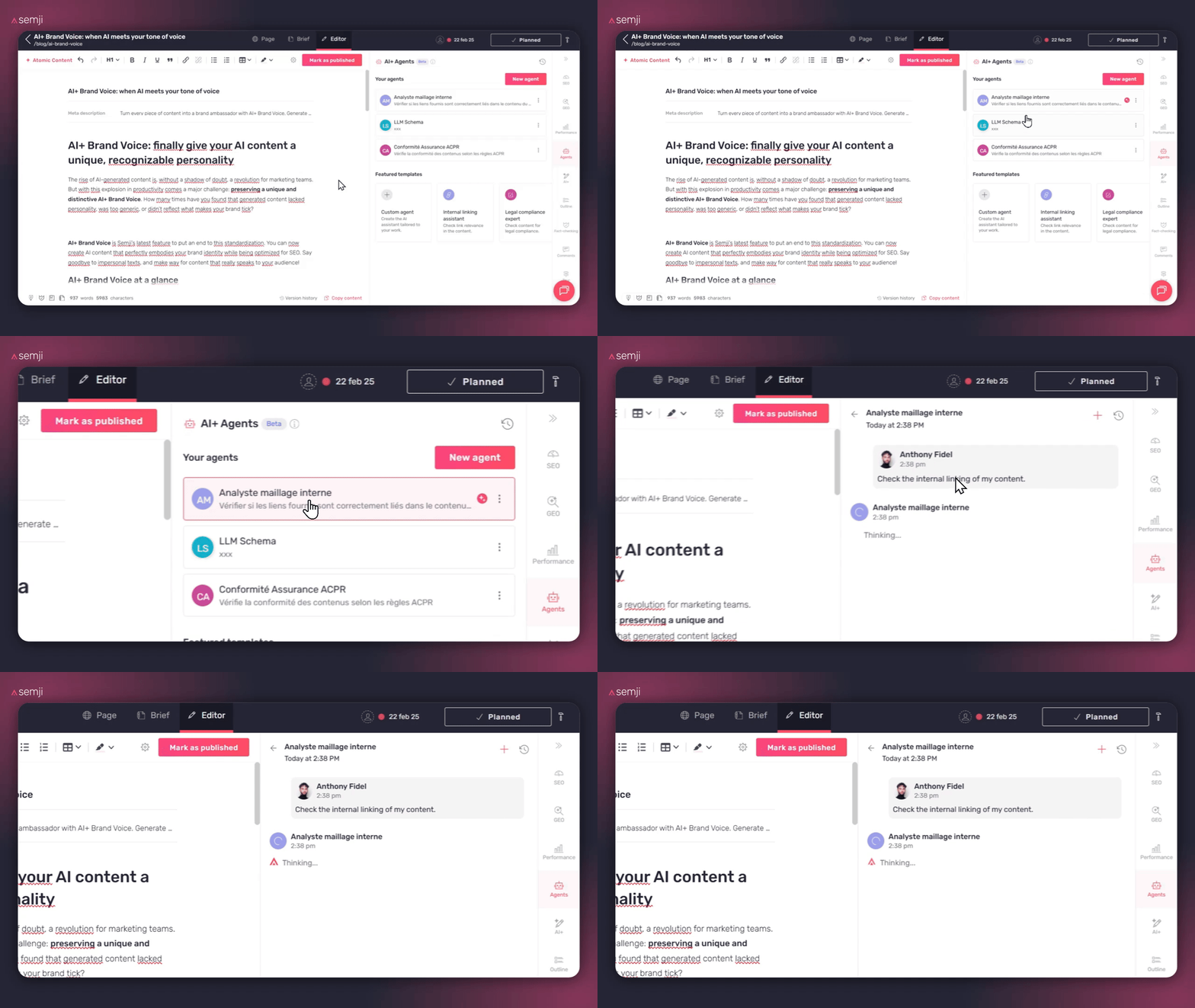
Step 5: Apply the recommendations
For each suggestion:- Find the relevant content in your text
- Copy the recommendation
- Replace or add the content
💡 Good to know: You can continue the conversation with the agent to refine its recommendations (cost: 10 AI credits per message)
Go further
Process dozens of pieces of content in a single action
Already comfortable with the per-content workflow? Take it to the next level with the Bulk Agent: from the editorial planning, select multiple drafts and run an AI agent on the entire selection in one click. The AI works in the background while you move on to something else.
Who it's for: content managers and SEO teams handling large volumes, multi-country campaigns, or large-scale compliance updates.
Good to know ℹ️: the Bulk Agent requires that your drafts have been analyzed beforehand and that you have sufficient AI credits. The system checks both before launching.
How to do it: in the planning list view, check your drafts, click "AI Agent" in the bulk action bar, choose your agent, then click "Start".