

 Home
Home Getting Started
 Help Center
 Developer
 Status
What is the Pages tab for?
Semji’s Pages tab allows you to easily prioritize existing content for optimization. After logging into Google Search Console, Semji will fetch the content on your website that has generated clicks in the last 28 days and add it to the Pages tab To help you prioritize your content, Semji will identify content with high click-through potential. The number of red dots shows the priority level of this content, the more red dots, the more potential Semji has identified.Note 💡: Content with low Click Potential does not mean that it should not be optimized. If it represents a business opportunity for you, you should optimize it.
What does the Pages tab contain?
The tab features different key indicators for your content. Monthly Clicks: This shows the number of clicks within 30 days on your content for all keywords combined.





- Clicks
- Conversions, based on the different objectives defined in your Google Analytics connector, Matomo, Piano Analytics, Adobe Analytics or Piwik Pro.
- Transactions
- Revenues\
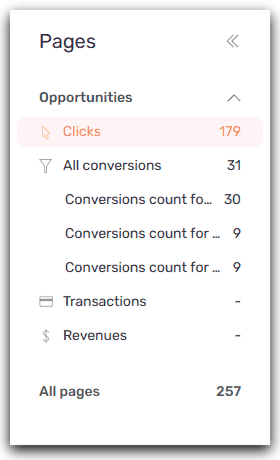
Note 💡: By default, Semji focuses on Click Opportunities as the main objective. The “All pages” view allows you to have a global view on all the existing content imported in Semji.
How to use the filters on the Pages tab? To make it easier to search for new content, Semji provides you with different filters to find content based on your objectives.
Good to know 💡: You can now filter your content using HTTP codes! This allows you to view your 301 pages after a redesign, and also to correct your 404 pages.
How to import content into the Pages tab? The ‘Import’ button gives you two options:

- Browse the best pages: Semji will browse your website and import the pages with the highest potential.
- Import URLs: Semji only imports pages that have received at least one impression. If you want to work on other pages of your website, simply enter the URLs you want to import. You can import several URLs at once.